# @ohos.arkui.advanced.SegmentButton (分段按钮)
分段按钮组件,包含页签类分段按钮、单选类分段按钮、多选类分段按钮。
>**说明:**
>
>该组件及其子组件从 API Version 11 开始支持。后续版本如有新增内容,则采用上角标单独标记该内容的起始版本。
## 导入模块
```
import { SegmentButton, SegmentButtonOptions, SegmentButtonItemOptionsArray } from '@ohos.arkui.advanced.SegmentButton'
```
## 子组件
无
## SegmentButton
SegmentButton({ options: SegmentButtonOptions, selectedIndexes: number[] })
**装饰器类型:**@Component
**系统能力:** SystemCapability.ArkUI.ArkUI.Full
**参数:**
| 名称 | 参数类型 | 必填 | 装饰器类型 | 说明 |
| --------------- | --------------------------------------------- | ---- | ----------- | ------------------------------------------------------------ |
| options | [SegmentButtonOptions](#segmentbuttonoptions) | 是 | @ObjectLink | 分段按钮选项。 |
| selectedIndexes | number[] | 是 | @Link | 分段按钮的选中项编号,第一项的编号为0,之后顺序增加。
**说明:**
`selectedIndexes`使用[@Link装饰器:父子双向同步](../../../quick-start/arkts-link.md),仅支持有效的按钮编号(第一个按钮编号为0,之后按顺序累加),如没有选中项可传入空数组`[]`。 |
>**说明:**
>
>分段按钮组件不支持通用属性。分段按钮组件使用当前区域可使用的最大宽度做为组件宽度,并且根据按钮个数平均分配每个按钮宽度;分段按钮组件高度根据按钮内容(文本及图片)自动适应,其最小高度为28vp。
## SegmentButtonOptions
分段按钮选项类,用于为分段按钮提供初始数据和自定义属性。
### 属性
| 属性 | 类型 | 描述 |
| ----------------------- | ------------------------------------------------------------ | ------------------------------------------------------------ |
| type | "tab" \| "capsule" | 分段按钮的类型。 |
| multiply | boolean | 是否可以多选。
**说明:**
页签类分段按钮只支持单选,设置`multiply`为`true`不生效。 |
| buttons | [SegmentButtonItemOptionsArray](#segmentbuttonitemoptionsarray) | 按钮信息,包括图标和文本信息。 |
| fontColor | [ResourceColor](ts-types.md#resourcecolor) | 按钮未选中态的文本颜色,默认值:#99182431。 |
| selectedFontColor | [ResourceColor](ts-types.md#resourcecolor) | 按钮选中态的文本颜色,默认值:#ff182431。 |
| fontSize | [DimensionNoPercentage](#dimensionnopercentage) | 按钮未选中态的字体大小(不支持百分比设置),默认值:14.0fp。 |
| selectedFontSize | [DimensionNoPercentage](#dimensionnopercentage) | 按钮选中态的字体大小(不支持百分比设置),默认值:14.0fp。 |
| fontWeight | [FontWeight](ts-appendix-enums.md#fontweight) | 按钮未选中态的字体粗细,默认值:FontWeight.Regular。 |
| selectedFontWeight | [FontWeight](ts-appendix-enums.md#fontweight) | 按钮选中态的字体粗细,默认值:FontWeight.Medium。 |
| backgroundColor | [ResourceColor](ts-types.md#resourcecolor) | 底板颜色,默认值:页签类\#0c182431,单选类/多选类\#0c182431。 |
| selectedBackgroundColor | [ResourceColor](ts-types.md#resourcecolor) | 按钮选中态底板颜色,默认值:页签类\#ffffffff,单选类/多选类\#ff007dff。 |
| imageSize | [SizeOptions](ts-types.md#sizeoptions) | 图片尺寸,默认值:{ width: 24, height: 24 }。
**说明:**
`imageSize`属性对仅图标按钮和图标+文本按钮生效,对仅文字按钮无效果。 |
| buttonPadding | [Padding](ts-types.md#padding) \| [Dimension](ts-types.md#dimension10) | 按钮内边距,默认值:仅图标按钮和仅文字按钮`{ top: 4, right: 8, bottom: 4, left: 8 }`,图标+文本按钮`{ top: 6, right: 8, bottom: 6, left: 8 }`。 |
| textPadding | [Padding](ts-types.md#padding) \| [Dimension](ts-types.md#dimension10) | 文本内边距,默认值:0。 |
| backgroundBlurStyle | [BlurStyle](ts-appendix-enums.md#blurstyle9) | 背景模糊材质,默认值:BlurStyle.NONE |
### constructor
constructor(options: TabSegmentButtonOptions | CapsuleSegmentButtonOptions)
构造函数。
**参数:**
| 名称 | 参数类型 | 必填 | 说明 |
| ------- | ------------------------------------------------------------ | ---- | -------------------- |
| options | [TabSegmentButtonOptions](#tabsegmentbuttonoptions)\| [CapsuleSegmentButtonOptions](#capsulesegmentbuttonoptions) | 是 | 页签类或者单选类/多选类分段按钮信息。 |
### tab
static tab(options: TabSegmentButtonConstructionOptions): SegmentButtonOptions
创建页签类的SegmentButtonOptions。
**参数:**
| 名称 | 参数类型 | 必填 | 说明 |
| ------- | ------------------------------------------------------------ | ---- | -------------------- |
| options | [TabSegmentButtonConstructionOptions](#tabsegmentbuttonconstructionoptions) | 是 | 页签类分段按钮信息。 |
**返回值:**
| 类型 | 说明 |
| ------ | ------------------------ |
| [SegmentButtonOptions](#segmentbuttonoptions) | 分段按钮选项。 |
### capsule
static capsule(options: CapsuleSegmentButtonConstructionOptions): SegmentButtonOptions
创建单选类/多选类的SegmentButtonOptions。
**参数:**
| 名称 | 参数类型 | 必填 | 说明 |
| ------- | ------------------------------------------------------------ | ---- | --------------------------- |
| options | [CapsuleSegmentButtonConstructionOptions](#capsulesegmentbuttonconstructionoptions) | 是 | 单选类/多选类分段按钮信息。 |
**返回值:**
| 类型 | 说明 |
| ------ | ------------------------ |
| [SegmentButtonOptions](#segmentbuttonoptions) | 分段按钮选项。 |
## DimensionNoPercentage
不支持百分比类型的长度的联合类型。
**系统能力:** SystemCapability.ArkUI.ArkUI.Full
| 类型 | 说明 |
| -------------------------------- | --------------------------------------------- |
| [PX](ts-types.md#px10) | 长度类型,用于描述以px像素单位为单位的长度。 |
| [VP](ts-types.md#vp10) | 长度类型,用于描述以vp像素单位为单位的长度。 |
| [FP](ts-types.md#fp10) | 长度类型,用于描述以fp像素单位为单位的长度。 |
| [LPX](ts-types.md#lpx10) | 长度类型,用于描述以lpx像素单位为单位的长度。 |
| [Resource](ts-types.md#resource) | 资源引用类型,用于设置组件属性的值。 |
## CommonSegmentButtonOptions
用于定义分段按钮组件可自定义的属性。
**系统能力:** SystemCapability.ArkUI.ArkUI.Full
**属性:**
| 属性 | 类型 | 描述 |
| ----------------------- | ------------------------------------------------------------ | ------------------------------------------------------------ |
| fontColor | [ResourceColor](ts-types.md#resourcecolor) | 按钮未选中态的文本颜色,默认值:#99182431。 |
| selectedFontColor | [ResourceColor](ts-types.md#resourcecolor) | 按钮选中态的文本颜色,默认值:#ff182431。 |
| fontSize | [DimensionNoPercentage](#dimensionnopercentage) | 按钮未选中态的字体大小(不支持百分比设置),默认值:14.0fp。 |
| selectedFontSize | [DimensionNoPercentage](#dimensionnopercentage) | 按钮选中态的字体大小(不支持百分比设置),默认值:14.0fp。 |
| fontWeight | [FontWeight](ts-appendix-enums.md#fontweight) | 按钮未选中态的字体粗细,默认值:FontWeight.Regular。 |
| selectedFontWeight | [FontWeight](ts-appendix-enums.md#fontweight) | 按钮选中态的字体粗细,默认值:FontWeight.Medium。 |
| backgroundColor | [ResourceColor](ts-types.md#resourcecolor) | 底板颜色,默认值:页签类\#0c182431,单选类/多选类\#0c182431。 |
| selectedBackgroundColor | [ResourceColor](ts-types.md#resourcecolor) | 按钮选中态底板颜色,默认值:页签类\#ffffffff,单选类/多选类\#ff007dff。 |
| imageSize | [SizeOptions](ts-types.md#sizeoptions) | 图片尺寸,默认值:{ width: 24, height: 24 }。
**说明:**
`imageSize`属性对仅图标按钮和图标+文本按钮生效,对仅文字按钮无效果。 |
| buttonPadding | [Padding](ts-types.md#padding) \| [Dimension](ts-types.md#dimension10) | 按钮内边距,默认值:仅图标按钮和仅文字按钮`{ top: 4, right: 8, bottom: 4, left: 8 }`,图标+文本按钮`{ top: 6, right: 8, bottom: 6, left: 8 }`。 |
| textPadding | [Padding](ts-types.md#padding) \| [Dimension](ts-types.md#dimension10) | 文本内边距,默认值:0。 |
| backgroundBlurStyle | [BlurStyle](ts-appendix-enums.md#blurstyle9) | 背景模糊材质,默认值:BlurStyle.NONE |
## TabSegmentButtonConstructionOptions
用于构建页签类的SegmentButtonOptions对象。
继承[CommonSegmentButtonOptions](#commonsegmentbuttonoptions)。
**系统能力:** SystemCapability.ArkUI.ArkUI.Full
| 属性 | 类型 | 必填 | 描述 |
| ------- | ------------------------------------------------------------ | ---- | ---------- |
| buttons | [ItemRestriction](#itemrestriction)\<[SegmentButtonTextItem](#segmentbuttontextitem)> | 是 | 按钮信息。 |
## CapsuleSegmentButtonConstructionOptions
用于构建单选类/多选类的SegmentButtonOptions对象。
继承[CommonSegmentButtonOptions](#commonsegmentbuttonoptions)。
**系统能力:** SystemCapability.ArkUI.ArkUI.Full
| 属性 | 类型 | 必填 | 描述 |
| -------- | ------------------------------------------------- | ---- | ----------------------------- |
| buttons | [SegmentButtonItemTuple](#segmentbuttonitemtuple) | 是 | 按钮信息。 |
| multiply | boolean | 否 | 是否可以多选,默认值:false。 |
## ItemRestriction
用于保存按钮信息的元组。
| 取值范围 | 说明 |
| ----------------------------------------- | --------------------------------- |
| ItemRestriction\ = [T, T, T?, T?, T?] | 表示包含2~5个相同类型元素的元组。 |
>**说明:**
>
>分段按钮组件仅支持2到5个按钮。
## SegmentButtonItemTuple
用于保存按钮信息的元组的联合类型。
**系统能力:** SystemCapability.ArkUI.ArkUI.Full
| 取值范围 | 说明 |
| ------------------------------------------------------------ | ------------------------- |
| [ItemRestriction](#itemrestriction)\<[SegmentButtonTextItem](#segmentbuttontextitem)\> | 仅文本按钮信息的元组。 |
| [ItemRestriction](#itemrestriction)\<[SegmentButtonIconItem](#segmentbuttoniconitem)\> | 仅图标按钮信息的元组。 |
| [ItemRestriction](#itemrestriction)\<[SegmentButtonIconTextItem](#segmentbuttonicontextitem)\> | 图标+文本按钮信息的元组。 |
## SegmentButtonItemArray
用于保存按钮信息的数组的联合类型。
**系统能力:** SystemCapability.ArkUI.ArkUI.Full
| 取值范围 | 说明 |
| ------------------------------------------------------------ | ------------------------- |
| Array\<[SegmentButtonTextItem](#segmentbuttontextitem)\> | 仅文本按钮信息的数组。 |
| Array\<[SegmentButtonIconItem](#segmentbuttoniconitem)\> | 仅图标按钮信息的数组。 |
| Array\<[SegmentButtonIconTextItem](#segmentbuttonicontextitem)\> | 图标+文本按钮信息的数组。 |
## SegmentButtonItemOptionsArray
用于保存按钮信息的数组。
>**说明:**
>
>分段按钮组件仅支持2到5个按钮,SegmentButtonItemOptionsArray只保存2到5个按钮信息。
### constructor
constructor(elements: SegmentButtonItemTuple)
构造函数。
**参数:**
| 名称 | 参数类型 | 必填 | 说明 |
| -------- | ------------------------------------------------- | ---- | ---------- |
| elements | [SegmentButtonItemTuple](#segmentbuttonitemtuple) | 是 | 按钮信息。 |
### push
push(...items: SegmentButtonItemArray): number
在数组末尾添加新的元素,返回添加元素后数组的长度。
**参数:**
| 名称 | 参数类型 | 必填 | 说明 |
| ----- | ------------------------------------------------- | ---- | ---------------------- |
| items | [SegmentButtonItemArray](#segmentbuttonitemarray) | 是 | 被添加的按钮信息数组。 |
**返回值:**
| 类型 | 说明 |
| ------ | ------------------------ |
| number | 添加元素后数组的长度。 |
>**说明:**
>
>分段按钮组件仅支持2到5个按钮,SegmentButtonItemOptionsArray只保存2到5个按钮信息,当超过按钮信息个数限制此方法无效。
### pop
pop(): SegmentButtonItemOptions | undefined
移除数组末尾最后一个元素,返回被移除的元素。
**返回值:**
| 类型 | 说明 |
| ------------------------------------------------------------ | -------------- |
| [SegmentButtonItemOptions](#segmentbuttonitemoptions) \| undefined | 被移除的元素。 |
>**说明:**
>
>分段按钮组件仅支持2到5个按钮,SegmentButtonItemOptionsArray只保存2到5个按钮信息,当超过按钮信息个数限制此方法无效。
### shift
shift(): SegmentButtonItemOptions | undefined
移除数组开头第一个元素,返回被移除的元素。
**返回值:**
| 类型 | 说明 |
| ------------------------------------------------------------ | -------------- |
| [SegmentButtonItemOptions](#segmentbuttonitemoptions) \| undefined | 被移除的元素。 |
>**说明:**
>
>分段按钮组件仅支持2到5个按钮,SegmentButtonItemOptionsArray只保存2到5个按钮信息,当超过按钮信息个数限制此方法无效。
### unshift
unshift(...items: SegmentButtonItemArray): number
在数组开头添加新的元素,返回添加元素后数组的长度。
**参数:**
| 名称 | 参数类型 | 必填 | 说明 |
| ----- | ------------------------------------------------- | ---- | -------------------- |
| items | [SegmentButtonItemArray](#segmentbuttonitemarray) | 是 | 添加的按钮信息数组。 |
**返回值:**
| 类型 | 说明 |
| ------ | ---------------------- |
| number | 添加元素后数组的长度。 |
>**说明:**
>
>分段按钮组件仅支持2到5个按钮,SegmentButtonItemOptionsArray只保存2到5个按钮信息,当超过按钮信息个数限制此方法无效。
### splice
splice(start: number, deleteCount: number, ...items: SegmentButtonItemOptions[]): SegmentButtonItemOptions[]
在数组中,删除从start位置开始的deleteCount数量的元素,并插入items中的元素,返回一个包含了被删除的元素的数组。
**参数:**
| 名称 | 参数类型 | 必填 | 说明 |
| ----------- | ------------------------------------------------------- | ---- | -------------------- |
| start | number | 是 | 删除元素的起始位置。 |
| deleteCount | number | 是 | 删除元素的数量。 |
| items | [SegmentButtonItemOptions](#segmentbuttonitemoptions)[] | 否 | 插入元素数组。 |
**返回值:**
| 类型 | 说明 |
| ------------------------------------------------------- | ------------------------------ |
| [SegmentButtonItemOptions](#segmentbuttonitemoptions)[] | 返回包含了被删除的元素的数组。 |
>**说明:**
>
>分段按钮组件仅支持2到5个按钮,SegmentButtonItemOptionsArray只保存2到5个按钮信息,当超过按钮信息个数限制此方法无效。
### create
static create(elements: SegmentButtonItemTuple): SegmentButtonItemOptionsArray
创建一个SegmentButtonItemOptionsArray对象。
**参数:**
| 名称 | 参数类型 | 必填 | 说明 |
| -------- | ------------------------------------------------- | ---- | ---------- |
| elements | [SegmentButtonItemTuple](#segmentbuttonitemtuple) | 是 | 按钮信息。 |
**返回值:**
| 类型 | 说明 |
| ------------------------------------------------------------ | ----------------------------------------- |
| [SegmentButtonItemOptionsArray](#segmentbuttonitemoptionsarray) | 创建的SegmentButtonItemOptionsArray对象。 |
## TabSegmentButtonOptions
页签类分段按钮选项。继承自[TabSegmentButtonConstructionOptions](#tabsegmentbuttonconstructionoptions)。
**系统能力:** SystemCapability.ArkUI.ArkUI.Full
| 属性 | 类型 | 描述 |
| ---- | ----- | ---------------------- |
| type | "tab" | 类型为页签类分段按钮。 |
## CapsuleSegmentButtonOptions
单选类/多选类分段按钮选项。继承自[CapsuleSegmentButtonConstructionOptions](#capsulesegmentbuttonconstructionoptions)。
**系统能力:** SystemCapability.ArkUI.ArkUI.Full
| 属性 | 类型 | 描述 |
| ---- | --------- | ----------------------------- |
| type | "capsule" | 类型为单选类/多选类分段按钮。 |
## SegmentButtonTextItem
仅文本按钮信息。
**系统能力:** SystemCapability.ArkUI.ArkUI.Full
| 属性 | 类型 | 必填 | 描述 |
| ---- | -------------------------------------- | ---- | ---------- |
| text | [ResourceStr](ts-types.md#resourcestr) | 是 | 按钮文本。 |
## SegmentButtonIconItem
仅图标按钮信息。
**系统能力:** SystemCapability.ArkUI.ArkUI.Full
| 属性 | 类型 | 必填 | 描述 |
| ------------ | -------------------------------------- | ---- | -------------------- |
| icon | [ResourceStr](ts-types.md#resourcestr) | 是 | 未选中态的按钮图标。 |
| selectedIcon | [ResourceStr](ts-types.md#resourcestr) | 是 | 选中态的按钮图标。 |
>**说明:**
>
>未选中态图标`icon`与选中态图标`selectedIcon`都需要被设置,单独设置不生效。
## SegmentButtonIconTextItem
图标+文本按钮信息。
**系统能力:** SystemCapability.ArkUI.ArkUI.Full
| 属性 | 类型 | 必填 | 描述 |
| ------------ | -------------------------------------- | ---- | -------------------- |
| icon | [ResourceStr](ts-types.md#resourcestr) | 是 | 未选中态的按钮图标。 |
| selectedIcon | [ResourceStr](ts-types.md#resourcestr) | 是 | 选中态的按钮图标。 |
| text | [ResourceStr](ts-types.md#resourcestr) | 是 | 按钮文本。 |
>**说明:**
>
>未选中态图标`icon`与选中态图标`selectedIcon`都需要被设置,单独设置不生效。
## SegmentButtonItemOptions
分段按钮中按钮的选项。
**属性:**
| 属性 | 类型 | 必填 | 描述 |
| ------------ | -------------------------------------- | ---- | -------------------- |
| icon | [ResourceStr](ts-types.md#resourcestr) | 否 | 未选中态的按钮图标。 |
| selectedIcon | [ResourceStr](ts-types.md#resourcestr) | 否 | 选中态的按钮图标。 |
| text | [ResourceStr](ts-types.md#resourcestr) | 否 | 按钮文本。 |
### constructor
constructor(options: SegmentButtonItemOptionsConstructorOptions)
构造函数。
**参数:**
| 参数名 | 类型 | 必填 | 说明 |
| ------- | ------------------------------------------------------------ | ---- | ------------------ |
| options | [SegmentButtonItemOptionsConstructorOptions](#segmentbuttonitemoptionsconstructoroptions) | 是 | 分段按钮按钮选项。 |
## SegmentButtonItemOptionsConstructorOptions
SegmentButtonItemOptions的构造参数。
**系统能力:** SystemCapability.ArkUI.ArkUI.Full
| 属性 | 类型 | 必填 | 描述 |
| ------------ | -------------------------------------- | ---- | -------------------- |
| icon | [ResourceStr](ts-types.md#resourcestr) | 否 | 未选中态的按钮图标。 |
| selectedIcon | [ResourceStr](ts-types.md#resourcestr) | 否 | 选中态的按钮图标。 |
| text | [ResourceStr](ts-types.md#resourcestr) | 否 | 按钮文本。 |
## 示例
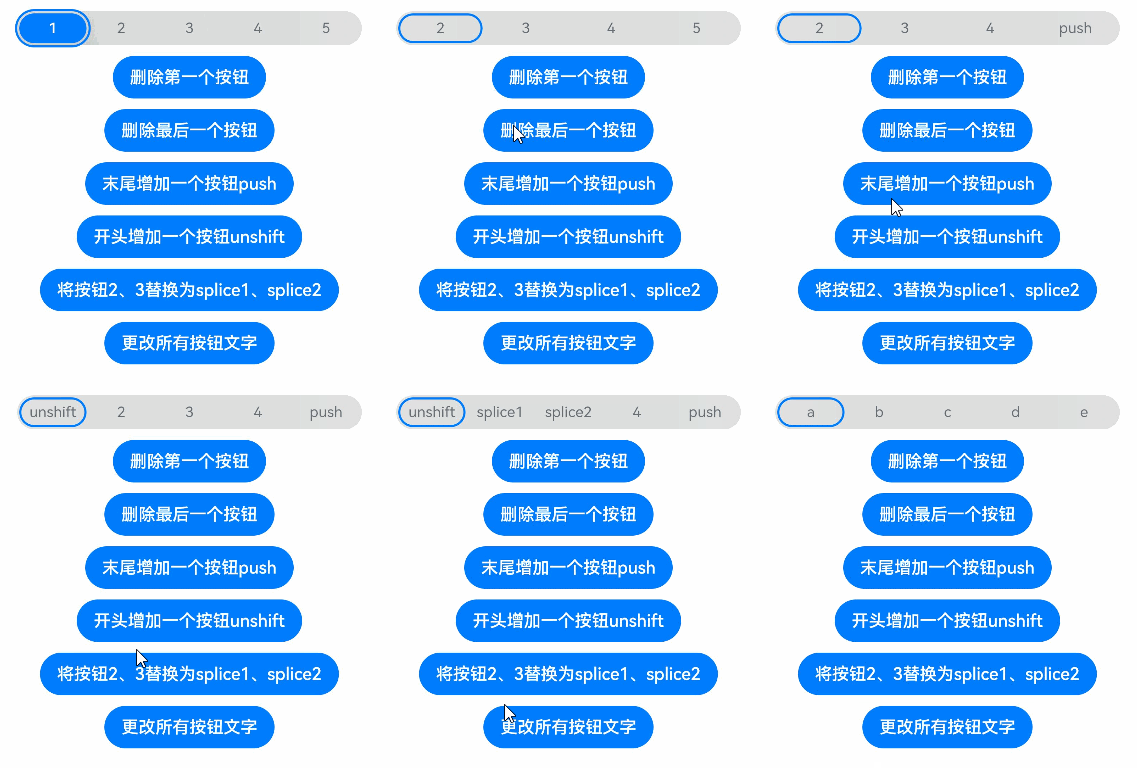
### 示例1
```ts
// xxx.ets
import {
ItemRestriction,
SegmentButton,
SegmentButtonItemTuple,
SegmentButtonOptions,
SegmentButtonTextItem
} from '@ohos.arkui.advanced.SegmentButton'
@Entry
@Component
struct Index {
@State tabOptions: SegmentButtonOptions = SegmentButtonOptions.tab({
buttons: [{ text: '页签按钮1' }, { text: '页签按钮2' }, {
text: '页签按钮3'
}] as ItemRestriction,
backgroundBlurStyle: BlurStyle.BACKGROUND_THICK
})
@State singleSelectCapsuleOptions: SegmentButtonOptions = SegmentButtonOptions.capsule({
buttons: [{ text: '单选按钮1' }, { text: '单选按钮2' }, { text: '单选按钮3' }] as SegmentButtonItemTuple,
multiply: false,
backgroundBlurStyle: BlurStyle.BACKGROUND_THICK
})
@State multiplySelectCapsuleOptions: SegmentButtonOptions = SegmentButtonOptions.capsule({
buttons: [{ text: '多选按钮1' }, { text: '多选按钮2' }, { text: '多选按钮3' }] as SegmentButtonItemTuple,
multiply: true
})
@State iconCapsuleOptions: SegmentButtonOptions = SegmentButtonOptions.capsule({
buttons: [
{ icon: $r('sys.media.ohos_ic_public_email'), selectedIcon: $r('sys.media.ohos_ic_public_clock') },
{ icon: $r('sys.media.ohos_ic_public_email'), selectedIcon: $r('sys.media.ohos_ic_public_clock') },
{ icon: $r('sys.media.ohos_ic_public_email'), selectedIcon: $r('sys.media.ohos_ic_public_clock') },
{ icon: $r('sys.media.ohos_ic_public_email'), selectedIcon: $r('sys.media.ohos_ic_public_clock') }
] as SegmentButtonItemTuple,
multiply: false,
backgroundBlurStyle: BlurStyle.BACKGROUND_THICK
})
@State iconTextCapsuleOptions: SegmentButtonOptions = SegmentButtonOptions.capsule({
buttons: [
{ text: '图标1', icon: $r('sys.media.ohos_ic_public_email'), selectedIcon: $r('sys.media.ohos_ic_public_clock') },
{ text: '图标2', icon: $r('sys.media.ohos_ic_public_email'), selectedIcon: $r('sys.media.ohos_ic_public_clock') },
{ text: '图标3', icon: $r('sys.media.ohos_ic_public_email'), selectedIcon: $r('sys.media.ohos_ic_public_clock') },
{ text: '图标4', icon: $r('sys.media.ohos_ic_public_email'), selectedIcon: $r('sys.media.ohos_ic_public_clock') },
{ text: '图标5', icon: $r('sys.media.ohos_ic_public_email'), selectedIcon: $r('sys.media.ohos_ic_public_clock') }
] as SegmentButtonItemTuple,
multiply: true
})
@State tabSelectedIndexes: number[] = [1]
@State singleSelectCapsuleSelectedIndexes: number[] = [0]
@State multiplySelectCapsuleSelectedIndexes: number[] = [0, 1]
@State singleSelectIconCapsuleSelectedIndexes: number[] = [3]
@State multiplySelectIconTextCapsuleSelectedIndexes: number[] = [1, 2]
build() {
Row() {
Column() {
Column({ space: 25 }) {
SegmentButton({ options: this.tabOptions,
selectedIndexes: $tabSelectedIndexes })
SegmentButton({ options: this.singleSelectCapsuleOptions,
selectedIndexes: $singleSelectCapsuleSelectedIndexes })
SegmentButton({
options: this.multiplySelectCapsuleOptions,
selectedIndexes: $multiplySelectCapsuleSelectedIndexes })
SegmentButton({ options: this.iconCapsuleOptions,
selectedIndexes: $singleSelectIconCapsuleSelectedIndexes })
SegmentButton({ options: this.iconTextCapsuleOptions,
selectedIndexes: $multiplySelectIconTextCapsuleSelectedIndexes })
}.width('90%')
}.width('100%')
}.height('100%')
}
}
```

### 示例2
```ts
// xxx.ets
import {
ItemRestriction,
SegmentButton,
SegmentButtonItemTuple,
SegmentButtonOptions,
SegmentButtonTextItem
} from '@ohos.arkui.advanced.SegmentButton'
@Entry
@Component
struct Index {
@State tabOptions: SegmentButtonOptions = SegmentButtonOptions.tab({
buttons: [{ text: '页签按钮1' }, { text: '页签按钮2' }, {
text: '页签按钮3'
}] as ItemRestriction,
backgroundColor: Color.Green,
selectedBackgroundColor: Color.Orange,
textPadding: { top: 10, right: 10, bottom: 10, left: 10 },
})
@State singleSelectCapsuleOptions: SegmentButtonOptions = SegmentButtonOptions.capsule({
buttons: [{ text: '单选按钮1' }, { text: '单选按钮2' }, { text: '单选按钮3' }] as SegmentButtonItemTuple,
multiply: false,
fontColor: Color.Black,
selectedFontColor: Color.Yellow,
backgroundBlurStyle: BlurStyle.BACKGROUND_THICK
})
@State multiplySelectCapsuleOptions: SegmentButtonOptions = SegmentButtonOptions.capsule({
buttons: [{ text: '多选按钮1' }, { text: '多选按钮2' }, { text: '多选按钮3' }] as SegmentButtonItemTuple,
multiply: true,
fontSize: 18,
selectedFontSize: 18,
fontWeight: FontWeight.Bolder,
selectedFontWeight: FontWeight.Lighter,
})
@State iconCapsuleOptions: SegmentButtonOptions = SegmentButtonOptions.capsule({
buttons: [
{ icon: $r('sys.media.ohos_ic_public_email'), selectedIcon: $r('sys.media.ohos_ic_public_clock') },
{ icon: $r('sys.media.ohos_ic_public_email'), selectedIcon: $r('sys.media.ohos_ic_public_clock') },
{ icon: $r('sys.media.ohos_ic_public_email'), selectedIcon: $r('sys.media.ohos_ic_public_clock') },
{ icon: $r('sys.media.ohos_ic_public_email'), selectedIcon: $r('sys.media.ohos_ic_public_clock') }
] as SegmentButtonItemTuple,
multiply: false,
imageSize: { width: 40, height: 40 },
buttonPadding: { top: 6, right: 10, bottom: 6, left: 10 },
backgroundBlurStyle: BlurStyle.BACKGROUND_THICK
})
@State iconTextCapsuleOptions: SegmentButtonOptions = SegmentButtonOptions.capsule({
buttons: [
{ text: '图标1', icon: $r('sys.media.ohos_ic_public_email'), selectedIcon: $r('sys.media.ohos_ic_public_clock') },
{ text: '图标2', icon: $r('sys.media.ohos_ic_public_email'), selectedIcon: $r('sys.media.ohos_ic_public_clock') },
{ text: '图标3', icon: $r('sys.media.ohos_ic_public_email'), selectedIcon: $r('sys.media.ohos_ic_public_clock') },
{ text: '图标4', icon: $r('sys.media.ohos_ic_public_email'), selectedIcon: $r('sys.media.ohos_ic_public_clock') },
{ text: '图标5', icon: $r('sys.media.ohos_ic_public_email'), selectedIcon: $r('sys.media.ohos_ic_public_clock') }
] as SegmentButtonItemTuple,
multiply: true,
imageSize: { width: 10, height: 10 },
})
@State tabSelectedIndexes: number[] = [0]
@State singleSelectCapsuleSelectedIndexes: number[] = [0]
@State multiplySelectCapsuleSelectedIndexes: number[] = [0, 1]
@State singleSelectIconCapsuleSelectedIndexes: number[] = [3]
@State multiplySelectIconTextCapsuleSelectedIndexes: number[] = [1, 2]
build() {
Row() {
Column() {
Column({ space: 20 }) {
SegmentButton({ options: this.tabOptions, selectedIndexes: $tabSelectedIndexes })
SegmentButton({ options: this.singleSelectCapsuleOptions,
selectedIndexes: $singleSelectCapsuleSelectedIndexes })
SegmentButton({ options: this.multiplySelectCapsuleOptions,
selectedIndexes: $multiplySelectCapsuleSelectedIndexes })
SegmentButton({ options: this.iconCapsuleOptions,
selectedIndexes: $singleSelectIconCapsuleSelectedIndexes })
SegmentButton({ options: this.iconTextCapsuleOptions,
selectedIndexes: $multiplySelectIconTextCapsuleSelectedIndexes })
}.width('90%')
}.width('100%')
}.height('100%')
}
}
```

### 示例3
```ts
import {
SegmentButton,
SegmentButtonOptions,
SegmentButtonItemOptionsArray,
SegmentButtonItemTuple,
SegmentButtonItemOptions
} from '@ohos.arkui.advanced.SegmentButton'
@Entry
@Component
struct Index {
@State singleSelectCapsuleOptions: SegmentButtonOptions = SegmentButtonOptions.capsule({
buttons: [{ text: '1' }, { text: '2' }, { text: '3' },
{ text: '4' }, { text: '5' }] as SegmentButtonItemTuple,
multiply: false,
backgroundBlurStyle: BlurStyle.BACKGROUND_THICK
})
@State capsuleSelectedIndexes: number[] = [0]
build() {
Row() {
Column() {
Column({ space: 10 }) {
SegmentButton({ options: this.singleSelectCapsuleOptions,
selectedIndexes: $capsuleSelectedIndexes })
Button("删除第一个按钮")
.onClick(() => {
this.singleSelectCapsuleOptions.buttons.shift()
})
Button("删除最后一个按钮")
.onClick(() => {
this.singleSelectCapsuleOptions.buttons.pop()
})
Button("末尾增加一个按钮push")
.onClick(() => {
this.singleSelectCapsuleOptions.buttons.push({ text: 'push' })
})
Button("开头增加一个按钮unshift")
.onClick(() => {
this.singleSelectCapsuleOptions.buttons.unshift(({ text: 'unshift' }))
})
Button("将按钮2、3替换为splice1、splice2")
.onClick(() => {
this.singleSelectCapsuleOptions.buttons.splice(1, 2, new SegmentButtonItemOptions({
text: 'splice1'
}), new SegmentButtonItemOptions({ text: 'splice2' }))
})
Button("更改所有按钮文字")
.onClick(() => {
this.singleSelectCapsuleOptions.buttons =
SegmentButtonItemOptionsArray.create([{ text: 'a' }, { text: 'b' },
{ text: 'c' }, { text: 'd' }, { text: 'e' }])
})
}.width('90%')
}.width('100%')
}.height('100%')
}
}
```