# RichEditor
支持图文混排和文本交互式编辑的组件。
> **说明:**
>
> 该组件从API Version 10开始支持。后续版本如有新增内容,则采用上角标单独标记该内容的起始版本。
>
> RichEditor[仅支持通过onDragStart事件](ts-universal-events-drag-drop.md)实现浮起等拖拽效果。
## 子组件
不包含子组件。
## 接口
RichEditor(value: RichEditorOptions)
**参数:**
| 参数名 | 参数类型 | 必填 | 参数描述 |
| ----- | --------------------------------------- | ---- | ----------- |
| value | [RichEditorOptions](#richeditoroptions) | 是 | 富文本组件初始化选项。 |
## 属性
除支持[通用属性](ts-universal-attributes-size.md)外,还支持以下属性:
> **说明:**
>
> 其中clip属性默认值为true。
> align属性只支持上方丶中间和下方位置的对齐方式。
| 名称 | 参数类型 | 描述 |
| -------------------------------- | ---------------------------------------- | ---------------------------------------- |
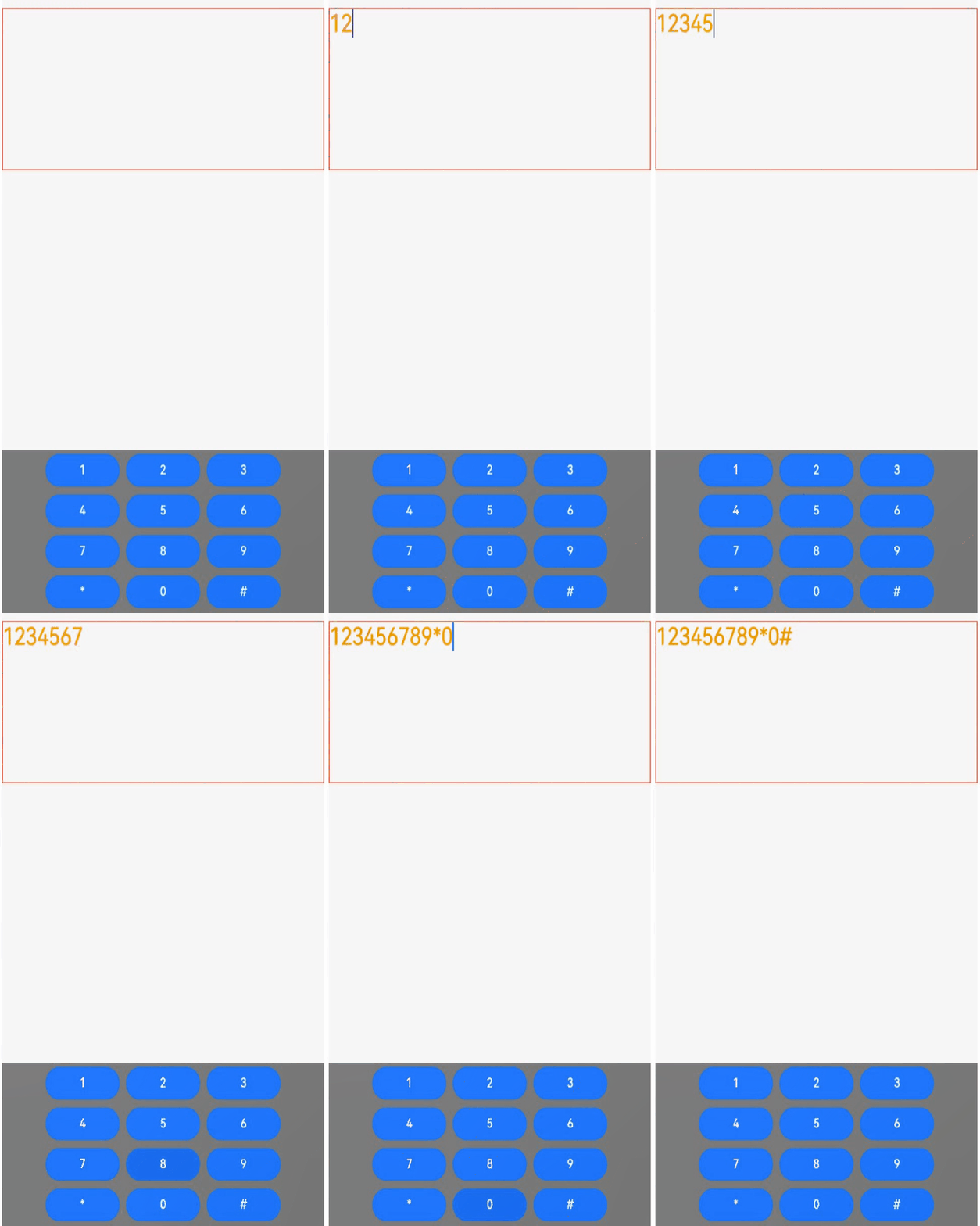
| customKeyboard | [CustomBuilder](ts-types.md#custombuilder8) | 设置自定义键盘。
**说明:**
当设置自定义键盘时,输入框激活后不会打开系统输入法,而是加载指定的自定义组件。
自定义键盘的高度可以通过自定义组件根节点的height属性设置,宽度不可设置,使用系统默认值。
自定义键盘采用覆盖原始界面的方式呈现,不会对应用原始界面产生压缩或者上提。
自定义键盘无法获取焦点,但是会拦截手势事件。
默认在输入控件失去焦点时,关闭自定义键盘。
如果设备支持拍摄输入,设置自定义键盘后,该输入框会不支持拍摄输入。 |
| bindSelectionMenu | {
spantype: [RichEditorSpanType](#richeditorspantype),
content: [CustomBuilder](ts-types.md#custombuilder8),
responseType: [ResponseType](ts-appendix-enums.md#responsetype8) \| [RichEditorResponseType11+](ts-appendix-enums.md#richeditorresponsetype11),
options?: [SelectionMenuOptions](#selectionmenuoptions11)
} | 设置自定义选择菜单。
默认值:{
spanType: RichEditorSpanType.TEXT
responseType: ResponseType.LongPress
其他:空
}
自定义菜单超长时,建议内部嵌套[Scroll](./ts-container-scroll.md)组件使用,避免键盘被遮挡。 |
| copyOptions | [CopyOptions](ts-appendix-enums.md#copyoptions9) | 组件支持设置文本内容是否可复制粘贴。
默认值:CopyOptions.LocalDevice
**说明:**
copyOptions不为CopyOptions.None时,长按组件内容,会弹出文本选择弹框。如果通过bindSelectionMenu等方式自定义文本选择菜单,则会弹出自定义的菜单。
设置copyOptions为CopyOptions.None,复制、剪切功能不生效。 |
| enableDataDetector11+ | boolean | 使能文本识别。
默认值: false
**说明:**
所识别实体的`fontColor`和`decoration`会被更改为如下样式:
fontColor:Color.Blue
decoration: {
type: TextDecorationType.Underline,
color: Color.Blue
}
该接口依赖设备底层应具有文本识别能力,否则设置不会生效。
当`enableDataDetector`设置为true,同时不设置`dataDetectorConfig`属性时,默认识别所有类型的实体。
当`copyOptions`设置为CopyOptions.None时,该功能不会生效。
对`addBuilderSpan`的节点文本,该功能不会生效。 |
| dataDetectorConfig11+ | [TextDataDetectorConfig](#textdatadetectorconfig11) | 文本识别配置。
默认值:{
types: [ ],
onDetectResultUpdate: null
}
**说明:**
需配合`enableDataDetector`一起使用,设置`enableDataDetector`为true时,`dataDetectorConfig`的配置才能生效。
|
## 事件
除支持[通用事件](ts-universal-events-click.md)外,还支持以下事件:
| 名称 | 功能描述 |
| ---------------------------------------- | ---------------------------------------- |
| onReady(callback: () => void) | 富文本组件初始化完成后,触发回调。 |
| onSelect(callback: (value: [RichEditorSelection](#richeditorselection)) => void) | 鼠标左键按下选择,松开左键后触发回调。
用手指选择时,松开手指触发回调。
- value:选中的所有span信息。 |
| aboutToIMEInput(callback: (value: [RichEditorInsertValue](#richeditorinsertvalue)) => boolean) | 输入法输入内容前,触发回调。
- value:输入法将要输入内容信息。 |
| onIMEInputComplete(callback: (value: [RichEditorTextSpanResult](#richeditortextspanresult)) => void) | 输入法完成输入后,触发回调。
- value:输入法完成输入后的文本Span信息。 |
| aboutToDelete(callback: (value: [RichEditorDeleteValue](#richeditordeletevalue)) => boolean) | 输入法删除内容前,触发回调。
- value:准备删除的内容所在的文本Span信息。 |
| onDeleteComplete(callback: () => void) | 输入法完成删除后,触发回调。 |
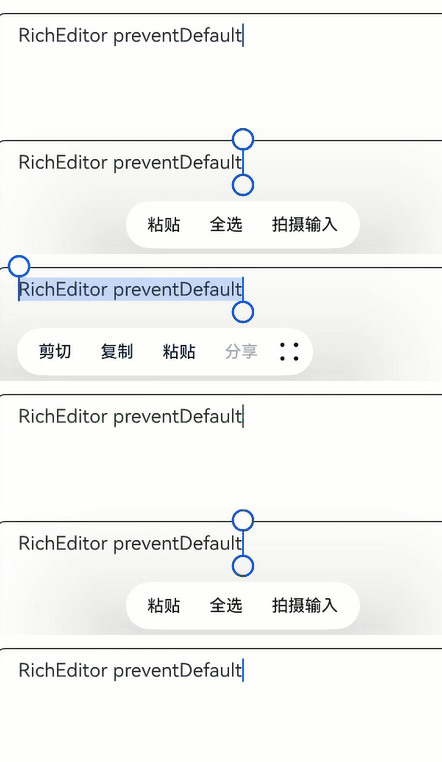
| onPaste11+(callback: (event?: [PasteEvent](#pasteevent11)) => void) | 完成粘贴前,触发回调。
**说明:**
系统的默认粘贴和拖拽行为,只支持纯文本的粘贴。
开发者可以通过该方法,覆盖系统默认行为,实现图文的粘贴。 |
## RichEditorInsertValue
插入文本信息。
| 名称 | 类型 | 必填 | 说明 |
| ------------ | ------ | ---- | ---------- |
| insertOffset | number | 是 | 插入的文本偏移位置。 |
| insertValue | string | 是 | 插入的文本内容。 |
## RichEditorDeleteValue
| 名称 | 类型 | 必填 | 说明 |
| --------------------- | ---------------------------------------- | ---- | ------------------- |
| offset | number | 是 | 删除内容的偏移位置。 |
| direction | [RichEditorDeleteDirection](#richeditordeletedirection) | 是 | 删除操作的方向。 |
| length | number | 是 | 删除内容长度。 |
| richEditorDeleteSpans | Array<[RichEditorTextSpanResult](#richeditortextspanresult) \| [RichEditorImageSpanResult](#richeditorimagespanresult)> | 是 | 删除的文本或者图片Span的具体信息。 |
## RichEditorDeleteDirection
删除操作的方向。
| 名称 | 描述 |
| -------- | ----- |
| BACKWARD | 向后删除。 |
| FORWARD | 向前删除。 |
## RichEditorTextSpanResult
文本Span信息。
| 名称 | 类型 | 必填 | 说明 |
| ----------------------------- | ---------------------------------------- | ---- | ---------------------- |
| spanPosition | [RichEditorSpanPosition](#richeditorspanposition) | 是 | Span位置。 |
| value | string | 是 | 文本Span内容。 |
| textStyle | [RichEditorTextStyleResult](#richeditortextstyleresult) | 是 | 文本Span样式信息。 |
| offsetInSpan | [number, number] | 是 | 文本Span内容里有效内容的起始和结束位置。 |
| valueResource11+ | [Resource](ts-types.md#resource) | 否 | 组件SymbolSpan内容。 |
| SymbolSpanStyle11+ | [RichEditorSymbolSpanStyle](#richeditorsymbolspanstyle11) | 否 | 组件SymbolSpan样式信息。 |
## RichEditorSpanPosition
Span位置信息。
| 名称 | 类型 | 必填 | 说明 |
| --------- | ---------------- | ---- | --------------------------- |
| spanIndex | number | 是 | Span索引值。 |
| spanRange | [number, number] | 是 | Span内容在RichEditor内的起始和结束位置。 |
## RichEditorSpanType
Span类型信息。
| 名称 | 值 | 描述 |
| ----- | ---- | ------------ |
| TEXT | 0 | Span为文字类型。 |
| IMAGE | 1 | Span为图像类型。 |
| MIXED | 2 | Span为图文混合类型。 |
## RichEditorTextStyleResult
后端返回的文本样式信息。
| 名称 | 类型 | 必填 | 描述 |
| ---------- | ---------------------------------------- | ---- | ------------ |
| fontColor | [ResourceColor](ts-types.md#resourcecolor) | 是 | 文本颜色。 |
| fontSize | number | 是 | 字体大小。 |
| fontStyle | [FontStyle](ts-appendix-enums.md#fontstyle) | 是 | 字体样式。 |
| fontWeight | number | 是 | 字体粗细。 |
| fontFamily | string | 是 | 字体列表。 |
| decoration | {
type: [TextDecorationType](ts-appendix-enums.md#textdecorationtype),
color: [ResourceColor](ts-types.md#resourcecolor)
} | 是 | 文本装饰线样式及其颜色。 |
## RichEditorImageSpanResult
后端返回的图片信息。
| 名称 | 类型 | 必填 | 描述 |
|------------------|-------------------------------------------------------------------|-----|------------------|
| spanPosition | [RichEditorSpanPosition](#richeditorspanposition) | 是 | Span位置。 |
| valuePixelMap | [PixelMap](../../apis-image-kit/js-apis-image.md#pixelmap7) | 否 | 图片内容。 |
| valueResourceStr | [ResourceStr](ts-types.md#resourcestr) | 否 | 图片资源id。 |
| imageStyle | [RichEditorImageSpanStyleResult](#richeditorimagespanstyleresult) | 是 | 图片样式。 |
| offsetInSpan | [number, number] | 是 | Span里图片的起始和结束位置。 |
## RichEditorImageSpanStyleResult
后端返回的图片样式信息。
| 名称 | 类型 | 必填 | 描述 |
| ------------- | ---------------------------------------- | ---- | --------- |
| size | [number, number] | 是 | 图片的宽度和高度。 |
| verticalAlign | [ImageSpanAlignment](ts-basic-components-imagespan.md#imagespanalignment) | 是 | 图片垂直对齐方式。 |
| objectFit | [ImageFit](ts-appendix-enums.md#imagefit) | 是 | 图片缩放类型。 |
## RichEditorOptions
RichEditor初始化参数。
| 名称 | 类型 | 必填 | 说明 |
| ---------- | ---------------------------------------- | ---- | ------- |
| controller | [RichEditorController](#richeditorcontroller) | 是 | 富文本控制器。 |
## TextDataDetectorConfig11+
文本识别配置参数。
| 名称 | 类型 | 必填 | 说明 |
| ---------- |-----------------------------------------------------------------------| ---- | ------- |
| types | [TextDataDetectorType](ts-appendix-enums.md#textdatadetectortype11)[] | 是 | 文本识别的实体类型。设置`types`为`null`或者`[]`时,识别所有类型的实体,否则只识别指定类型的实体。 |
| onDetectResultUpdate | (result: string) => void | 否 | 文本识别成功后,触发`onDetectResultUpdate`回调。
`result`:文本识别的结果,Json格式。 |
## RichEditorController
RichEditor组件的控制器。
### 导入对象
```
controller: RichEditorController = new RichEditorController()
```
### getCaretOffset
getCaretOffset(): number
返回当前光标所在位置。
**返回值:**
| 类型 | 说明 |
| ------ | --------- |
| number | 当前光标所在位置。 |
### setCaretOffset
setCaretOffset(offset: number): boolean
设置光标位置。
**参数:**
| 参数名 | 参数类型 | 必填 | 参数描述 |
| ------ | ------ | ---- | -------------------- |
| offset | number | 是 | 光标偏移位置。超出文本范围时,设置失败。 |
**返回值:**
| 类型 | 说明 |
| ------- | --------- |
| boolean | 光标是否设置成功。 |
### addTextSpan
addTextSpan(value: string, options?: RichEditorTextSpanOptions): number
添加文本内容。
**参数:**
| 参数名 | 参数类型 | 必填 | 参数描述 |
| ------- | ---------------------------------------- | ---- | ----- |
| value | string | 是 | 文本内容。 |
| options | [RichEditorTextSpanOptions](#richeditortextspanoptions) | 否 | 文本选项。 |
**返回值:**
| 类型 | 说明 |
| ------ | -------------------- |
| number | 添加完成的Text Span所在的位置。 |
### addImageSpan
addImageSpan(value: PixelMap | ResourceStr, options?: RichEditorImageSpanOptions): number
添加图片内容。
**参数:**
| 参数名 | 参数类型 | 必填 | 参数描述 |
| ------- | ---------------------------------------- | ---- | ----- |
| value | [PixelMap](../../apis-image-kit/js-apis-image.md#pixelmap7)\|[ResourceStr](ts-types.md#resourcestr) | 是 | 图片内容。 |
| options | [RichEditorImageSpanOptions](#richeditorimagespanoptions) | 否 | 图片选项。 |
**返回值:**
| 类型 | 说明 |
| ------ | -------------------- |
| number | 添加完成的imageSpan所在的位置。 |
### addBuilderSpan11+
addBuilderSpan(value: CustomBuilder, options?: RichEditorBuilderSpanOptions): number
> **说明:**
>
> - RichEditor组件添加占位Span,占位Span调用系统的measure方法计算真实的长宽和位置。
> - 可通过[RichEditorBuilderSpanOptions](#richeditorbuilderspanoptions11)设置此builder在RichEditor中的index(一个文字为一个单位)。
> - 此占位Span不可获焦,不支持拖拽(与可拖拽Span如文本或图片Span一起拖拽时,此Span对应的位置内容不会显示但会占相同大小的区域),支持部分通用属性,占位、删除等能力等同于ImageSpan,长度视为一个文字。
> - 不支持通过[bindSelectionMenu](#属性)设置自定义菜单。
> - 不支持通过[getSpans](#getspans),[getSelection](#getselection11),[onSelect](#事件),[aboutToDelete](#事件)获取builderSpan信息。
> - 不支持通过[updateSpanStyle](#updatespanstyle),[updateParagraphStyle](#updateparagraphstyle11)等方式更新builder。
> - 对此builder节点进行复制或粘贴不生效。
> - builder的布局约束由RichEditor传入,如果builder里最外层组件不设置大小,则会用RichEditor的大小作为maxSize。
> - builder的手势相关事件机制与通用手势事件相同,如果builder中未设置透传,则仅有builder中的子组件响应。
通用属性仅支持[size](ts-universal-attributes-size.md#size)、[padding](ts-universal-attributes-size.md#padding)、[margin](ts-universal-attributes-size.md#margin)、[aspectRatio](ts-universal-attributes-layout-constraints.md#aspectratio)、[borderStyle](ts-universal-attributes-border.md#borderstyle)、[borderWidth](ts-universal-attributes-border.md#borderwidth)、[borderColor](ts-universal-attributes-border.md#bordercolor)、[borderRadius](ts-universal-attributes-border.md#borderradius)、[backgroundColor](ts-universal-attributes-background.md#backgroundcolor)、[backgroundBlurStyle](ts-universal-attributes-background.md#backgroundblurstyle9)、[opacity](ts-universal-attributes-opacity.md)、[blur](ts-universal-attributes-image-effect.md#blur)、[backdropBlur](ts-universal-attributes-image-effect.md#backdropblur)、[shadow](ts-universal-attributes-image-effect.md#shadow)、[grayscale](ts-universal-attributes-image-effect.md#grayscale)、[brightness](ts-universal-attributes-image-effect.md#brightness)、[saturate](ts-universal-attributes-image-effect.md#saturate)、
[contrast](ts-universal-attributes-image-effect.md#contrast)、[invert](ts-universal-attributes-image-effect.md#invert)、[sepia](ts-universal-attributes-image-effect.md#sepia)、[hueRotate](ts-universal-attributes-image-effect.md#huerotate)、[colorBlend](ts-universal-attributes-image-effect.md#colorblend7)、[linearGradientBlur](ts-universal-attributes-image-effect.md#lineargradientblur10)、[clip](ts-universal-attributes-sharp-clipping.md#clip)、[mask](ts-universal-attributes-sharp-clipping.md#mask)、[foregroundBlurStyle](ts-universal-attributes-foreground-blur-style.md#foregroundblurstyle)、[accessibilityGroup](ts-universal-attributes-accessibility.md#accessibilitygroup)、[accessibilityText](ts-universal-attributes-accessibility.md#accessibilitytext)、[accessibilityDescription](ts-universal-attributes-accessibility.md#accessibilitydescription)、[accessibilityLevel](ts-universal-attributes-accessibility.md#accessibilitylevel)、[sphericalEffect](ts-universal-attributes-image-effect-sys.md#sphericaleffect10)、[lightUpEffect](ts-universal-attributes-image-effect-sys.md#lightupeffect10)、[pixelStretchEffect](ts-universal-attributes-image-effect-sys.md#pixelstretcheffect10)。
**参数:**
| 参数名 | 参数类型 | 必填 | 参数描述 |
| ------- | ---------------------------------------- | ---- | ---------- |
| value | [CustomBuilder](ts-types.md#custombuilder8) | 是 | 自定义组件。 |
| options | [RichEditorBuilderSpanOptions](#richeditorbuilderspanoptions11) | 否 | builder选项。 |
**返回值:**
| 类型 | 说明 |
| ------ | ---------------------- |
| number | 添加完成的builderSpan所在的位置。 |
### addSymbolSpan11+
addSymbolSpan(value: Resource, options?: RichEditorSymbolSpanOptions ): number
在Richeditor中添加SymbolSpan。
暂不支持手势处理。
**参数:**
| 参数名 | 参数类型 | 必填 | 参数描述 |
| ------- | ---------------------------------------- | ---- | ----- |
| value | [Resource](ts-types.md#resource) | 是 | 组件内容。 |
| options | [RichEditorSymbolSpanOptions](#richeditorsymbolspanoptions11) | 否 | 组件选项。 |
**返回值:**
| 类型 | 说明 |
| ------ | --------------------- |
| number | 添加完成的SymbolSpan所在的位置。 |
### getTypingStyle11+
getTypingStyle(): RichEditorTextStyle
获得用户预设的样式。
**返回值:**
| 类型 | 说明 |
| ---------------------------------------- | ------- |
| [RichEditorTextStyle](#richeditortextstyle) | 用户预设样式。 |
### setTypingStyle11+
setTypingStyle(value: RichEditorTextStyle): void
设置用户预设的样式。
**参数:**
| 参数名 | 参数类型 | 必填 | 参数描述 |
| ----- | ---------------------------------------- | ---- | ----- |
| value | [RichEditorTextStyle](#richeditortextstyle) | 是 | 预设样式。 |
### updateSpanStyle
updateSpanStyle(value: RichEditorUpdateTextSpanStyleOptions | RichEditorUpdateImageSpanStyleOptions | RichEditorUpdateSymbolSpanStyleOptions): void
更新文本或者图片样式。
若只更新了一个Span的部分内容,则会根据更新部分、未更新部分将该Span拆分为多个Span。
使用该接口更新文本或图片样式时默认不会关闭自定义文本选择菜单。
**参数:**
| 名称 | 类型 | 必填 | 描述 |
| ------ | -------- | ---- | -------------------------------------- |
| value | [RichEditorUpdateTextSpanStyleOptions](#richeditorupdatetextspanstyleoptions) \| [RichEditorUpdateImageSpanStyleOptions](#richeditorupdateimagespanstyleoptions) \| [RichEditorUpdateSymbolSpanStyleOptions](#richeditorupdatesymbolspanstyleoptions11)11+ | 是 | 文本或者图片的样式选项信息。 |
### updateParagraphStyle11+
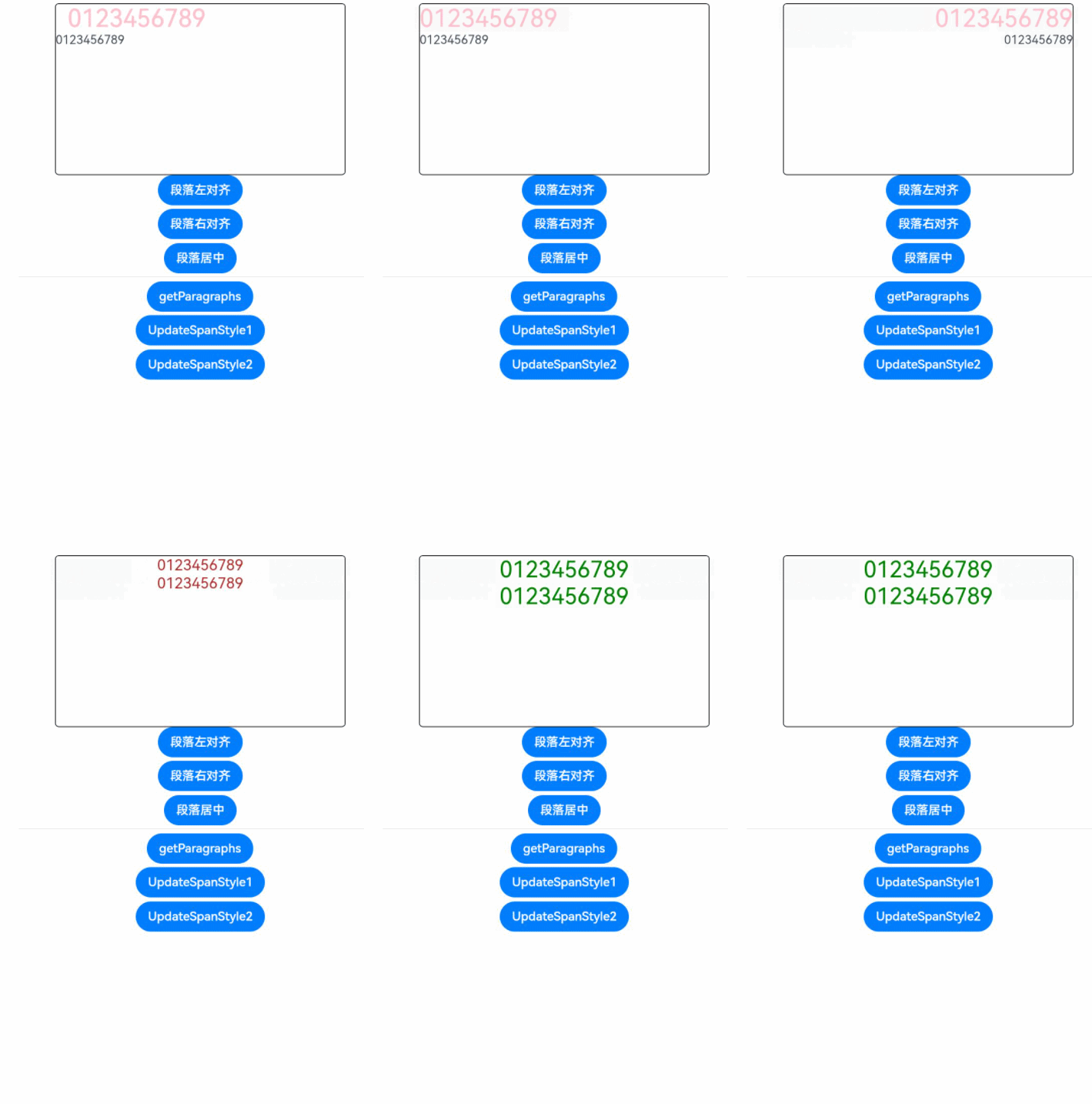
updateParagraphStyle(value: RichEditorParagraphStyleOptions): void
更新段落的样式。
**参数:**
| 名称 | 类型 | 必填 | 描述 |
| ----- | ---------------------------------------- | ---- | ---------- |
| value | [RichEditorParagraphStyleOptions](#richeditorparagraphstyleoptions11) | 是 | 段落的样式选项信息。 |
### getSpans
getSpans(value?: RichEditorRange): Array
获取span信息。
**参数:**
| 参数名 | 参数类型 | 必填 | 参数描述 |
| ----- | ----------------------------------- | ---- | ----------- |
| value | [RichEditorRange](#richeditorrange) | 否 | 需要获取span范围。 |
**返回值:**
| 类型 | 说明 |
| ---------------------------------------- | ------------ |
| Array<[RichEditorTextSpanResult](#richeditortextspanresult) \| [RichEditorImageSpanResult](#richeditorimagespanresult)> | 文本和图片Span信息。 |
### deleteSpans
deleteSpans(value?: RichEditorRange): void
删除指定范围内的文本和图片。
**参数:**
| 参数名 | 参数类型 | 必填 | 参数描述 |
| ----- | ----------------------------------- | ---- | ------------------- |
| value | [RichEditorRange](#richeditorrange) | 否 | 删除范围。省略时,删除所有文本和图片。 |
### getParagraphs11+
getParagraphs(value?: RichEditorRange): Array\
获得指定返回的段落。
**参数:**
| 参数名 | 参数类型 | 必填 | 参数描述 |
| ----- | ----------------------------------- | ---- | ---------- |
| value | [RichEditorRange](#richeditorrange) | 否 | 需要获取段落的范围。 |
**返回值:**
| 类型 | 说明 |
| ---------------------------------------- | -------- |
| Array\<[RichEditorParagraphResult](#richeditorparagraphresult11)> | 选中段落的信息。 |
### closeSelectionMenu
closeSelectionMenu(): void
关闭自定义选择菜单或系统默认选择菜单。
### setSelection11+
setSelection(selectionStart: number, selectionEnd: number)
支持设置文本选中,选中部分背板高亮。
selectionStart和selectionEnd均为-1时表示全选。
接口调用前有带手柄菜单弹出时则调用后不主动关闭菜单,且调整菜单位置。
接口调用前有不带手柄菜单弹出时则调用后不主动关闭菜单,且保持菜单原来位置。
接口调用前无菜单弹出,则调用后也无菜单弹出。
未获焦时调用该接口不产生选中效果。
使用[示例](ts-composite-components-selectionmenu.md#示例)。
**参数:**
| 参数名 | 参数类型 | 必填 | 参数描述 |
| -------------- | ------ | ---- | ------- |
| selectionStart | number | 是 | 选中开始位置。 |
| selectionEnd | number | 是 | 选中结束位置。 |
### getSelection11+
getSelection(): RichEditorSelection
获取选中文本内容。如果未选中内容,返回光标所在span信息。
使用[示例](ts-composite-components-selectionmenu.md#示例)。
**返回值:**
| 类型 | 说明 |
| ---------------------------------------- | ------- |
| [RichEditorSelection](#richeditorselection) | 选中内容信息。 |
## RichEditorSelection
选中内容信息。
| 名称 | 类型 | 必填 | 说明 |
| --------- | ---------------------------------------- | ---- | ------- |
| selection | [number, number] | 是 | 选中范围。 |
| spans | Array<[RichEditorTextSpanResult](#richeditortextspanresult)\| [RichEditorImageSpanResult](#richeditorimagespanresult)> | 是 | span信息。 |
## RichEditorUpdateTextSpanStyleOptions
文本样式选项。
| 名称 | 类型 | 必填 | 描述 |
| --------- | ---------------------------------------- | ---- | ------------------------------- |
| start | number | 否 | 需要更新样式的文本起始位置,省略或者设置负值时表示从0开始。 |
| end | number | 否 | 需要更新样式的文本结束位置,省略或者超出文本范围时表示无穷大。 |
| textStyle | [RichEditorTextStyle](#richeditortextstyle) | 是 | 文本样式。 |
> **说明:**
>
> 当start大于end时为异常情况,此时start为0,end为无穷大。
## RichEditorUpdateImageSpanStyleOptions
图片样式选项。
| 名称 | 类型 | 必填 | 描述 |
| ---------- | ---------------------------------------- | ---- | ------------------------------- |
| start | number | 否 | 需要更新样式的图片起始位置,省略或者设置负值时表示从0开始。 |
| end | number | 否 | 需要更新样式的图片结束位置,省略或者超出文本范围时表示无穷大。 |
| imageStyle | [RichEditorImageSpanStyle](#richeditorimagespanstyle) | 是 | 图片样式。 |
> **说明:**
>
> 当start大于end时为异常情况,此时start为0,end为无穷大。
## RichEditorUpdateSymbolSpanStyleOptions11+
SymbolSpan样式选项。
| 名称 | 类型 | 必填 | 描述 |
| ----------- | ---------------------------------------- | ---- | ------------------------------- |
| start | number | 否 | 需要更新样式的文本起始位置,省略或者设置负值时表示从0开始。 |
| end | number | 否 | 需要更新样式的文本结束位置,省略或者超出文本范围时表示无穷大。 |
| symbolStyle | [RichEditorSymbolSpanStyle](#richeditorsymbolspanstyle11) | 是 | 组件样式。 |
> **说明:**
>
> 当start大于end时为异常情况,此时start为0,end为无穷大。
## RichEditorParagraphStyleOptions11+
段落样式选项
| 名称 | 类型 | 必填 | 描述 |
| ----- | ---------------------------------------- | ---- | ---------------------------------- |
| start | number | 否 | 需要更新样式的段落起始位置,省略或者设置负值时表示从0开始。 |
| end | number | 否 | 需要更新样式的段落结束位置,省略、负数或者超出文本范围时表示无穷大。 |
| style | [RichEditorParagraphStyle](#richeditorparagraphstyle11) | 是 | 段落样式。 |
> **说明:**
>
> 当start大于end时为异常情况,此时start为0,end为无穷大。
## RichEditorParagraphStyle11+
段落样式。
| 名称 | 类型 | 必填 | 描述 |
| ------------- | ---------------------------------------- | ---- | ------------------ |
| textAlign | [TextAlign](ts-appendix-enums.md#textalign) | 否 | 设置文本段落在水平方向的对齐方式。 |
| leadingMargin | [Dimension](ts-types.md#dimension10) \| [LeadingMarginPlaceholder](#leadingmarginplaceholder11) | 否 | 设置文本段落缩进,不支持设置百分比,图片放在段首时不支持。 |
## LeadingMarginPlaceholder11+
前导边距占位符,用于表示文本段落左侧与组件边缘之间的距离。
| 名称 | 类型 | 必填 | 描述 |
| -------- | ---------------------------------------- | ---- | -------------- |
| pixelMap | [PixelMap](../../apis-image-kit/js-apis-image.md#pixelmap7) | 是 | 图片内容。 |
| size | \[[Dimension](ts-types.md#dimension10), [Dimension](ts-types.md#dimension10)\] | 是 | 图片大小,不支持设置百分比。 |
## RichEditorParagraphResult11+
后端返回的段落信息。
| 名称 | 类型 | 必填 | 描述 |
| ----- | ---------------------------------------- | ---- | ------- |
| style | [RichEditorParagraphStyle](#richeditorparagraphstyle11) | 是 | 段落样式。 |
| range | \[number, number\] | 是 | 段落起始和结束位置。 |
## RichEditorTextSpanOptions
添加文本的偏移位置和文本样式信息。
| 名称 | 类型 | 必填 | 描述 |
| ---------------------------- | ---------------------------------------- | ---- | -------------------------- |
| offset | number | 否 | 添加文本的位置。省略时,添加到所有文本字符串的最后。
当值小于0时,放在字符串最前面;当值大于字符串长度时,放在字符串最后面。 |
| style | [RichEditorTextStyle](#richeditortextstyle) | 否 | 文本样式信息。省略时,使用系统默认文本信息。 |
| paragraphStyle11+ | [RichEditorParagraphStyle](#richeditorparagraphstyle11) | 否 | 段落样式。 |
| gesture11+ | [RichEditorGesture](#richeditorgesture11) | 否 | 行为触发回调。省略时,仅使用系统默认行为。 |
## RichEditorTextStyle
文本样式信息。
| 名称 | 类型 | 必填 | 描述 |
| ------------------------ | ---------------------------------------- | ---- | ---------------------------------------- |
| fontColor | [ResourceColor](ts-types.md#resourcecolor) | 否 | 文本颜色。
默认值:Color.Black。 |
| fontSize | [Length](ts-types.md#length) \| number | 否 | 设置字体大小,Length为number类型时,使用fp单位。字体默认大小16。不支持设置百分比字符串。
从API version 9开始,该接口支持在ArkTS卡片中使用。 |
| fontStyle | [FontStyle](ts-appendix-enums.md#fontstyle) | 否 | 字体样式。
默认值:FontStyle.Normal。 |
| fontWeight | [FontWeight](ts-appendix-enums.md#fontweight) \| number \| string | 否 | 字体粗细。
number类型取值[100,900],取值间隔为100,默认为400,取值越大,字体越粗。
string类型仅支持number类型取值的字符串形式,例如“400”,以及“bold”、“bolder”、“lighter”、“regular” 、“medium”分别对应FontWeight中相应的枚举值。
默认值:FontWeight.Normal。 |
| fontFamily | [ResourceStr](ts-types.md#resourcestr) | 否 | 设置字体列表。默认字体'HarmonyOS Sans',当前支持'HarmonyOS Sans'字体和[注册自定义字体](../js-apis-font.md)。
默认字体:'HarmonyOS Sans'。 |
| decoration | {
type: [TextDecorationType](ts-appendix-enums.md#textdecorationtype),
color?: [ResourceColor](ts-types.md#resourcecolor)
} | 否 | 设置文本装饰线样式及其颜色。
默认值:{
type: TextDecorationType.None,
color:Color.Black
}。 |
| textShadow11+ | [ShadowOptions](ts-universal-attributes-image-effect.md#shadowoptions对象说明) \| Array<[ShadowOptions](ts-universal-attributes-image-effect.md#shadowoptions对象说明)> | 否 | 设置文字阴影效果。该接口支持以数组形式入参,实现多重文字阴影。
**说明:**
不支持fill字段, 不支持智能取色模式。 |
## RichEditorImageSpanOptions
添加图片的偏移位置和图片样式信息。
| 名称 | 类型 | 必填 | 描述 |
| --------------------- | ---------------------------------------- | ---- | -------------------------- |
| offset | number | 否 | 添加图片的位置。省略时,添加到所有文本字符串的最后。
当值小于0时,放在字符串最前面;当值大于字符串长度时,放在字符串最后面。 |
| imageStyle | [RichEditorImageSpanStyle](#richeditorimagespanstyle) | 否 | 图片样式信息。省略时,使用系统默认图片信息。 |
| gesture11+ | [RichEditorGesture](#richeditorgesture11) | 否 | 行为触发回调。省略时,仅使用系统默认行为。 |
## RichEditorImageSpanStyle
图片样式。
| 名称 | 类型 | 必填 | 描述 |
| ------------------------- | ---------------------------------------- | ---- | ---------------------------------------- |
| size | [[Dimension](ts-types.md#dimension10), [Dimension](ts-types.md#dimension10)] | 否 | 图片宽度和高度。 |
| verticalAlign | [ImageSpanAlignment](ts-basic-components-imagespan.md#imagespanalignment) | 否 | 图片垂直对齐方式。
默认值:ImageSpanAlignment.BASELINE |
| objectFit | [ImageFit](ts-appendix-enums.md#imagefit) | 否 | 图片缩放类型。
默认值:ImageFit.Cover。 |
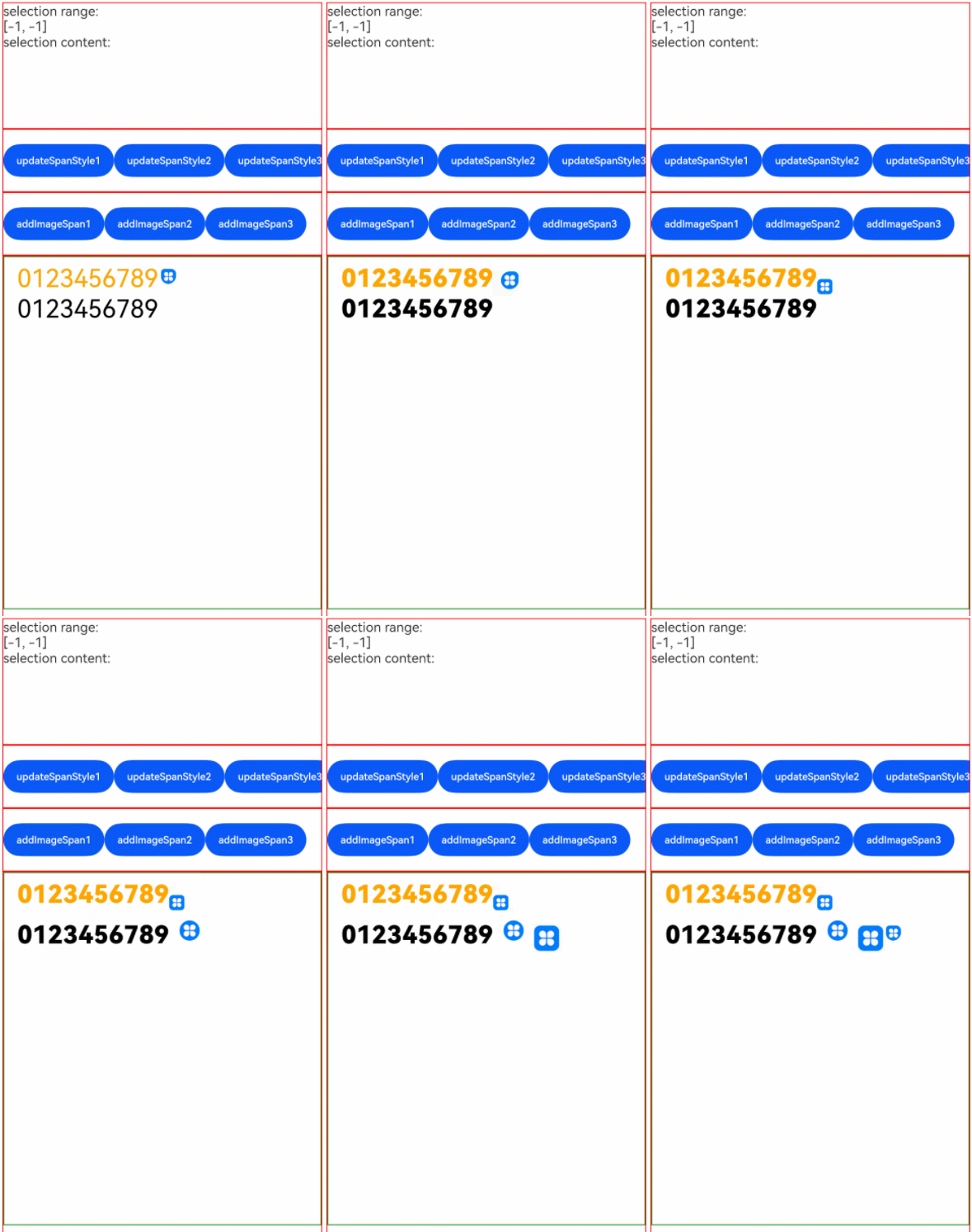
| layoutStyle11+ | [RichEditorLayoutStyle](#richeditorlayoutstyle11) | 否 | 图片布局风格。
|
## RichEditorLayoutStyle11+
|名称 |类型 |必填| 描述|
| ------------- | ----------------------- | ---- | ------------------------------------------------------------ |
|margin | [Dimension](ts-types.md#dimension10) \| [Margin](ts-types.md#margin) | 否 | 外边距类型,用于描述组件不同方向的外边距。
参数为Dimension类型时,四个方向外边距同时生效。|
|borderRadius | [Dimension](ts-types.md#dimension10) \| [BorderRadiuses](ts-types.md#borderradiuses9) | 否 | 圆角类型,用于描述组件边框圆角半径。|
## RichEditorSymbolSpanOptions11+
添加文本的偏移位置和文本样式信息。
| 名称 | 类型 | 必填 | 描述 |
| ------ | ---------------------------------------- | ---- | -------------------------- |
| offset | number | 否 | 添加组件的位置。省略时,添加到所有文本字符串的最后。
当值小于0时,放在字符串最前面;当值大于字符串长度时,放在字符串最后面。 |
| style | [RichEditorSymbolSpanStyle](#richeditorsymbolspanstyle11) | 否 | 组件样式信息。省略时,使用系统默认文本信息。 |
## RichEditorSymbolSpanStyle11+
组件SymbolSpan样式信息。
| 名称 | 类型 | 必填 | 描述 |
| ------ | -------- | ---- | -------------------------------------- |
| fontColor | Array\<[ResourceColor](ts-types.md#resourcecolor)\> | 否 | 设置SymbolGlyph组件颜色。
默认值:不同渲染策略下默认值不同。 |
| fontSize | number \| string \| [Resource](ts-types.md#resource) | 否 | 设置SymbolGlyph组件大小。
默认值:系统默认值。 |
| fontWeight | [FontWeight](ts-appendix-enums.md#fontweight) \| number \| string | 否 | 设置SymbolGlyph组件粗细。
number类型取值[100,900],取值间隔为100,默认为400,取值越大,字体越粗。
string类型仅支持number类型取值的字符串形式,例如“400”,以及“bold”、“bolder”、“lighter”、“regular” 、“medium”分别对应FontWeight中相应的枚举值。
默认值:FontWeight.Normal。 |
| renderingStrategy | [SymbolRenderingStrategy](ts-appendix-enums.md#symbolrenderingstrategy11) | 否 | 设置SymbolGlyph组件渲染策略。
默认值:SymbolRenderingStrategy.SINGLE。
**说明:**
$r('sys.symbol.ohos_*')中引用的资源仅ohos_trash_circle、ohos_folder_badge_plus、ohos_lungs支持分层与多色模式。 |
| effectStrategy | [SymbolEffectStrategy](ts-appendix-enums.md#symboleffectstrategy11) | 否 | 设置SymbolGlyph组件动效策略。
默认值:SymbolEffectStrategy.NONE。
**说明:**
$r('sys.symbol.ohos_*')中引用的资源仅ohos_wifi支持层级动效模式。 |
## RichEditorBuilderSpanOptions11+
添加图片的偏移位置和图片样式信息。
| 名称 | 类型 | 必填 | 描述 |
| ------ | ------ | ---- | ------------------------------------- |
| offset | number | 否 | 添加builder的位置。省略或者为异常值时,添加到所有文本字符串的最后。 |
## RichEditorRange
范围信息。
| 名称 | 类型 | 必填 | 描述 |
| ----- | ------ | ---- | ---------------------- |
| start | number | 否 | 起始位置,省略或者设置负值时表示从0开始。 |
| end | number | 否 | 结束位置,省略或者超出文本范围时表示无穷大。 |
## SelectionMenuOptions11+
范围信息。
| 名称 | 类型 | 必填 | 描述 |
| ----------- | ---------- | ---- | ------------- |
| onAppear | () => void | 否 | 自定义选择菜单弹出时回调。 |
| onDisappear | () => void | 否 | 自定义选择菜单关闭时回调。 |
## PasteEvent11+
定义用户粘贴事件。
| 名称 | 类型 | 必填 | 描述 |
| -------------- | ----------- | ---- | ----------------------------- |
| preventDefault | () => void | 否 | 阻止系统默认粘贴事件。 |
## RichEditorGesture11+
用户行为回调。
### onClick11+
onClick(callback: (event?: ClickEvent) => void)
点击完成时回调事件。
双击时,第一次点击触发回调事件。
**参数:**
| 参数名 | 参数类型 | 必填 | 描述 |
| ----- | ---------------------------------------- | ---- | ------- |
| event | [ClickEvent](ts-universal-events-click.md#clickevent对象说明) | 否 | 用户点击事件。 |
### onLongPress11+
onLongPress(callback: (event?: GestureEvent) => void )
长按完成时回调事件。
**参数:**
| 参数名 | 参数类型 | 必填 | 描述 |
| ----- | ---------------------------------------- | ---- | ------- |
| event | [GestureEvent](ts-gesture-settings.md#gestureevent对象说明) | 否 | 用户长按事件。 |
## 示例
### 示例1
```ts
// xxx.ets
@Entry
@Component
struct Index {
controller: RichEditorController = new RichEditorController();
options: RichEditorOptions = { controller: this.controller };
private start: number = -1;
private end: number = -1;
@State message: string = "[-1, -1]"
@State content: string = ""
build() {
Column() {
Column() {
Text("selection range:").width("100%")
Text() {
Span(this.message)
}.width("100%")
Text("selection content:").width("100%")
Text() {
Span(this.content)
}.width("100%")
}
.borderWidth(1)
.borderColor(Color.Red)
.width("100%")
.height("20%")
Row() {
Button("更新样式:加粗").onClick(() => {
this.controller.updateSpanStyle({
start: this.start,
end: this.end,
textStyle:
{
fontWeight: FontWeight.Bolder
}
})
})
Button("获取选择内容").onClick(() => {
this.content = "";
this.controller.getSpans({
start: this.start,
end: this.end
}).forEach(item => {
if(typeof(item as RichEditorImageSpanResult)['imageStyle'] != 'undefined'){
this.content += (item as RichEditorImageSpanResult).valueResourceStr;
this.content += "\n"
} else {
if(typeof(item as RichEditorTextSpanResult)['symbolSpanStyle'] != 'undefined') {
this.content += (item as RichEditorTextSpanResult).symbolSpanStyle?.fontSize;
this.content += "\n"
}else {
this.content += (item as RichEditorTextSpanResult).value;
this.content += "\n"
}
}
})
})
Button("删除选择内容").onClick(() => {
this.controller.deleteSpans({
start: this.start,
end: this.end
})
this.start = -1;
this.end = -1;
this.message = "[" + this.start + ", " + this.end + "]"
})
}
.borderWidth(1)
.borderColor(Color.Red)
.width("100%")
.height("10%")
Column() {
RichEditor(this.options)
.onReady(() => {
this.controller.addTextSpan("012345",
{
style:
{
fontColor: Color.Orange,
fontSize: 30
}
})
this.controller.addSymbolSpan($r("sys.symbol.ohos_trash"),
{
style:
{
fontSize: 30
}
})
this.controller.addImageSpan($r("app.media.icon"),
{
imageStyle:
{
size: ["57px", "57px"]
}
})
this.controller.addTextSpan("56789",
{
style:
{
fontColor: Color.Black,
fontSize: 30
}
})
})
.onSelect((value: RichEditorSelection) => {
this.start = value.selection[0];
this.end = value.selection[1];
this.message = "[" + this.start + ", " + this.end + "]"
})
.aboutToIMEInput((value: RichEditorInsertValue) => {
console.log("---------------------- aboutToIMEInput ----------------------")
console.log("insertOffset:" + value.insertOffset)
console.log("insertValue:" + value.insertValue)
return true;
})
.onIMEInputComplete((value: RichEditorTextSpanResult) => {
console.log("---------------------- onIMEInputComplete ---------------------")
console.log("spanIndex:" + value.spanPosition.spanIndex)
console.log("spanRange:[" + value.spanPosition.spanRange[0] + "," + value.spanPosition.spanRange[1] + "]")
console.log("offsetInSpan:[" + value.offsetInSpan[0] + "," + value.offsetInSpan[1] + "]")
console.log("value:" + value.value)
})
.aboutToDelete((value: RichEditorDeleteValue) => {
console.log("---------------------- aboutToDelete --------------------------")
console.log("offset:" + value.offset)
console.log("direction:" + value.direction)
console.log("length:" + value.length)
value.richEditorDeleteSpans.forEach(item => {
console.log("---------------------- item --------------------------")
console.log("spanIndex:" + item.spanPosition.spanIndex)
console.log("spanRange:[" + item.spanPosition.spanRange[0] + "," + item.spanPosition.spanRange[1] + "]")
console.log("offsetInSpan:[" + item.offsetInSpan[0] + "," + item.offsetInSpan[1] + "]")
if (typeof(item as RichEditorImageSpanResult)['imageStyle'] != 'undefined') {
console.log("image:" + (item as RichEditorImageSpanResult).valueResourceStr)
} else {
console.log("text:" + (item as RichEditorTextSpanResult).value)
}
})
return true;
})
.onDeleteComplete(() => {
console.log("---------------------- onDeleteComplete ------------------------")
})
.placeholder("input...", {
fontColor: Color.Gray,
font: {
size: 16,
weight: FontWeight.Normal,
family: "HarmonyOS Sans",
style: FontStyle.Normal
}
})
.borderWidth(1)
.borderColor(Color.Green)
.width("100%")
.height("30%")
}
.borderWidth(1)
.borderColor(Color.Red)
.width("100%")
.height("70%")
}
}
}
```

### 示例2
```ts
// xxx.ets
@Entry
@Component
struct RichEditorExample {
controller: RichEditorController = new RichEditorController()
// 自定义键盘组件
@Builder CustomKeyboardBuilder() {
Column() {
Grid() {
ForEach([1, 2, 3, 4, 5, 6, 7, 8, 9, '*', 0, '#'], (item: number | string) => {
GridItem() {
Button(item + "")
.width(110).onClick(() => {
this.controller.addTextSpan(item + '', {
offset: this.controller.getCaretOffset(),
style:
{
fontColor: Color.Orange,
fontSize: 30
}
})
this.controller.setCaretOffset(this.controller.getCaretOffset() + item.toString().length)
})
}
})
}.maxCount(3).columnsGap(10).rowsGap(10).padding(5)
}.backgroundColor(Color.Gray)
}
build() {
Column() {
RichEditor({ controller: this.controller })
// 绑定自定义键盘
.customKeyboard(this.CustomKeyboardBuilder()).margin(10).border({ width: 1 })
.height(200)
.borderWidth(1)
.borderColor(Color.Red)
.width("100%")
}
}
}
```
### 示例3
```ts
// xxx.ets
import pasteboard from '@ohos.pasteboard'
import { BusinessError } from '@ohos.base';
export interface SelectionMenuTheme {
imageSize: number;
buttonSize: number;
menuSpacing: number;
editorOptionMargin: number;
expandedOptionPadding: number;
defaultMenuWidth: number;
imageFillColor: Resource;
backGroundColor: Resource;
iconBorderRadius: Resource;
containerBorderRadius: Resource;
cutIcon: Resource;
copyIcon: Resource;
pasteIcon: Resource;
selectAllIcon: Resource;
shareIcon: Resource;
translateIcon: Resource;
searchIcon: Resource;
arrowDownIcon: Resource;
iconPanelShadowStyle: ShadowStyle;
iconFocusBorderColor: Resource;
}
export const defaultTheme: SelectionMenuTheme = {
imageSize: 24,
buttonSize: 48,
menuSpacing: 8,
editorOptionMargin: 1,
expandedOptionPadding: 3,
defaultMenuWidth: 256,
imageFillColor: $r('sys.color.ohos_id_color_primary'),
backGroundColor: $r('sys.color.ohos_id_color_dialog_bg'),
iconBorderRadius: $r('sys.float.ohos_id_corner_radius_default_m'),
containerBorderRadius: $r('sys.float.ohos_id_corner_radius_card'),
cutIcon: $r("sys.media.ohos_ic_public_cut"),
copyIcon: $r("sys.media.ohos_ic_public_copy"),
pasteIcon: $r("sys.media.ohos_ic_public_paste"),
selectAllIcon: $r("sys.media.ohos_ic_public_select_all"),
shareIcon: $r("sys.media.ohos_ic_public_share"),
translateIcon: $r("sys.media.ohos_ic_public_translate_c2e"),
searchIcon: $r("sys.media.ohos_ic_public_search_filled"),
arrowDownIcon: $r("sys.media.ohos_ic_public_arrow_down"),
iconPanelShadowStyle: ShadowStyle.OUTER_DEFAULT_MD,
iconFocusBorderColor: $r('sys.color.ohos_id_color_focused_outline'),
}
@Entry
@Component
struct SelectionMenu {
@State message: string = 'Hello World'
@State textSize: number = 40
@State sliderShow: boolean = false
@State start: number = -1
@State end: number = -1
@State colorTransparent: Color = Color.Transparent
controller: RichEditorController = new RichEditorController();
options: RichEditorOptions = { controller: this.controller }
private iconArr: Array =
[$r('app.media.icon'), $r("app.media.icon"), $r('app.media.icon'),
$r("app.media.icon"), $r('app.media.icon')]
@State iconBgColor: ResourceColor[] = new Array(this.iconArr.length).fill(this.colorTransparent)
@State pasteEnable: boolean = false
@State visibilityValue: Visibility = Visibility.Visible
@State textStyle: RichEditorTextStyle = {}
private fontWeightTable: string[] = ["100", "200", "300", "400", "500", "600", "700", "800", "900", "bold", "normal", "bolder", "lighter", "medium", "regular"]
private theme: SelectionMenuTheme = defaultTheme;
aboutToAppear() {
if (this.controller) {
let richEditorSelection = this.controller.getSelection()
if (richEditorSelection) {
let start = richEditorSelection.selection[0]
let end = richEditorSelection.selection[1]
if (start === 0 && this.controller.getSpans({ start: end + 1, end: end + 1 }).length === 0) {
this.visibilityValue = Visibility.None
} else {
this.visibilityValue = Visibility.Visible
}
}
}
let sysBoard = pasteboard.getSystemPasteboard()
if (sysBoard && sysBoard.hasDataSync()) {
this.pasteEnable = true
} else {
this.pasteEnable = false
}
}
build() {
Column() {
Column() {
RichEditor(this.options)
.onReady(() => {
this.controller.addTextSpan(this.message, { style: { fontColor: Color.Orange, fontSize: 30 } })
})
.onSelect((value: RichEditorSelection) => {
if (value.selection[0] == -1 && value.selection[1] == -1) {
return
}
this.start = value.selection[0]
this.end = value.selection[1]
})
.bindSelectionMenu(RichEditorSpanType.TEXT, this.panel, ResponseType.LongPress, { onDisappear: () => {
this.sliderShow = false
}})
.bindSelectionMenu(RichEditorSpanType.TEXT, this.panel, ResponseType.RightClick, { onDisappear: () => {
this.sliderShow = false
}})
.borderWidth(1)
.borderColor(Color.Red)
.width(200)
.height(200)
}.width('100%').backgroundColor(Color.White)
}.height('100%')
}
PushDataToPasteboard(richEditorSelection: RichEditorSelection) {
let sysBoard = pasteboard.getSystemPasteboard()
let pasteData = pasteboard.createData(pasteboard.MIMETYPE_TEXT_PLAIN, '')
if (richEditorSelection.spans && richEditorSelection.spans.length > 0) {
let count = richEditorSelection.spans.length
for (let i = count - 1; i >= 0; i--) {
let item = richEditorSelection.spans[i]
if ((item as RichEditorTextSpanResult)?.textStyle) {
let span = item as RichEditorTextSpanResult
let style = span.textStyle
let data = pasteboard.createRecord(pasteboard.MIMETYPE_TEXT_PLAIN, span.value.substring(span.offsetInSpan[0], span.offsetInSpan[1]))
let prop = pasteData.getProperty()
let temp: Record = {
'color': style.fontColor,
'size': style.fontSize,
'style': style.fontStyle,
'weight': this.fontWeightTable[style.fontWeight],
'fontFamily': style.fontFamily,
'decorationType': style.decoration.type,
'decorationColor': style.decoration.color
}
prop.additions[i] = temp;
pasteData.addRecord(data)
pasteData.setProperty(prop)
}
}
}
sysBoard.clearData()
sysBoard.setData(pasteData).then(() => {
console.info('SelectionMenu copy option, Succeeded in setting PasteData.');
this.pasteEnable = true;
}).catch((err: BusinessError) => {
console.error('SelectionMenu copy option, Failed to set PasteData. Cause:' + err.message);
})
}
PopDataFromPasteboard(richEditorSelection: RichEditorSelection) {
let start = richEditorSelection.selection[0]
let end = richEditorSelection.selection[1]
if (start == end && this.controller) {
start = this.controller.getCaretOffset()
end = this.controller.getCaretOffset()
}
let moveOffset = 0
let sysBoard = pasteboard.getSystemPasteboard()
sysBoard.getData((err, data) => {
if (err) {
return
}
let count = data.getRecordCount()
for (let i = 0; i < count; i++) {
const element = data.getRecord(i);
let tex: RichEditorTextStyle = {
fontSize: 16,
fontColor: Color.Black,
fontWeight: FontWeight.Normal,
fontFamily: "HarmonyOS Sans",
fontStyle: FontStyle.Normal,
decoration: { type: TextDecorationType.None, color: "#FF000000" }
}
if (data.getProperty() && data.getProperty().additions[i]) {
const tmp = data.getProperty().additions[i] as Record;
if (tmp.color) {
tex.fontColor = tmp.color as ResourceColor;
}
if (tmp.size) {
tex.fontSize = tmp.size as Length | number;
}
if (tmp.style) {
tex.fontStyle = tmp.style as FontStyle;
}
if (tmp.weight) {
tex.fontWeight = tmp.weight as number | FontWeight | string;
}
if (tmp.fontFamily) {
tex.fontFamily = tmp.fontFamily as ResourceStr;
}
if (tmp.decorationType && tex.decoration) {
tex.decoration.type = tmp.decorationType as TextDecorationType;
}
if (tmp.decorationColor && tex.decoration) {
tex.decoration.color = tmp.decorationColor as ResourceColor;
}
if (tex.decoration) {
tex.decoration = { type: tex.decoration.type, color: tex.decoration.color }
}
}
if (element && element.plainText && element.mimeType === pasteboard.MIMETYPE_TEXT_PLAIN && this.controller) {
this.controller.addTextSpan(element.plainText,
{
style: tex,
offset: start + moveOffset
}
)
moveOffset += element.plainText.length
}
}
if (this.controller) {
this.controller.setCaretOffset(start + moveOffset)
this.controller.closeSelectionMenu()
}
if (start != end && this.controller) {
this.controller.deleteSpans({ start: start + moveOffset, end: end + moveOffset })
}
})
}
@Builder
panel() {
Column() {
this.iconPanel()
if (!this.sliderShow) {
this.SystemMenu()
} else {
this.sliderPanel()
}
}.width(256)
}
@Builder iconPanel() {
Column() {
Row({ space: 2 }) {
ForEach(this.iconArr, (item:Resource, index ?: number) => {
Flex({ justifyContent: FlexAlign.Center, alignItems: ItemAlign.Center }) {
Image(item).fillColor(this.theme.imageFillColor).width(24).height(24).focusable(true).draggable(false)
}
.borderRadius(this.theme.iconBorderRadius)
.width(this.theme.buttonSize)
.height(this.theme.buttonSize)
.onClick(() => {
if (index as number == 0) {
this.sliderShow = false
if (this.controller) {
let selection = this.controller.getSelection();
let spans = selection.spans
spans.forEach((item: RichEditorTextSpanResult | RichEditorImageSpanResult, index) => {
if (typeof (item as RichEditorTextSpanResult)['textStyle'] != 'undefined') {
let span = item as RichEditorTextSpanResult
this.textStyle = span.textStyle
let start = span.offsetInSpan[0]
let end = span.offsetInSpan[1]
let offset = span.spanPosition.spanRange[0]
if (this.textStyle.fontWeight != 11) {
this.textStyle.fontWeight = FontWeight.Bolder
} else {
this.textStyle.fontWeight = FontWeight.Normal
}
this.controller.updateSpanStyle({
start: offset + start,
end: offset + end,
textStyle: this.textStyle
})
}
})
}
} else if (index as number == 1) {
this.sliderShow = false
if (this.controller) {
let selection = this.controller.getSelection();
let spans = selection.spans
spans.forEach((item: RichEditorTextSpanResult | RichEditorImageSpanResult, index) => {
if (typeof (item as RichEditorTextSpanResult)['textStyle'] != 'undefined') {
let span = item as RichEditorTextSpanResult
this.textStyle = span.textStyle
let start = span.offsetInSpan[0]
let end = span.offsetInSpan[1]
let offset = span.spanPosition.spanRange[0]
if (this.textStyle.fontStyle == FontStyle.Italic) {
this.textStyle.fontStyle = FontStyle.Normal
} else {
this.textStyle.fontStyle = FontStyle.Italic
}
this.controller.updateSpanStyle({
start: offset + start,
end: offset + end,
textStyle: this.textStyle
})
}
})
}
} else if (index as number == 2) {
this.sliderShow = false
if (this.controller) {
let selection = this.controller.getSelection();
let spans = selection.spans
spans.forEach((item: RichEditorTextSpanResult | RichEditorImageSpanResult, index) => {
if (typeof (item as RichEditorTextSpanResult)['textStyle'] != 'undefined') {
let span = item as RichEditorTextSpanResult
this.textStyle = span.textStyle
let start = span.offsetInSpan[0]
let end = span.offsetInSpan[1]
let offset = span.spanPosition.spanRange[0]
if (this.textStyle.decoration) {
if (this.textStyle.decoration.type == TextDecorationType.Underline) {
this.textStyle.decoration.type = TextDecorationType.None
} else {
this.textStyle.decoration.type = TextDecorationType.Underline
}
} else {
this.textStyle.decoration = { type: TextDecorationType.Underline, color: Color.Black }
}
this.controller.updateSpanStyle({
start: offset + start,
end: offset + end,
textStyle: this.textStyle
})
}
})
}
} else if (index as number == 3) {
this.sliderShow = !this.sliderShow
} else if (index as number == 4) {
this.sliderShow = false
if (this.controller) {
let selection = this.controller.getSelection();
let spans = selection.spans
spans.forEach((item: RichEditorTextSpanResult | RichEditorImageSpanResult, index) => {
if (typeof (item as RichEditorTextSpanResult)['textStyle'] != 'undefined') {
let span = item as RichEditorTextSpanResult
this.textStyle = span.textStyle
let start = span.offsetInSpan[0]
let end = span.offsetInSpan[1]
let offset = span.spanPosition.spanRange[0]
if (this.textStyle.fontColor == Color.Orange || this.textStyle.fontColor == '#FFFFA500') {
this.textStyle.fontColor = Color.Black
} else {
this.textStyle.fontColor = Color.Orange
}
this.controller.updateSpanStyle({
start: offset + start,
end: offset + end,
textStyle: this.textStyle
})
}
})
}
}
})
.onTouch((event?: TouchEvent | undefined) => {
if(event != undefined){
if (event.type === TouchType.Down) {
this.iconBgColor[index as number] = $r('sys.color.ohos_id_color_click_effect')
}
if (event.type === TouchType.Up) {
this.iconBgColor[index as number] = this.colorTransparent
}
}
})
.onHover((isHover?: boolean, event?: HoverEvent) => {
this.iconBgColor.forEach((icon:ResourceColor, index1) => {
this.iconBgColor[index1] = this.colorTransparent
})
if(isHover != undefined) {
this.iconBgColor[index as number] = $r('sys.color.ohos_id_color_hover')
}
})
.backgroundColor(this.iconBgColor[index as number])
})
}
}
.clip(true)
.width(this.theme.defaultMenuWidth)
.padding(this.theme.expandedOptionPadding)
.borderRadius(this.theme.containerBorderRadius)
.margin({ bottom: this.theme.menuSpacing })
.backgroundColor(this.theme.backGroundColor)
.shadow(this.theme.iconPanelShadowStyle)
}
@Builder
SystemMenu() {
Column() {
Menu() {
if (this.controller) {
MenuItemGroup() {
MenuItem({ startIcon: this.theme.cutIcon, content: "剪切", labelInfo: "Ctrl+X" })
.onClick(() => {
if (!this.controller) {
return
}
let richEditorSelection = this.controller.getSelection()
this.PushDataToPasteboard(richEditorSelection);
this.controller.deleteSpans({
start: richEditorSelection.selection[0],
end: richEditorSelection.selection[1]
})
})
MenuItem({ startIcon: this.theme.copyIcon, content: "复制", labelInfo: "Ctrl+C" })
.onClick(() => {
if (!this.controller) {
return
}
let richEditorSelection = this.controller.getSelection()
this.PushDataToPasteboard(richEditorSelection);
this.controller.closeSelectionMenu()
})
MenuItem({ startIcon: this.theme.pasteIcon, content: "粘贴", labelInfo: "Ctrl+V" })
.enabled(this.pasteEnable)
.onClick(() => {
if (!this.controller) {
return
}
let richEditorSelection = this.controller.getSelection()
this.PopDataFromPasteboard(richEditorSelection)
})
MenuItem({ startIcon: this.theme.selectAllIcon, content: "全选", labelInfo: "Ctrl+A" })
.visibility(this.visibilityValue)
.onClick(() => {
if (!this.controller) {
return
}
this.controller.setSelection(-1, -1)
this.visibilityValue = Visibility.None
})
MenuItem({ startIcon: this.theme.shareIcon, content: "分享", labelInfo: "" })
.enabled(false)
MenuItem({ startIcon: this.theme.translateIcon, content: "翻译", labelInfo: "" })
.enabled(false)
MenuItem({ startIcon: this.theme.searchIcon, content: "搜索", labelInfo: "" })
.enabled(false)
}
}
}
.onVisibleAreaChange([0.0, 1.0], () => {
if (!this.controller) {
return
}
let richEditorSelection = this.controller.getSelection()
let start = richEditorSelection.selection[0]
let end = richEditorSelection.selection[1]
if (start === 0 && this.controller.getSpans({ start: end + 1, end: end + 1 }).length === 0) {
this.visibilityValue = Visibility.None
} else {
this.visibilityValue = Visibility.Visible
}
})
.radius(this.theme.containerBorderRadius)
.clip(true)
.backgroundColor(Color.White)
.width(this.theme.defaultMenuWidth)
}
.width(this.theme.defaultMenuWidth)
}
@Builder sliderPanel() {
Column() {
Flex({ justifyContent: FlexAlign.SpaceBetween, alignItems: ItemAlign.Center }) {
Text('A').fontSize(15)
Slider({ value: this.textSize, step: 10, style: SliderStyle.InSet })
.width(210)
.onChange((value: number, mode: SliderChangeMode) => {
if (this.controller) {
let selection = this.controller.getSelection();
if (mode == SliderChangeMode.End) {
if (this.textSize == undefined) {
this.textSize = 0
}
let spans = selection.spans
spans.forEach((item: RichEditorTextSpanResult | RichEditorImageSpanResult, index) => {
if (typeof (item as RichEditorTextSpanResult)['textStyle'] != 'undefined') {
this.textSize = Math.max(this.textSize, (item as RichEditorTextSpanResult).textStyle.fontSize)
}
})
}
if (mode == SliderChangeMode.Moving || mode == SliderChangeMode.Click) {
this.start = selection.selection[0]
this.end = selection.selection[1]
this.textSize = value
this.controller.updateSpanStyle({
start: this.start,
end: this.end,
textStyle: { fontSize: this.textSize }
})
}
}
})
Text('A').fontSize(20).fontWeight(FontWeight.Medium)
}.borderRadius(this.theme.containerBorderRadius)
}
.shadow(ShadowStyle.OUTER_DEFAULT_MD)
.backgroundColor(Color.White)
.borderRadius(this.theme.containerBorderRadius)
.padding(15)
.height(48)
}
}
```
> **说明:**
>
> 系统暂未预置加粗、斜体等图标,示例代码使用系统默认图标,开发者使用时需自行替换iconArr中的资源。

### 示例4
```ts
// xxx.ets
@Entry
@Component
struct Index {
controller: RichEditorController = new RichEditorController();
options: RichEditorOptions = { controller: this.controller };
private start: number = -1;
private end: number = -1;
@State message: string = "[-1, -1]"
@State content: string = ""
@State paddingVal: number = 5
@State borderRad: number = 4
build() {
Column() {
Column() {
Text("selection range:").width("100%")
Text() {
Span(this.message)
}.width("100%")
Text("selection content:").width("100%")
Text() {
Span(this.content)
}.width("100%")
}
.borderWidth(1)
.borderColor(Color.Red)
.width("100%")
.height("20%")
Row() {
Button("updateSpanStyle1")
.fontSize(12)
.onClick(() => {
this.controller.updateSpanStyle({
start: this.start,
textStyle:
{
fontWeight: FontWeight.Bolder
},
imageStyle: {
size: ["80px", "80px"],
layoutStyle: {
borderRadius: undefined,
margin: undefined
}
}
})
})
Button("updateSpanStyle2")
.fontSize(12)
.onClick(() => {
this.controller.updateSpanStyle({
start: this.start,
textStyle:
{
fontWeight: FontWeight.Bolder
},
imageStyle: {
size: ["70px", "70px"],
layoutStyle: {
borderRadius: { topLeft: '100px', topRight: '20px', bottomLeft: '100px', bottomRight: '20px' },
margin: { left: '30px', top: '20px', right: '20px', bottom: '20px' }
}
}
})
})
Button("updateSpanStyle3")
.fontSize(12)
.onClick(() => {
this.controller.updateSpanStyle({
start: this.start,
textStyle:
{
fontWeight: FontWeight.Bolder
},
imageStyle: {
size: ["60px", "60px"],
layoutStyle: {
borderRadius: '-10px',
margin: '-10px'
}
}
})
})
}
.borderWidth(1)
.borderColor(Color.Red)
.width("100%")
.height("10%")
Row() {
Button('addImageSpan1')
.fontSize(12)
.onClick(() => {
this.controller.addImageSpan($r('app.media.app_icon'), {
imageStyle: {
size: ["80px", "80px"],
layoutStyle: {
borderRadius: '50px',
margin: '40px'
}
}
})
})
Button('addImageSpan2')
.fontSize(12)
.onClick(() => {
this.controller.addImageSpan($r('app.media.app_icon'), {
imageStyle: {
size: ["100px", "100px"],
verticalAlign: ImageSpanAlignment.BOTTOM,
layoutStyle: {
borderRadius: undefined,
margin: undefined
}
}
})
})
Button('addImageSpan3')
.fontSize(12)
.onClick(() => {
this.controller.addImageSpan($r('app.media.app_icon'), {
imageStyle: {
size: ["60px", "60px"],
verticalAlign: ImageSpanAlignment.BOTTOM,
layoutStyle: {
borderRadius: { topLeft: '10px', topRight: '20px', bottomLeft: '30px', bottomRight: '40px' },
margin: { left: '10px', top: '20px', right: '30px', bottom: '40px' }
}
}
})
})
}
.borderWidth(1)
.borderColor(Color.Red)
.width("100%")
.height("10%")
Column() {
RichEditor(this.options)
.onReady(() => {
this.controller.addTextSpan("0123456789",
{
style:
{
fontColor: Color.Orange,
fontSize: 30
}
})
this.controller.addImageSpan($r("app.media.app_icon"),
{
imageStyle:
{
size: ["60px", "60px"],
verticalAlign: ImageSpanAlignment.BOTTOM,
layoutStyle: {
borderRadius: { topLeft: '10px', topRight: '20px', bottomLeft: '30px', bottomRight: '40px' },
margin: { left: '10px', top: '20px', right: '30px', bottom: '40px' }
}
}
})
this.controller.addTextSpan("0123456789",
{
style:
{
fontColor: Color.Black,
fontSize: 30
}
})
})
.onSelect((value: RichEditorSelection) => {
this.start = value.selection[0];
this.end = value.selection[1];
this.message = "[" + this.start + ", " + this.end + "]"
})
.aboutToIMEInput((value: RichEditorInsertValue) => {
console.log("---------------------- aboutToIMEInput ----------------------")
console.log("insertOffset:" + value.insertOffset)
console.log("insertValue:" + value.insertValue)
return true;
})
.onIMEInputComplete((value: RichEditorTextSpanResult) => {
console.log("---------------------- onIMEInputComplete ---------------------")
console.log("spanIndex:" + value.spanPosition.spanIndex)
console.log("spanRange:[" + value.spanPosition.spanRange[0] + "," + value.spanPosition.spanRange[1] + "]")
console.log("offsetInSpan:[" + value.offsetInSpan[0] + "," + value.offsetInSpan[1] + "]")
console.log("value:" + value.value)
})
.aboutToDelete((value: RichEditorDeleteValue) => {
console.log("---------------------- aboutToDelete --------------------------")
console.log("offset:" + value.offset)
console.log("direction:" + value.direction)
console.log("length:" + value.length)
value.richEditorDeleteSpans.forEach(item => {
console.log("---------------------- item --------------------------")
console.log("spanIndex:" + item.spanPosition.spanIndex)
console.log("spanRange:[" + item.spanPosition.spanRange[0] + "," + item.spanPosition.spanRange[1] + "]")
console.log("offsetInSpan:[" + item.offsetInSpan[0] + "," + item.offsetInSpan[1] + "]")
if (typeof (item as RichEditorImageSpanResult)['imageStyle'] != 'undefined') {
console.log("image:" + (item as RichEditorImageSpanResult).valueResourceStr)
} else {
console.log("text:" + (item as RichEditorTextSpanResult).value)
}
})
return true;
})
.onDeleteComplete(() => {
console.log("---------------------- onDeleteComplete ------------------------")
})
.borderWidth(1)
.borderColor(Color.Green)
.width("100%")
.height('80.00%')
}
.borderWidth(1)
.borderColor(Color.Red)
.width("100%")
.height("70%")
}
}
}
```
### 示例5
```ts
// xxx.ets
@Entry
@Component
struct Index {
controller: RichEditorController = new RichEditorController()
options: RichEditorOptions = { controller: this.controller };
@State textFlag: string = "TextFlag";
build() {
Column() {
Column() {
Text(this.textFlag)
.copyOption(CopyOptions.InApp)
.fontSize(50)
}
Divider()
Column() {
RichEditor(this.options)
.onReady(() => {
this.controller.addTextSpan('Area1\n', {
style:
{
fontColor: Color.Orange,
fontSize: 50
},
gesture:
{
onClick: () => {
this.textFlag = "Area1 is onClick."
},
onLongPress: () => {
this.textFlag = "Area1 is onLongPress."
}
}
})
this.controller.addTextSpan('Area2\n', {
style:
{
fontColor: Color.Blue,
fontSize: 50
},
gesture:
{
onClick: () => {
this.textFlag = "Area2 is onClick."
},
onLongPress: () => {
this.textFlag = "Area2 is onLongPress."
}
}
})
this.controller.addImageSpan($r("app.media.icon"),
{
imageStyle:
{
size: ["100px", "100px"],
layoutStyle: {
margin: 5,
borderRadius: 15
}
},
gesture:
{
onClick: () => {
this.textFlag = "ImageSpan is onClick."
},
onLongPress: () => {
this.textFlag = "ImageSpan is onLongPress."
}
}
})
})
}
.borderWidth(1)
.borderColor(Color.Red)
.width("100%")
.height("70%")
}
}
}
```

### 示例6
```ts
// xxx.ets
@Entry
@Component
struct Index {
controller: RichEditorController = new RichEditorController();
private spanParagraphs: RichEditorParagraphResult[] = [];
build() {
Column() {
RichEditor({ controller: this.controller })
.onReady(() => {
this.controller.addTextSpan("0123456789\n", {
style: {
fontColor: Color.Pink,
fontSize: "32",
},
paragraphStyle: {
textAlign: TextAlign.Start,
leadingMargin: 16
}
})
this.controller.addTextSpan("0123456789")
})
.width("80%")
.height("30%")
.border({ width: 1, radius: 5 })
.draggable(false)
Column({ space: 5 }) {
Button("段落左对齐").onClick(() => {
this.controller.updateParagraphStyle({ start: -1, end: -1,
style: {
textAlign: TextAlign.Start,
}
})
})
Button("段落右对齐").onClick(() => {
this.controller.updateParagraphStyle({ start: -1, end: -1,
style: {
textAlign: TextAlign.End,
}
})
})
Button("段落居中").onClick(() => {
this.controller.updateParagraphStyle({ start: -1, end: -1,
style: {
textAlign: TextAlign.Center,
}
})
})
Divider()
Button("getParagraphs").onClick(() => {
this.spanParagraphs = this.controller.getParagraphs({ start: -1, end: -1 })
console.log("RichEditor getParagraphs:" + JSON.stringify(this.spanParagraphs))
})
Button("UpdateSpanStyle1").onClick(() => {
this.controller.updateSpanStyle({ start: -1, end: -1,
textStyle: {
fontColor: Color.Brown,
fontSize: 20
}
})
})
Button("UpdateSpanStyle2").onClick(() => {
this.controller.updateSpanStyle({ start: -1, end: -1,
textStyle: {
fontColor: Color.Green,
fontSize: 30
}
})
})
}
}
}
}
```
### 示例7
```ts
// xxx.ets
import font from '@ohos.font'
const canvasWidth = 1000
const canvasHeight = 100
const Indentation = 40
class LeadingMarginCreator {
private settings: RenderingContextSettings = new RenderingContextSettings(true)
private offscreenCanvas: OffscreenCanvas = new OffscreenCanvas(canvasWidth, canvasHeight)
private offContext: OffscreenCanvasRenderingContext2D = this.offscreenCanvas.getContext("2d", this.settings)
public static instance: LeadingMarginCreator = new LeadingMarginCreator()
// 获得字体字号级别,分别是从0到4级
public getFontSizeLevel(fontSize: number) {
const fontScaled: number = Number(fontSize) / 16
enum FontSizeScaleThreshold {
SMALL = 0.9,
NORMAL = 1.1,
LEVEL_1_LARGE = 1.2,
LEVEL_2_LARGE = 1.4,
LEVEL_3_LARGE = 1.5
}
let fontSizeLevel: number = 1
if (fontScaled < FontSizeScaleThreshold.SMALL) {
fontSizeLevel = 0
} else if (fontScaled < FontSizeScaleThreshold.NORMAL) {
fontSizeLevel = 1
} else if (fontScaled < FontSizeScaleThreshold.LEVEL_1_LARGE) {
fontSizeLevel = 2
} else if (fontScaled < FontSizeScaleThreshold.LEVEL_2_LARGE) {
fontSizeLevel = 3
} else if (fontScaled < FontSizeScaleThreshold.LEVEL_3_LARGE) {
fontSizeLevel = 4
} else {
fontSizeLevel = 1
}
return fontSizeLevel
}
// 获得字体字号级别,分别是从0到4级
public getmarginLevel(Width: number) {
let marginlevel: number = 1
if (Width == 40) {
marginlevel = 2.0
} else if (Width == 80) {
marginlevel = 1.0
} else if (Width == 120) {
marginlevel = 2/3
} else if (Width == 160) {
marginlevel = 0.5
} else if (Width == 200) {
marginlevel = 0.4
}
return marginlevel
}
public genStrMark(fontSize: number, str: string): PixelMap {
this.offContext = this.offscreenCanvas.getContext("2d", this.settings)
this.clearCanvas()
this.offContext.font = fontSize + 'vp sans-serif'
this.offContext.fillText(str + '.', 0, fontSize * 0.9)
return this.offContext.getPixelMap(0, 0, fontSize * (str.length + 1) / 1.75, fontSize)
}
public genSquareMark(fontSize: number): PixelMap {
this.offContext = this.offscreenCanvas.getContext("2d", this.settings)
this.clearCanvas()
const coordinate = fontSize * (1 - 1 / 1.5) / 2
const sideLength = fontSize / 1.5
this.offContext.fillRect(coordinate, coordinate, sideLength, sideLength)
return this.offContext.getPixelMap(0, 0, fontSize, fontSize)
}
// 生成圆圈符号
public genCircleMark(fontSize: number, width: number, level?: number ): PixelMap {
const indentLevel = level ?? 1
const offsetLevel = [22, 28, 32, 34, 38]
const fontSizeLevel = this.getFontSizeLevel(fontSize)
const marginlevel = this.getmarginLevel(width)
const newOffContext: OffscreenCanvasRenderingContext2D = this.offscreenCanvas.getContext("2d", this.settings)
const centerCoordinate = 50
const radius = 10
this.clearCanvas()
newOffContext.ellipse(100 * (indentLevel + 1) - centerCoordinate * marginlevel, offsetLevel[fontSizeLevel], radius * marginlevel, radius, 0, 0, 2 * Math.PI)
newOffContext.fillStyle = '66FF0000'
newOffContext.fill()
return newOffContext.getPixelMap(0, 0, 100 + 100 * indentLevel, 100)
}
private clearCanvas() {
this.offContext.clearRect(0, 0, canvasWidth, canvasHeight)
}
}
@Entry
@Component
struct Index {
controller: RichEditorController = new RichEditorController()
options: RichEditorOptions = { controller: this.controller }
private leadingMarkCreatorInstance = LeadingMarginCreator.instance
private fontNameRawFile: string = 'MiSans-Bold'
@State fs: number = 30
@State cl: number = Color.Black
private leftMargin: Dimension = 0
private richEditorTextStyle: RichEditorTextStyle = {}
aboutToAppear() {
font.registerFont({
familyName: 'MiSans-Bold',
familySrc: '/font/MiSans-Bold.ttf'
})
}
build() {
Scroll() {
Column() {
RichEditor(this.options)
.onReady(() => {
this.controller.addTextSpan("0123456789\n",
{
style:
{
fontWeight: 'medium',
fontFamily: this.fontNameRawFile,
fontColor: Color.Red,
fontSize: 50,
fontStyle: FontStyle.Italic,
decoration: { type: TextDecorationType.Underline, color: Color.Green }
}
})
this.controller.addTextSpan("abcdefg",
{
style:
{
fontWeight: FontWeight.Lighter,
fontFamily: 'HarmonyOS Sans',
fontColor: 'rgba(0,128,0,0.5)',
fontSize: 30,
fontStyle: FontStyle.Normal,
decoration: { type: TextDecorationType.Overline, color: 'rgba(169, 26, 246, 0.50)' }
}
})
})
.borderWidth(1)
.borderColor(Color.Green)
.width("100%")
.height("50%")
Row({ space: 5 }) {
Button('setTypingStyle1')
.fontSize(10)
.onClick(() => {
this.controller.setTypingStyle(
{
fontWeight: 'medium',
fontFamily: this.fontNameRawFile,
fontColor: Color.Blue,
fontSize: 50,
fontStyle: FontStyle.Italic,
decoration: { type: TextDecorationType.Underline, color: Color.Green }
})
})
Button('setTypingStyle2')
.fontSize(10)
.onClick(() => {
this.controller.setTypingStyle(
{
fontWeight: FontWeight.Lighter,
fontFamily: 'HarmonyOS Sans',
fontColor: Color.Green,
fontSize: '30',
fontStyle: FontStyle.Normal,
decoration: { type: TextDecorationType.Overline, color: 'rgba(169, 26, 246, 0.50)' }
})
})
}
Divider()
Button("getTypingStyle").onClick(() => {
this.richEditorTextStyle = this.controller.getTypingStyle()
console.log("RichEditor getTypingStyle:" + JSON.stringify(this.richEditorTextStyle))
})
Divider()
Row({ space: 5 }) {
Button("向右列表缩进").onClick(() => {
let margin = Number(this.leftMargin)
if (margin < 200) {
margin += Indentation
this.leftMargin = margin
}
this.controller.updateParagraphStyle({
start: -10,
end: -10,
style: {
leadingMargin : {
pixelMap : this.leadingMarkCreatorInstance.genCircleMark(100, margin, 1),
size: [margin, 40]
}
}
})
})
Button("向左列表缩进").onClick(() => {
let margin = Number(this.leftMargin)
if (margin > 0) {
margin -= Indentation
this.leftMargin = margin
}
this.controller.updateParagraphStyle({
start: -10,
end: -10,
style: {
leadingMargin : {
pixelMap : this.leadingMarkCreatorInstance.genCircleMark(100, margin, 1),
size: [margin, 40]
}
}
})
})
}
Divider()
Row({ space: 5 }) {
Button("向右空白缩进").onClick(() => {
let margin = Number(this.leftMargin)
if (margin < 200) {
margin += Indentation
this.leftMargin = margin
}
this.controller.updateParagraphStyle({
start: -10,
end: -10,
style: {
leadingMargin: margin
}
})
})
Button("向左空白缩进").onClick(() => {
let margin = Number(this.leftMargin)
if (margin > 0) {
margin -= Indentation
this.leftMargin = margin
}
this.controller.updateParagraphStyle({
start: -10,
end: -10,
style: {
leadingMargin: margin
}
})
})
}
}.borderWidth(1).borderColor(Color.Red)
}
}
}
```

### 示例8
``` ts
@Entry
@Component
struct Index {
controller: RichEditorController = new RichEditorController();
options: RichEditorOptions = { controller: this.controller };
private start: number = -1;
private end: number = -1;
@State message: string = "[-1, -1]"
@State content: string = ""
@State visable :number = 0;
@State index:number = 0;
@State offsetx: number = 0;
@State textShadows : (ShadowOptions | Array ) =
[{ radius: 10, color: Color.Red, offsetX: 10, offsetY: 0 },{ radius: 10, color: Color.Black, offsetX: 20, offsetY: 0 },
{ radius: 10, color: Color.Brown, offsetX: 30, offsetY: 0 },{ radius: 10, color: Color.Green, offsetX: 40, offsetY: 0 },
{ radius: 10, color: Color.Yellow, offsetX: 100, offsetY: 0 }]
@State textshadowOf : ShadowOptions[] = []
build() {
Column() {
Column() {
Text("selection range:").width("100%")
Text() {
Span(this.message)
}.width("100%")
Text("selection content:").width("100%")
Text() {
Span(this.content)
}.width("100%")
}
.borderWidth(1)
.borderColor(Color.Red)
.width("100%")
.height("20%")
Row() {
Button("更新样式: 加粗 & 文本阴影").onClick(() => {
this.controller.updateSpanStyle({
start: this.start,
end: this.end,
textStyle:
{
fontWeight: FontWeight.Bolder,
textShadow: this.textShadows
}
})
})
}
.borderWidth(1)
.borderColor(Color.Red)
.width("100%")
.height("10%")
Column() {
RichEditor(this.options)
.onReady(() => {
this.controller.addTextSpan("0123456789",
{
style:
{
fontColor: Color.Orange,
fontSize: 30,
textShadow: { radius: 10, color: Color.Blue, offsetX: 10, offsetY: 0 }
}
})
})
.borderWidth(1)
.borderColor(Color.Green)
.width("100%")
.height("30%")
}
.borderWidth(1)
.borderColor(Color.Red)
.width("100%")
.height("70%")
}
}
}
```

### 示例9
``` ts
@Builder
function placeholderBuilder2() {
Row({ space: 2 }) {
Image($r("app.media.icon")).width(24).height(24).margin({ left: -5 })
Text('okokokok').fontSize(10)
}.width('20%').height(50).padding(10).backgroundColor(Color.Red)
}
// xxx.ets
@Entry
@Component
struct Index {
controller: RichEditorController = new RichEditorController();
option: RichEditorOptions = { controller: this.controller };
private start: number = 2;
private end: number = 4;
@State message: string = "[-1, -1]"
@State content: string = ""
private my_offset: number | undefined = undefined
private my_builder: CustomBuilder = undefined
@Builder
placeholderBuilder() {
Row({ space: 2 }) {
Image($r("app.media.icon")).width(24).height(24).margin({ left: -5 })
Text('Custom Popup').fontSize(10)
}.width(100).height(50).padding(5)
}
@Builder
placeholderBuilder3() {
Text("hello").padding('20').borderWidth(1).width('100%')
}
@Builder
placeholderBuilder4() {
Column() {
Column({ space: 5 }) {
Text('direction:Row').fontSize(9).fontColor(0xCCCCCC).width('90%')
Flex({ direction: FlexDirection.Row }) { // 子组件在容器主抽上行布局
Text('1').width('20%').height(50).backgroundColor(0xF5DEB3)
Text('1').width('20%').height(50).backgroundColor(0xD2B48C)
Text('1').width('20%').height(50).backgroundColor(0xF5DEB3)
Text('1').width('20%').height(50).backgroundColor(0xD2B48C)
}
.height(70)
.width('90%')
.padding(10)
.backgroundColor(0xAFEEEE)
Text('direction:RowReverse').fontSize(9).fontColor(0xCCCCCC).width('90%')
Flex({ direction: FlexDirection.RowReverse }) { // 子组件在容器主抽上反向行布局
Text('1').width('20%').height(50).backgroundColor(0xF5DEB3)
Text('1').width('20%').height(50).backgroundColor(0xD2B48C)
Text('1').width('20%').height(50).backgroundColor(0xF5DEB3)
Text('1').width('20%').height(50).backgroundColor(0xD2B48C)
}
.height(70)
.width('90%')
.padding(10)
.backgroundColor(0xAFEEEE)
Text('direction:Column').fontSize(9).fontColor(0xCCCCCC).width('90%')
Flex({ direction: FlexDirection.Column }) { // 子组件在容器主抽上列布局
Text('1').width('20%').height(40).backgroundColor(0xF5DEB3)
Text('1').width('20%').height(40).backgroundColor(0xD2B48C)
Text('1').width('20%').height(40).backgroundColor(0xF5DEB3)
Text('1').width('20%').height(40).backgroundColor(0xD2B48C)
}
.height(160)
.width('90%')
.padding(10)
.backgroundColor(0xAFEEEE)
Text('direction:ColumnReverse').fontSize(9).fontColor(0xCCCCCC).width('90%')
Flex({ direction: FlexDirection.ColumnReverse }) { // 子组件在容器主抽上反向列布局
Text('1').width('20%').height(40).backgroundColor(0xF5DEB3)
Text('1').width('20%').height(40).backgroundColor(0xD2B48C)
Text('1').width('20%').height(40).backgroundColor(0xF5DEB3)
Text('1').width('20%').height(40).backgroundColor(0xD2B48C)
}
.height(160)
.width('90%')
.padding(10)
.backgroundColor(0xAFEEEE)
}.width('100%').margin({ top: 5 })
}.width('100%')
}
@Builder
MyMenu() {
Menu() {
MenuItem({ startIcon: $r("app.media.icon"), content: "菜单选项1" })
MenuItem({ startIcon: $r("app.media.icon"), content: "菜单选项2" })
.enabled(false)
}
}
build() {
Column() {
Column() {
Text("selection range:").width("100%")
Text() {
Span(this.message)
}.width("100%")
Text("selection content:").width("100%")
Text() {
Span(this.content)
}.width("100%")
}
.borderWidth(1)
.borderColor(Color.Red)
.width("100%")
.height("20%")
Row() {
Button("获取选择内容 getSpans").onClick(() => {
console.info('getSpans='+JSON.stringify(this.controller.getSpans({ start:1, end:5 })))
console.info('getParagraphs='+JSON.stringify(this.controller.getParagraphs({ start:1, end:5 })))
this.content = ""
this.controller.getSpans({
start: this.start,
end: this.end
}).forEach(item => {
if (typeof (item as RichEditorImageSpanResult)['imageStyle'] != 'undefined') {
if ((item as RichEditorImageSpanResult).valueResourceStr == "") {
console.info("builder span index " + (item as RichEditorImageSpanResult).spanPosition.spanIndex + ", range : " + (item as RichEditorImageSpanResult).offsetInSpan[0] + ", " +
(item as RichEditorImageSpanResult).offsetInSpan[1] + ", size : " + (item as RichEditorImageSpanResult).imageStyle[0] + ", " + (item as RichEditorImageSpanResult).imageStyle[1])
} else {
console.info("image span " + (item as RichEditorImageSpanResult).valueResourceStr + ", index : " + (item as RichEditorImageSpanResult).spanPosition.spanIndex + ", range: " +
(item as RichEditorImageSpanResult).offsetInSpan[0] + ", " + (item as RichEditorImageSpanResult).offsetInSpan[1] + ", size : " +
(item as RichEditorImageSpanResult).imageStyle.size[0] + ", " + (item as RichEditorImageSpanResult).imageStyle.size[1])
}
} else {
this.content += (item as RichEditorTextSpanResult).value;
this.content += "\n"
console.info("text span: " + (item as RichEditorTextSpanResult).value)
}
})
})
Button("获取选择内容 getSelection").onClick(() => {
this.content = "";
let select = this.controller.getSelection()
console.info("selection start " + select.selection[0] + " end " + select.selection[1])
select.spans.forEach(item => {
if (typeof (item as RichEditorImageSpanResult)['imageStyle'] != 'undefined') {
if ((item as RichEditorImageSpanResult).valueResourceStr == "") {
console.info("builder span index " + (item as RichEditorImageSpanResult).spanPosition.spanIndex + ", range : " + (item as RichEditorImageSpanResult).offsetInSpan[0] + ", " +
(item as RichEditorImageSpanResult).offsetInSpan[1] + ", size : " + (item as RichEditorImageSpanResult).imageStyle[0] + ", " + (item as RichEditorImageSpanResult).imageStyle[1])
} else {
console.info("image span " + (item as RichEditorImageSpanResult).valueResourceStr + ", index : " + (item as RichEditorImageSpanResult).spanPosition.spanIndex + ", range: " +
(item as RichEditorImageSpanResult).offsetInSpan[0] + ", " + (item as RichEditorImageSpanResult).offsetInSpan[1] + ", size : " +
(item as RichEditorImageSpanResult).imageStyle.size[0] + ", " + (item as RichEditorImageSpanResult).imageStyle.size[1])
}
} else {
this.content += (item as RichEditorTextSpanResult).value;
this.content += "\n"
console.info("text span: " + (item as RichEditorTextSpanResult).value)
}
})
})
Button("删除选择内容").onClick(() => {
this.controller.deleteSpans({
start: this.start,
end: this.end
})
})
}
.borderWidth(1)
.borderColor(Color.Red)
.width("100%")
.height("10%")
Column() {
RichEditor(this.option)
.onReady(() => {
this.controller.addTextSpan("0123456789",
{
style:
{
fontColor: Color.Orange,
fontSize: 30
}
})
this.controller.addImageSpan($r("app.media.icon"),
{
imageStyle:
{
size: ["57px", "57px"]
}
})
})
.onSelect((value: RichEditorSelection) => {
this.start = value.selection[0];
this.end = value.selection[1];
this.message = "[" + this.start + ", " + this.end + "]"
console.info("onSelect="+JSON.stringify(value))
})
.aboutToIMEInput((value: RichEditorInsertValue) => {
console.log("---------------------- aboutToIMEInput --------------------")
console.info("aboutToIMEInput="+JSON.stringify(value))
console.log("insertOffset:" + value.insertOffset)
console.log("insertValue:" + value.insertValue)
return true;
})
.onIMEInputComplete((value: RichEditorTextSpanResult) => {
console.log("---------------------- onIMEInputComplete --------------------")
console.info("onIMEInputComplete="+JSON.stringify(value))
console.log("spanIndex:" + value.spanPosition.spanIndex)
console.log("spanRange:[" + value.spanPosition.spanRange[0] + "," + value.spanPosition.spanRange[1] + "]")
console.log("offsetInSpan:[" + value.offsetInSpan[0] + "," + value.offsetInSpan[1] + "]")
console.log("value:" + value.value)
})
.aboutToDelete((value: RichEditorDeleteValue) => {
value.richEditorDeleteSpans.forEach(item => {
console.log("---------------------- item --------------------")
console.info("spanIndex=" + item.spanPosition.spanIndex)
console.log("spanRange:[" + item.spanPosition.spanRange[0] + "," + item.spanPosition.spanRange[1] + "]")
console.log("offsetInSpan:[" + item.offsetInSpan[0] + "," + item.offsetInSpan[1] + "]")
if (typeof (item as RichEditorImageSpanResult)['imageStyle'] != 'undefined') {
if ((item as RichEditorImageSpanResult).valueResourceStr == "") {
console.info("builder span index " + (item as RichEditorImageSpanResult).spanPosition.spanIndex + ", range : " + (item as RichEditorImageSpanResult).offsetInSpan[0] + ", " +
(item as RichEditorImageSpanResult).offsetInSpan[1] + ", size : " + (item as RichEditorImageSpanResult).imageStyle[0] + ", " + (item as RichEditorImageSpanResult).imageStyle[1])
} else {
console.info("image span " + (item as RichEditorImageSpanResult).valueResourceStr + ", index : " + (item as RichEditorImageSpanResult).spanPosition.spanIndex + ", range: " +
(item as RichEditorImageSpanResult).offsetInSpan[0] + ", " + (item as RichEditorImageSpanResult).offsetInSpan[1] + ", size : " +
(item as RichEditorImageSpanResult).imageStyle.size[0] + ", " + (item as RichEditorImageSpanResult).imageStyle.size[1])
}
} else {
console.info("delete text: " + (item as RichEditorTextSpanResult).value)
}
})
return true;
})
.borderWidth(1)
.borderColor(Color.Green)
.width("100%")
.height("30%")
Button("add span")
.onClick(() => {
let num = this.controller.addBuilderSpan(this.my_builder, { offset: this.my_offset })
console.info('addBuilderSpan return ' + num)
})
Button("add image")
.onClick(() => {
let num = this.controller.addImageSpan($r("app.media.icon"), {
imageStyle: {
size: ["50px", "50px"],
verticalAlign: ImageSpanAlignment.BOTTOM,
layoutStyle: {
borderRadius: undefined,
margin: undefined
}
}
})
console.info('addImageSpan return' + num)
})
Row() {
Button('builder1').onClick(() => {
this.my_builder = () => {
this.placeholderBuilder()
}
})
Button('builder2').onClick(() => {
this.my_builder = placeholderBuilder2.bind(this)
})
Button('builder3').onClick(() => {
this.my_builder = () => {
this.placeholderBuilder3()
}
})
Button('builder4').onClick(() => {
this.my_builder = () => {
this.placeholderBuilder4()
}
})
}
}
.borderWidth(1)
.borderColor(Color.Red)
.width("100%")
.height("70%")
}
}
}
```

### 示例10
enableDataDetector和dataDetectorConfig使用示例
```ts
@Entry
@Component
struct TextExample7 {
controller: RichEditorController = new RichEditorController();
options: RichEditorOptions = { controller: this.controller };
@State phoneNumber: string = '(86) (755) ********';
@State url: string = 'www.********.com';
@State email: string = '***@example.com';
@State address: string = 'XX省XX市XX区XXXX';
@State enableDataDetector: boolean = true;
@State types: TextDataDetectorType[] = [];
build() {
Row() {
Column() {
RichEditor(this.options)
.onReady(() => {
this.controller.addTextSpan('电话号码:' + this.phoneNumber + '\n',
{
style:
{
fontSize: 30
}
})
this.controller.addTextSpan('链接:' + this.url + '\n',
{
style:
{
fontSize: 30
}
})
this.controller.addTextSpan('邮箱:' + this.email + '\n',
{
style:
{
fontSize: 30
}
})
this.controller.addTextSpan('地址:' + this.address,
{
style:
{
fontSize: 30
}
})
})
.copyOptions(CopyOptions.InApp)
.enableDataDetector(this.enableDataDetector)
.dataDetectorConfig({types : this.types, onDetectResultUpdate: (result: string)=>{}})
.borderWidth(1)
.padding(10)
.width('100%')
}
.width('100%')
}
}
}
```
### 示例11
preventDefault使用示例
```ts
@Entry
@Component
struct RichEditorDemo {
controller: RichEditorController = new RichEditorController();
options: RichEditorOptions = { controller: this.controller };
build() {
Column({ space: 2 }) {
RichEditor(this.options)
.onReady(() => {
this.controller.addTextSpan('RichEditor preventDefault')
})
.onPaste((event?: PasteEvent) => {
if (event != undefined && event.preventDefault) {
event.preventDefault();
}
})
.borderWidth(1)
.borderColor(Color.Green)
.width('100%')
.height('40%')
}
}
}
```