# 自定义弹窗 (CustomDialog)
通过CustomDialogController类显示自定义弹窗。使用弹窗组件时,可优先考虑自定义弹窗,便于自定义弹窗的样式与内容。
> **说明:**
>
> 从API Version 7开始支持。后续版本如有新增内容,则采用上角标单独标记该内容的起始版本。
## 接口
CustomDialogController(value: CustomDialogControllerOptions)
配置自定义弹窗的参数。
> **说明:**
>
> 自定义弹窗的所有参数,不支持动态刷新。
**系统能力:** SystemCapability.ArkUI.ArkUI.Full
**参数:**
| 参数名 | 类型 | 必填 | 说明 |
| ------ | ------------------------------------------------------------ | ---- | ---------------------- |
| value | [CustomDialogControllerOptions](#customdialogcontrolleroptions对象说明) | 是 | 配置自定义弹窗的参数。 |
## CustomDialogControllerOptions对象说明
| 名称 | 参数类型 | 必填 | 描述 |
| ----------------------------- | ---------------------------------------- | ---- | ---------------------------------------- |
| builder | [CustomDialog](../../../ui/arkts-common-components-custom-dialog.md) | 是 | 自定义弹窗内容构造器。
**说明:**
若builder构造器使用回调函数作为入参,请注意使用this绑定问题,如build: custombuilder({ callback: ()=> {...}})。 |
| cancel | () => void | 否 | 返回、ESC键和点击遮障层弹窗退出时的回调。 |
| autoCancel | boolean | 否 | 是否允许点击遮障层退出,true表示关闭弹窗。false表示不关闭弹窗。
默认值:true |
| alignment | [DialogAlignment](ts-methods-alert-dialog-box.md#dialogalignment枚举说明) | 否 | 弹窗在竖直方向上的对齐方式。
默认值:DialogAlignment.Default |
| offset | [Offset](ts-types.md#offset) | 否 | 弹窗相对alignment所在位置的偏移量。 |
| customStyle | boolean | 否 | 弹窗容器样式是否自定义。
默认值:false,弹窗容器的宽度根据栅格系统自适应,不跟随子节点;高度自适应子节点,最大为窗口高度的90%;圆角为24vp。
设置为true时,宽度跟随子节点自适应,圆角为0,弹窗背景色为透明色。 |
| gridCount8+ | number | 否 | 弹窗宽度占[栅格宽度](../../../ui/arkts-layout-development-grid-layout.md)的个数。
默认为按照窗口大小自适应,异常值按默认值处理,最大栅格数为系统最大栅格数。 |
| maskColor10+ | [ResourceColor](ts-types.md#resourcecolor) | 否 | 自定义蒙层颜色。
默认值: 0x33000000 |
| maskRect10+ | [Rectangle](ts-methods-alert-dialog-box.md#rectangle8类型说明) | 否 | 弹窗遮蔽层区域,在遮蔽层区域内的事件不透传,在遮蔽层区域外的事件透传。
默认值:{ x: 0, y: 0, width: '100%', height: '100%' }
**说明:**
showInSubWindow为true时,maskRect不生效。|
| openAnimation10+ | [AnimateParam](ts-explicit-animation.md#animateparam对象说明) | 否 | 自定义设置弹窗弹出的动画效果相关参数。
**说明**:
tempo默认值为1,当设置小于0的值时按默认值处理。
iterations默认值为1,默认播放一次,设置为其他数值时按默认值处理。
playMode控制动画播放模式,默认值为PlayMode.Normal,设置为其他数值时按照默认值处理。 |
| closeAnimation10+ | [AnimateParam](ts-explicit-animation.md#animateparam对象说明) | 否 | 自定义设置弹窗关闭的动画效果相关参数。
**说明**:
tempo默认值为1,当设置小于0的值时按默认值处理。
iterations默认值为1,默认播放一次,设置为其他数值时按默认值处理。
playMode控制动画播放模式,默认值为PlayMode.Normal,设置为其他数值时按照默认值处理。
页面转场切换时,建议使用默认关闭动效。 |
| showInSubWindow10+ | boolean | 否 | 某弹框需要显示在主窗口之外时,是否在子窗口显示此弹窗。
默认值:false,弹窗显示在应用内,而非独立子窗口。
**说明**:showInSubWindow为true的弹窗无法触发显示另一个showInSubWindow为true的弹窗。 |
| backgroundColor10+ | [ResourceColor](ts-types.md#resourcecolor) | 否 | 设置弹窗背板填充。
**说明**:如果同时设置了内容构造器的背景色,则backgroundColor会被内容构造器的背景色覆盖。 |
| cornerRadius10+ | [BorderRadiuses](ts-types.md#borderradiuses9) \| [Dimension](ts-types.md#dimension10) | 否 | 设置背板的圆角半径。
可分别设置4个圆角的半径。
默认值:{ topLeft: '24vp', topRight: '24vp', bottomLeft: '24vp', bottomRight: '24vp' }
**说明**:自定义弹窗默认的背板圆角半径为24vp,如果需要使用cornerRadius属性,请和[borderRadius](ts-universal-attributes-border.md#borderradius)属性一起使用。 |
| isModal11+ | boolean | 否 | 弹窗是否为模态窗口,模态窗口有蒙层,非模态窗口无蒙层。
默认值:true,此时弹窗有蒙层。 |
> **说明:**
>
> - 按下返回键和ESC键时会让弹窗退出。
> - 自定义弹窗仅适用于简单提示场景,不能替代页面使用。由于弹窗存在完全避让输入法行为,即在软键盘弹出时,会自动向上抬起软键盘高度,因此如果弹窗高度过大时,可能会导致部分区域不可见。
## CustomDialogController
### 导入对象
```ts
dialogController : CustomDialogController | null = new CustomDialogController(CustomDialogControllerOptions)
```
**说明**:CustomDialogController仅在作为@CustomDialog和@Component struct的成员变量,且在@Component struct内部定义时赋值才有效,具体用法可看下方示例。
### open
open(): void
显示自定义弹窗内容,允许多次使用,但如果弹框为SubWindow模式,则该弹框不允许再弹出SubWindow弹框。
### close
close(): void
关闭显示的自定义弹窗,若已关闭,则不生效。
## 示例
### 示例1
```ts
// xxx.ets
@CustomDialog
struct CustomDialogExampleTwo {
controllerTwo?: CustomDialogController
build() {
Column() {
Text('我是第二个弹窗')
.fontSize(30)
.height(100)
Button('点我关闭第二个弹窗')
.onClick(() => {
if (this.controllerTwo != undefined) {
this.controllerTwo.close()
}
})
.margin(20)
}
}
}
@CustomDialog
struct CustomDialogExample {
@Link textValue: string
@Link inputValue: string
dialogControllerTwo: CustomDialogController | null = new CustomDialogController({
builder: CustomDialogExampleTwo(),
alignment: DialogAlignment.Bottom,
offset: { dx: 0, dy: -25 } })
controller?: CustomDialogController
// 若尝试在CustomDialog中传入多个其他的Controller,以实现在CustomDialog中打开另一个或另一些CustomDialog,那么此处需要将指向自己的controller放在所有controller的后面
cancel: () => void = () => {
}
confirm: () => void = () => {
}
build() {
Column() {
Text('Change text').fontSize(20).margin({ top: 10, bottom: 10 })
TextInput({ placeholder: '', text: this.textValue }).height(60).width('90%')
.onChange((value: string) => {
this.textValue = value
})
Text('Whether to change a text?').fontSize(16).margin({ bottom: 10 })
Flex({ justifyContent: FlexAlign.SpaceAround }) {
Button('cancel')
.onClick(() => {
if (this.controller != undefined) {
this.controller.close()
this.cancel()
}
}).backgroundColor(0xffffff).fontColor(Color.Black)
Button('confirm')
.onClick(() => {
if (this.controller != undefined) {
this.inputValue = this.textValue
this.controller.close()
this.confirm()
}
}).backgroundColor(0xffffff).fontColor(Color.Red)
}.margin({ bottom: 10 })
Button('点我打开第二个弹窗')
.onClick(() => {
if (this.dialogControllerTwo != null) {
this.dialogControllerTwo.open()
}
})
.margin(20)
}.borderRadius(10)
// 如果需要使用border属性或cornerRadius属性,请和borderRadius属性一起使用。
}
}
@Entry
@Component
struct CustomDialogUser {
@State textValue: string = ''
@State inputValue: string = 'click me'
dialogController: CustomDialogController | null = new CustomDialogController({
builder: CustomDialogExample({
cancel: ()=> { this.onCancel() },
confirm: ()=> { this.onAccept() },
textValue: $textValue,
inputValue: $inputValue
}),
cancel: this.exitApp,
autoCancel: true,
alignment: DialogAlignment.Bottom,
offset: { dx: 0, dy: -20 },
gridCount: 4,
customStyle: false,
cornerRadius: 10,
})
// 在自定义组件即将析构销毁时将dialogControlle置空
aboutToDisappear() {
this.dialogController = null // 将dialogController置空
}
onCancel() {
console.info('Callback when the first button is clicked')
}
onAccept() {
console.info('Callback when the second button is clicked')
}
exitApp() {
console.info('Click the callback in the blank area')
}
build() {
Column() {
Button(this.inputValue)
.onClick(() => {
if (this.dialogController != null) {
this.dialogController.open()
}
}).backgroundColor(0x317aff)
}.width('100%').margin({ top: 5 })
}
}
```
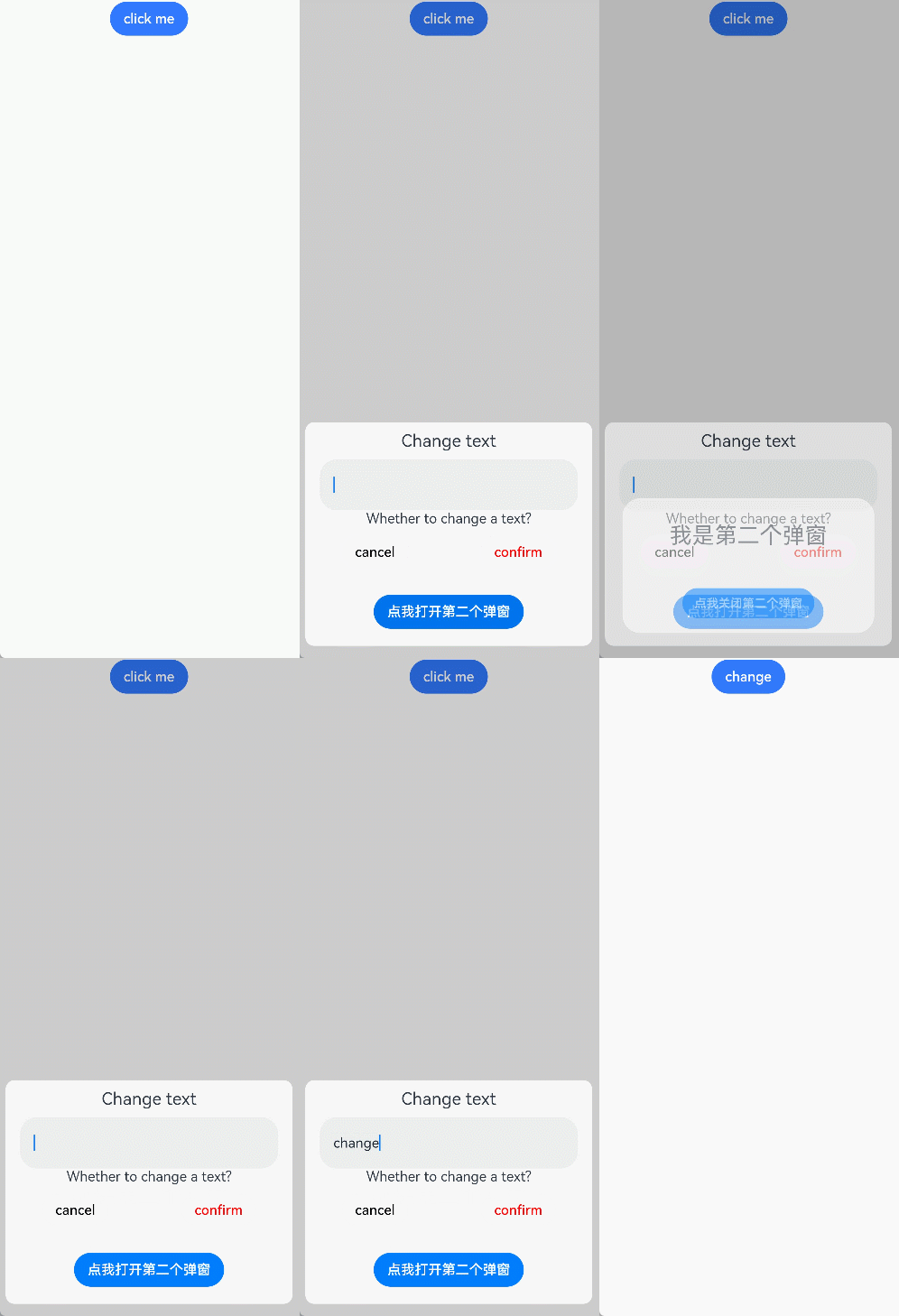
### 示例2
```ts
// xxx.ets
@CustomDialog
struct CustomDialogExample {
controller?: CustomDialogController
cancel: () => void = () => {
}
confirm: () => void = () => {
}
build() {
Column() {
Text('可展示在主窗口外的弹窗')
.fontSize(30)
.height(100)
Button('点我关闭弹窗')
.onClick(() => {
if (this.controller != undefined) {
this.controller.close()
}
})
.margin(20)
}
}
}
@Entry
@Component
struct CustomDialogUser {
dialogController: CustomDialogController | null = new CustomDialogController({
builder: CustomDialogExample({
cancel: ()=> { this.onCancel() },
confirm: ()=> { this.onAccept() }
}),
cancel: this.existApp,
autoCancel: true,
alignment: DialogAlignment.Center,
offset: { dx: 0, dy: -20 },
gridCount: 4,
showInSubWindow: true,
isModal: true,
customStyle: false,
cornerRadius: 10,
})
// 在自定义组件即将析构销毁时将dialogControlle置空
aboutToDisappear() {
this.dialogController = null // 将dialogController置空
}
onCancel() {
console.info('Callback when the first button is clicked')
}
onAccept() {
console.info('Callback when the second button is clicked')
}
existApp() {
console.info('Click the callback in the blank area')
}
build() {
Column() {
Button('click me')
.onClick(() => {
if (this.dialogController != null) {
this.dialogController.open()
}
}).backgroundColor(0x317aff)
}.width('100%').margin({ top: 5 })
}
}
```
