# Swiper
The **Swiper** component is able to display child components in looping mode.
> **NOTE**
>
> - This component is supported since API version 7. Updates will be marked with a superscript to indicate their earliest API version.
>
> - The default value of the universal attribute [clip](ts-universal-attributes-sharp-clipping.md) is **true** for the **Swiper** component.
## Child Components
This component can contain child components.
> **NOTE**
>
> - Supported types of child components: built-in components and custom components, with support for rendering control with [if/else](../../../quick-start/arkts-rendering-control-ifelse.md), [ForEach](../../../quick-start/arkts-rendering-control-foreach.md), [LazyForEach](../../../quick-start/arkts-rendering-control-lazyforeach.md), or [Repeat](../../../quick-start/arkts-new-rendering-control-repeat.md).
>
> - If a child component has its **visibility** attribute set to **None** and the **Swiper** component has its **displayCount** attribute set to **'auto'**, the child component takes up space in the viewport, but is not displayed.
>
> - If a child component has its **visibility** attribute set to **None** or **Hidden**, it takes up space in the viewport, but is not displayed.
>
> - When the number of child components is less than or equal to the total number of allowed nodes in the content area (totalDisplayCount = displayCount + prevMargin? (1 : 0 ) + nextMargin? (1 : 0 )), the **Swiper** component generally uses the non-looping mode for layout. In this case, the child components specified by **nextMargin** and **prevMargin** take up space in the viewport, but are not displayed. The specifications of the **Swiper** component are calculated based on the value of **totalDisplayCount**. The exceptions are as follows:
>
> - When the number of child components is equal to the total number of allowed nodes in the content area and both **prevMargin** and **nextMargin** take effect, set **loop** to **true** to enable loop playback.
>
> - When the number of child components is equal to the value of **displayCount** plus 1 and at least one of **prevMargin** and **nextMargin** takes effect, set **loop** to **true** to enable loop playback. When loop playback is enabled, a snapshot is generated as the placeholder image. (The snapshot may not be correctly generated for those components that take a long time to display, such as those that use asynchronous image loading. Avoid enabling loop playback under this scenario.)
>
> - Child components of the **Swiper** component are drawn based on their level if they have the **offset** attribute set. A child component with a higher level overwrites one with a lower level. For example, if the **Swiper** contains three child components and **offset({ x: 100 })** is set for the third child component, the third child component overwrites the first child component during horizontal loop playback. To prevent the first child component from being overwritten, set its **zIndex** attribute to a value greater than that of the third child component.
>
> - Do not add or delete child components during a page turning animation. Doing so may result in child components not yet animated entering the viewport in advance and causing display exceptions.
## APIs
Swiper(controller?: SwiperController)
**Widget capability**: This API can be used in ArkTS widgets since API version 10.
**Atomic service API**: This API can be used in atomic services since API version 11.
**System capability**: SystemCapability.ArkUI.ArkUI.Full
**Parameters**
| Name | Type | Mandatory | Description |
| ---------- | ------------------------------------- | ---- | -------------------- |
| controller | [SwiperController](#swipercontroller) | No | Controller bound to the component to control the page turning.|
## Attributes
In addition to the [universal attributes](ts-universal-attributes-size.md), the following attributes are supported.
### index
index(value: number)
Sets the index of the child component currently displayed in the container. If the value is less than 0 or greater than or equal to the number of child components, the default value **0** is used.
Since API version 10, this attribute supports two-way binding through [$$](../../../quick-start/arkts-two-way-sync.md).
**Widget capability**: This API can be used in ArkTS widgets since API version 10.
**Atomic service API**: This API can be used in atomic services since API version 11.
**System capability**: SystemCapability.ArkUI.ArkUI.Full
**Parameters**
| Name| Type | Mandatory| Description |
| ------ | ------ | ---- | ------------------------------------------------ |
| value | number | Yes | Index of the child component currently displayed in the container.
Default value: **0**|
### autoPlay
autoPlay(value: boolean)
Sets whether to enable automatic playback for child component switching.
If **loop** is set to **false**, the playback stops when the last page is displayed. The playback continues when the page is not the last page after a swipe gesture.
**Widget capability**: This API can be used in ArkTS widgets since API version 10.
**Atomic service API**: This API can be used in atomic services since API version 11.
**System capability**: SystemCapability.ArkUI.ArkUI.Full
**Parameters**
| Name| Type | Mandatory| Description |
| ------ | ------- | ---- | -------------------------------------- |
| value | boolean | Yes | Whether to enable automatic playback for child component switching.
Default value: **false**|
### interval
interval(value: number)
Sets the interval for automatic playback.
**Widget capability**: This API can be used in ArkTS widgets since API version 10.
**Atomic service API**: This API can be used in atomic services since API version 11.
**System capability**: SystemCapability.ArkUI.ArkUI.Full
**Parameters**
| Name| Type | Mandatory| Description |
| ------ | ------ | ---- | ---------------------------------------------------------- |
| value | number | Yes | Interval for automatic playback.
Default value: **3000**
Unit: ms|
### indicator
indicator(value: DotIndicator | DigitIndicator | boolean)
Sets the style of the navigation point indicator.
**Widget capability**: This API can be used in ArkTS widgets since API version 10.
**Atomic service API**: This API can be used in atomic services since API version 11.
**System capability**: SystemCapability.ArkUI.ArkUI.Full
**Parameters**
| Name| Type | Mandatory| Description |
| ------ | ------------------------------------------------------------ | ---- | ------------------------------------------------------------ |
| value | [DotIndicator](#dotindicator10)10+ \| [DigitIndicator](#digitindicator10)10+ \| boolean | Yes | Style of the navigation point indicator.
\- **DotIndicator**: dot style.
\- **DigitIndicator**: digit style.
\- **boolean**: whether to enable the navigation point indicator. The value **true** means to enable the feature, and **false** means the opposite.
Default value: **true**
Default style: **DotIndicator**|
### loop
loop(value: boolean)
Sets whether to enable loop playback. The value **true** means to enable loop playback. When LazyForEach is used, it is recommended that the number of the components to load exceed 5.
**Widget capability**: This API can be used in ArkTS widgets since API version 10.
**Atomic service API**: This API can be used in atomic services since API version 11.
**System capability**: SystemCapability.ArkUI.ArkUI.Full
**Parameters**
| Name| Type | Mandatory| Description |
| ------ | ------- | ---- | ------------------------------- |
| value | boolean | Yes | Whether to enable loop playback.
Default value: **true**|
### duration
duration(value: number)
Sets the duration of the animation for child component switching.
**duration** must be used in conjunction with [curve](#curve8).
The default curve for the animation is [interpolatingSpring](../js-apis-curve.md#curvesinterpolatingspring10).When this curve is applied, the duration of the animation is determined solely by the parameters of the curve itself and is no longer governed by the **duration** setting. For curves that are not governed by the **duration** setting, see [Interpolation Calculation](../js-apis-curve.md).
Such curves include [springMotion](../js-apis-curve.md#curvesspringmotion9), [responsiveSpringMotion](../js-apis-curve.md#curvesresponsivespringmotion9), and **interpolatingSpring**. To have the animation duration managed by **duration**, you should select a different curve for the **curve** attribute.
**Atomic service API**: This API can be used in atomic services since API version 11.
**System capability**: SystemCapability.ArkUI.ArkUI.Full
**Parameters**
| Name| Type | Mandatory| Description |
| ------ | ------ | ---- | ----------------------------------------------------- |
| value | number | Yes | Duration of the autoplay for child component switching.
Default value: **400**
Unit: ms|
### vertical
vertical(value: boolean)
Sets whether vertical swiping is used.
**Widget capability**: This API can be used in ArkTS widgets since API version 10.
**Atomic service API**: This API can be used in atomic services since API version 11.
**System capability**: SystemCapability.ArkUI.ArkUI.Full
**Parameters**
| Name| Type | Mandatory| Description |
| ------ | ------- | ---- | ---------------------------------- |
| value | boolean | Yes | Whether vertical swiping is used. The value **true** means vertical swiping, and **false** means horizontal swiping.
Default value: **false**|
### itemSpace
itemSpace(value: number | string)
Sets the space between child components. This attribute cannot be set in percentage.
If the type is number, the default unit is vp. If the type is string, the pixel unit must be explicitly specified, for example, **'10px'**; if the unit is not specified, for example, **'10'**, the default unit vp is used.
**Widget capability**: This API can be used in ArkTS widgets since API version 10.
**Atomic service API**: This API can be used in atomic services since API version 11.
**System capability**: SystemCapability.ArkUI.ArkUI.Full
**Parameters**
| Name| Type | Mandatory| Description |
| ------ | -------------------------- | ---- | -------------------------------------- |
| value | number \| string | Yes | Space between child components.
Default value: **0**|
### displayMode
displayMode(value: SwiperDisplayMode)
Sets the mode in which elements are displayed along the main axis. This API takes effect only when **displayCount** is not set.
**Widget capability**: This API can be used in ArkTS widgets since API version 10.
**Atomic service API**: This API can be used in atomic services since API version 11.
**System capability**: SystemCapability.ArkUI.ArkUI.Full
**Parameters**
| Name| Type | Mandatory| Description |
| ------ | ----------------------------------------------- | ---- | ------------------------------------------------------------ |
| value | [SwiperDisplayMode](#swiperdisplaymode) | Yes | Mode in which elements are displayed along the main axis.
Default value: **SwiperDisplayMode.STRETCH**|
### cachedCount8+
cachedCount(value: number)
Sets the number of child components to be preloaded (cached), which are needed for the specific number of pages immediately before and after the current page. For example, if **cachedCount** is set to **1**, the child components on the previous page and the next page are cached. If **swipeByGroup** in **displayCount** is set to **true**, child components are cached by group. For example, if **cachedCount** is set to **1** and **swipeByGroup** is set to **true**, the child components in the previous and next groups are cached.
**Widget capability**: This API can be used in ArkTS widgets since API version 10.
**Atomic service API**: This API can be used in atomic services since API version 11.
**System capability**: SystemCapability.ArkUI.ArkUI.Full
**Parameters**
| Name| Type | Mandatory| Description |
| ------ | ------ | ---- | -------------------------------- |
| value | number | Yes | Number of child components to be preloaded (cached).
Default value: **1**|
### disableSwipe8+
disableSwipe(value: boolean)
Sets whether to disable the swipe feature.
**Widget capability**: This API can be used in ArkTS widgets since API version 10.
**Atomic service API**: This API can be used in atomic services since API version 11.
**System capability**: SystemCapability.ArkUI.ArkUI.Full
**Parameters**
| Name| Type | Mandatory| Description |
| ------ | ------- | ---- | ---------------------------------------- |
| value | boolean | Yes | Whether to disable the swipe feature. The value **true** means to disable the feature, and **false** means the opposite.
Default value: **false**|
### curve8+
curve(value: Curve | string | ICurve)
Sets the animation curve. The interpolating spring curve is used by default. For details about common curves, see [Curve](ts-appendix-enums.md#curve). You can also create custom curves (interpolation curve objects) by using the API provided by the [interpolation calculation](../js-apis-curve.md) module.
**Widget capability**: This API can be used in ArkTS widgets since API version 10.
**Atomic service API**: This API can be used in atomic services since API version 11.
**System capability**: SystemCapability.ArkUI.ArkUI.Full
**Parameters**
| Name| Type | Mandatory| Description |
| ------ | ------------------------------------------------------------ | ---- | ------------------------------------------- |
| value | [Curve](ts-appendix-enums.md#curve) \| string \| [ICurve](../js-apis-curve.md#icurve9)10+ | Yes | Animation curve.
Default value: **interpolatingSpring(-1, 1, 328, 34)**|
### indicatorStyle(deprecated)
indicatorStyle(value?: IndicatorStyle)
Sets the style of the navigation point indicator.
This API is supported since API version 8 and is deprecated since API version 10. You are advised to use [indicator](#indicator10) instead.
**System capability**: SystemCapability.ArkUI.ArkUI.Full
**Parameters**
| Name| Type | Mandatory| Description |
| ------ | --------------------------------------------------- | ---- | ------------ |
| value | [IndicatorStyle](#indicatorstyledeprecated) | No | Style of the navigation point indicator.|
### displayCount8+
displayCount(value: number | string | SwiperAutoFill, swipeByGroup?: boolean)
Sets the number of elements to display per page.
For the string type, this attribute can only be set to **'auto'**.
If the value is set to a number less than or equal to 0, the default value **1** is used.
If the value is of the number type, child components stretch (shrink) on the main axis after the swiper width [deducting the result of itemSpace x (displayCount - 1)] is evenly distributed among them on the main axis.
If the value is of the SwiperAutoFill type, the system automatically works out the value based on the width and **minSize** settings of the **Swiper** component. If **minSize** is left empty or set to a value less than or equal to 0, the **Swiper** component displays one column.
With page turning by group, placeholders are used if the number of child elements in the last group is less than the value of **displayCount**. Such placeholders are used to reserve space in the layout and does not display any content. The background style of the **Swiper** is applied to where the placeholders are displayed.
With page turning by group, the drag distance threshold for page turning is half of the width of the **Swiper** component. (With page turning by child element, the threshold is half of the width of the child element.)
**Widget capability**: This API can be used in ArkTS widgets since API version 10.
**Atomic service API**: This API can be used in atomic services since API version 11.
**System capability**: SystemCapability.ArkUI.ArkUI.Full
**Parameters**
| Name | Type | Mandatory| Description |
| -------------------------- | ------------------------------------------------------------ | ---- | ------------------------------------------------------------ |
| value | number \| string \| [SwiperAutoFill](#swiperautofill10)10+ | Yes | Number of elements to display per page.
Default value: **1** |
| swipeByGroup11+ | boolean | No | Whether to turn pages by group. The value **true** means to turn pages by group, and **false** means to turn pages by child element. With page turning by group, the number of child elements per group is the value of **displayCount**.
Default value: **false**|
### effectMode8+
effectMode(value: EdgeEffect)
Sets the effect used when the component is at one of the edges. This attribute takes effect when **loop** is set to **false**. For details about the supported effects, see the **EdgeEffect** enums. The spring effect does not take effect when the controller API is called.
**Widget capability**: This API can be used in ArkTS widgets since API version 10.
**Atomic service API**: This API can be used in atomic services since API version 11.
**System capability**: SystemCapability.ArkUI.ArkUI.Full
**Parameters**
| Name| Type | Mandatory| Description |
| ------ | --------------------------------------------- | ---- | -------------------------------------------- |
| value | [EdgeEffect](ts-appendix-enums.md#edgeeffect) | Yes | Effect used when the component is at one of the edges.
Default value: **EdgeEffect.Spring**|
### displayArrow10+
displayArrow(value: ArrowStyle | boolean, isHoverShow?: boolean)
Sets the arrow style of the navigation point indicator.
**Atomic service API**: This API can be used in atomic services since API version 11.
**System capability**: SystemCapability.ArkUI.ArkUI.Full
**Parameters**
| Name | Type | Mandatory| Description |
| -------------------------- | ------------------------------------------------ | ---- | ------------------------------------------------------------ |
| value | [ArrowStyle](#arrowstyle10) \| boolean | Yes | Arrow and background to set. In cases of exceptions, the default values in the **ArrowStyle** object are used. The value **true** means to show the arrow and background in the default styles, and **false** means to hide the arrow and background.
Default value: **false**|
| isHoverShow | boolean | No | Whether to show the arrow only when the mouse pointer hovers over the navigation point indicator.
Default value: **false**
**NOTE**
When **isHoverShow** is set to **false**, the arrow is always displayed and can be clicked to turn pages.
When **isHoverShow** is set to **true**, the arrow is displayed only when the mouse pointer hovers over the navigation point indicator, and it can be clicked to turn pages.|
### nextMargin10+
nextMargin(value: Length, ignoreBlank?:boolean)
Sets the next margin, used to reveal a small part of the next item. This attribute is effective only when the layout mode of the child components in **Swiper** is set to stretch, which mainly includes two scenarios: 1. **displayMode** is set to **SwiperDisplayMode.STRETCH**; 2. **displayCount** is assigned a numeric value.
When the main axis runs horizontally and either the next margin or previous margin is greater than the measured width of the child component, neither the next margin nor previous margin is displayed.
When the main axis runs vertically and either the next margin or previous margin is greater than the measured height of the child component, neither the next margin nor previous margin is displayed.
**Atomic service API**: This API can be used in atomic services since API version 11.
**System capability**: SystemCapability.ArkUI.ArkUI.Full
**Parameters**
| Name| Type | Mandatory| Description |
| ------ | ---------------------------- | ---- | ---------------------- |
| value | [Length](ts-types.md#length) | Yes | Next margin.
Default value: **0**|
| ignoreBlank12+ | boolean | No | Whether to hide (ignore) the next margin on the last page in non-loop scenarios.
**true**: The last page does not show the next margin, and the right edge of the last page is aligned with that of the **Swiper**'s viewable area.
**false**: The last page displays the next margin, and the distance between the right edge of the last page and that of the **Swiper**'s viewable area is equal to the next margin.
Default value: **false**
**NOTE**
On the last page, the values of **prevMargin** and **nextMargin** are added to create a left margin that allows the previous page to be displayed partially.|
### prevMargin10+
prevMargin(value: Length, ignoreBlank?:boolean)
Sets the previous margin, used to reveal a small part of the previous item. This attribute is effective only when the layout mode of the child components in **Swiper** is set to stretch, which mainly includes two scenarios: 1. **displayMode** is set to **SwiperDisplayMode.STRETCH**; 2. **displayCount** is assigned a numeric value.
When the main axis runs horizontally and either the next margin or previous margin is greater than the measured width of the child component, neither the next margin nor previous margin is displayed.
When the main axis runs vertically and either the next margin or previous margin is greater than the measured height of the child component, neither the next margin nor previous margin is displayed.
**Atomic service API**: This API can be used in atomic services since API version 11.
**System capability**: SystemCapability.ArkUI.ArkUI.Full
**Parameters**
| Name| Type | Mandatory| Description |
| ------ | ---------------------------- | ---- | ---------------------- |
| value | [Length](ts-types.md#length) | Yes | Previous margin.
Default value: **0**|
| ignoreBlank12+ | boolean | No | Whether to hide (ignore) the previous margin on the first page in non-loop scenarios.
**true**: The first page does not show the previous margin, and the left edge of the first page is align with that of the **Swiper**'s viewable area.
**false**: The first page displays the previous margin, and the distance between the left edge of the first page and that of the **Swiper**'s viewable area is equal to the previous margin.
Default value: **false**
**NOTE**
On the first page, the values of **prevMargin** and **nextMargin** are added to create a right margin that allows the next page to be displayed partially.|
### nestedScroll11+
nestedScroll(value: SwiperNestedScrollMode)
Sets the nested scrolling mode of the **Swiper** component and its parent container. When **loop** is set to **true**, the **Swiper** component has no edge effect and does not trigger nested scrolling of its parent container.
**Atomic service API**: This API can be used in atomic services since API version 11.
**System capability**: SystemCapability.ArkUI.ArkUI.Full
**Parameters**
| Name| Type | Mandatory| Description |
| ------ | ----------------------------------------------------------- | ---- | ------------------------------------------------------------ |
| value | [SwiperNestedScrollMode](#swipernestedscrollmode11) | Yes | Nested scrolling mode of the **Swiper** component and its parent container.
Default value: **SwiperNestedScrollMode.SELF_ONLY**|
> **NOTE**
>
> The **Swiper** component's flick animation logic differs from other scrollable components, as **Swiper** can only slide one page at a time and performs a page-flip animation during a flick. When a **Swiper** component is nested with other scrollable components, it will not accept the scroll offset values transmitted by its child nodes after its page-turning animation has already started. At this point, the page-turning animation of the **Swiper** and the edge effect animation of the child node will be executed simultaneously.
### indicatorInteractive12+
indicatorInteractive(value: boolean)
Sets whether the navigation point indicator is interactive. The value **true** means that the navigation point indicator is interactive.
**Atomic service API**: This API can be used in atomic services since API version 12.
**System capability**: SystemCapability.ArkUI.ArkUI.Full
**Parameters**
| Name| Type | Mandatory| Description |
| ------ | ----------------------------------------------------------- | ---- | ------------------------------------------------------------ |
| value | boolean | Yes | Whether the navigation point indicator is interactive.
Default value: **true**|
## IndicatorStyle(deprecated)
This API is supported since API version 8 and is deprecated since API version 10. You are advised to use [indicator](#indicator10) instead.
**System capability**: SystemCapability.ArkUI.ArkUI.Full
| Name | Type | Mandatory| Description |
| ------------- | ------------------------------------------ | ---- | ---------------------------------------------------- |
| left | [Length](ts-types.md#length) | No | Distance between the navigation point indicator and the left edge of the **Swiper** component. |
| top | [Length](ts-types.md#length) | No | Distance between the navigation point indicator and the top edge of the **Swiper** component. |
| right | [Length](ts-types.md#length) | No | Distance between the navigation point indicator and the right edge of the **Swiper** component. |
| bottom | [Length](ts-types.md#length) | No | Distance between the navigation point indicator and the bottom edge of the **Swiper** component. |
| size | [Length](ts-types.md#length) | No | Diameter of the navigation point indicator. It cannot be set in percentage.
Default value: **6vp**|
| mask | boolean | No | Whether to enable the mask for the navigation point indicator. |
| color | [ResourceColor](ts-types.md#resourcecolor) | No | Color of the navigation point indicator. |
| selectedColor | [ResourceColor](ts-types.md#resourcecolor) | No | Color of the selected navigation point indicator. |
## SwiperDisplayMode
Enumerates the modes in which elements are displayed along the main axis.
**System capability**: SystemCapability.ArkUI.ArkUI.Full
| Name | Description |
| --------------------------------- | ------------------------------------------------------------ |
| Stretch(deprecated) | The slide width of the **Swiper** component is equal to the width of the component.
This API is deprecated since API version 10. You are advised to use **STRETCH** instead.
**Widget capability**: This API can be used in ArkTS widgets since API version 7.|
| AutoLinear(deprecated) | The slide width of the **Swiper** component is equal to that of the child component with the maximum width.
This API is deprecated since API version 10. You are advised to use [Scroller.scrollTo](ts-container-scroll.md#scrollto) instead.
**Widget capability**: This API can be used in ArkTS widgets since API version 7.|
| STRETCH10+ | The slide width of the **Swiper** component is equal to the width of the component.
**Widget capability**: This API can be used in ArkTS widgets since API version 10.
**Atomic service API**: This API can be used in atomic services since API version 11.|
| AUTO_LINEAR(deprecated) | The slide width of the **Swiper** component is equal to the width of the leftmost child component in the viewport.
This API is supported since API version 10 and is deprecated since API version 12. You are advised to use [Scroller.scrollTo](ts-container-scroll.md#scrollto) instead.
**Widget capability**: This API can be used in ArkTS widgets since API version 10.
**Atomic service API**: This API can be used in atomic services since API version 11.|
## SwiperNestedScrollMode11+
Enumerates the nested scrolling modes of the **Swiper** component and its parent container.
**Atomic service API**: This API can be used in atomic services since API version 11.
**System capability**: SystemCapability.ArkUI.ArkUI.Full
| Name | Value| Description |
| ------------ | -- | ---------------------------------------- |
| SELF_ONLY | 0 | The scrolling is contained within the **Swiper** component, and no scroll chaining occurs, that is, the parent container does not scroll when the component scrolling reaches the boundary.|
| SELF_FIRST | 1 | The **Swiper** component scrolls first, and when it hits the boundary, the parent container scrolls. When the parent container hits the boundary, its edge effect is displayed. If no edge effect is specified for the parent container, the edge effect of the **Swiper** component is displayed instead.|
## SwiperController
Controller of the **Swiper** component. You can bind this object to the **Swiper** component and use it to control page switching.
**Widget capability**: This API can be used in ArkTS widgets since API version 10.
**Atomic service API**: This API can be used in atomic services since API version 11.
**System capability**: SystemCapability.ArkUI.ArkUI.Full
### Objects to Import
```ts
let controller: SwiperController = new SwiperController()
```
### constructor
constructor()
A constructor used to create a **SwiperController** object.
**Widget capability**: This API can be used in ArkTS widgets since API version 10.
**Atomic service API**: This API can be used in atomic services since API version 11.
**System capability**: SystemCapability.ArkUI.ArkUI.Full
### showNext
showNext()
Turns to the next page. Page turning occurs with the animation, whose duration is specified by **duration**.
**Widget capability**: This API can be used in ArkTS widgets since API version 10.
**Atomic service API**: This API can be used in atomic services since API version 11.
**System capability**: SystemCapability.ArkUI.ArkUI.Full
### showPrevious
showPrevious()
Turns to the previous page. Page turning occurs with the animation, whose duration is specified by **duration**.
**Widget capability**: This API can be used in ArkTS widgets since API version 10.
**Atomic service API**: This API can be used in atomic services since API version 11.
**System capability**: SystemCapability.ArkUI.ArkUI.Full
### changeIndex12+
changeIndex(index: number, useAnimation?: boolean)
Goes to a specified page.
**Widget capability**: This API can be used in ArkTS widgets since API version 12.
**Atomic service API**: This API can be used in atomic services since API version 12.
**System capability**: SystemCapability.ArkUI.ArkUI.Full
**Parameters**
| Name | Type | Mandatory | Description |
| -------- | ---------- | ---- | -------- |
| index| number | Yes | Index of the target page in the **Swiper** component.|
| useAnimation| boolean | No | Whether to use an animation for when the target page is reached. The value **true** means to use an animation, and **false** means the opposite.
Default value: **false**|
### finishAnimation
finishAnimation(callback?: () => void)
Stops an animation.
**Widget capability**: This API can be used in ArkTS widgets since API version 10.
**Atomic service API**: This API can be used in atomic services since API version 11.
**System capability**: SystemCapability.ArkUI.ArkUI.Full
**Parameters**
| Name | Type | Mandatory | Description |
| -------- | ---------- | ---- | -------- |
| callback | () => void | No | Callback invoked when the animation stops.|
## Indicator10+
Sets the distance between the navigation point indicator and the **Swiper** component.
**Widget capability**: This API can be used in ArkTS widgets since API version 10.
**Atomic service API**: This API can be used in atomic services since API version 11.
**System capability**: SystemCapability.ArkUI.ArkUI.Full
### Attributes
| Name | Type | Mandatory | Description |
| ------ | ---------------------------- | ---- | ---------------------------------------- |
| left | [Length](ts-types.md#length) | Yes | Distance between the navigation point indicator and the left edge of the **Swiper** component.
Default value: **0**
Unit: vp|
| top | [Length](ts-types.md#length) | Yes | Distance between the navigation point indicator and the top edge of the **Swiper** component.
Default value: **0**
Unit: vp|
| right | [Length](ts-types.md#length) | Yes | Distance between the navigation point indicator and the right edge of the **Swiper** component.
Default value: **0**
Unit: vp|
| bottom | [Length](ts-types.md#length) | Yes | Distance between the navigation point indicator and the bottom edge of the **Swiper** component.
Default value: **0**
Unit: vp|
| start12+ | [LengthMetrics](../js-apis-arkui-graphics.md#lengthmetrics12) | Yes | Right-to-left scripts: Distance between the navigation point indicator and the right edge of the **Swiper** component.
Left-to-right scripts: Distance between the navigation point indicator and the left edge of the **Swiper** component.
Default value: **0**
Unit: vp
**Widget capability**: This API can be used in ArkTS widgets since API version 10.
**Atomic service API**: This API can be used in atomic services since API version 12.|
| end12+ | [LengthMetrics](../js-apis-arkui-graphics.md#lengthmetrics12) | Yes | Right-to-left scripts: Distance between the navigation point indicator and the left edge of the **Swiper** component.
Left-to-right scripts: Distance between the navigation point indicator and the right edge of the **Swiper** component.
Default value: **0**
Unit: vp
**Widget capability**: This API can be used in ArkTS widgets since API version 10.
**Atomic service API**: This API can be used in atomic services since API version 12.|
### dot
static dot(): DotIndicator
**DotIndicator** object returned.
**Widget capability**: This API can be used in ArkTS widgets since API version 10.
**Atomic service API**: This API can be used in atomic services since API version 11.
**System capability**: SystemCapability.ArkUI.ArkUI.Full
### digit
static digit(): DigitIndicator
**DigitIndicator** object returned.
**Widget capability**: This API can be used in ArkTS widgets since API version 10.
**Atomic service API**: This API can be used in atomic services since API version 11.
**System capability**: SystemCapability.ArkUI.ArkUI.Full
## DotIndicator10+
Defines the navigation point indicator of the dot style. It inherits from [Indicator](#indicator10).
**Atomic service API**: This API can be used in atomic services since API version 11.
**System capability**: SystemCapability.ArkUI.ArkUI.Full
| Name | Type | Mandatory| Description |
| ----------------------------- | ------------------------------------------ | ------ | ------------------------------------------------------------ |
| itemWidth | [Length](ts-types.md#length) | Yes | Width of the navigation point indicator of the dot style. This parameter cannot be set in percentage.
Default value: **6**
Unit: vp
**Widget capability**: This API can be used in ArkTS widgets since API version 10.|
| itemHeight | [Length](ts-types.md#length) | Yes | Height of the navigation point indicator of the dot style. This parameter cannot be set in percentage.
Default value: **6**
Unit: vp
**Widget capability**: This API can be used in ArkTS widgets since API version 10.|
| selectedItemWidth | [Length](ts-types.md#length) | Yes | Width of the selected navigation point indicator of the dot style. This parameter cannot be set in percentage.
Default value: **12**
Unit: vp
**Widget capability**: This API can be used in ArkTS widgets since API version 10.|
| selectedItemHeight | [Length](ts-types.md#length) | Yes | Height of the selected navigation point indicator of the dot style. This parameter cannot be set in percentage.
Default value: **6**
Unit: vp
**Widget capability**: This API can be used in ArkTS widgets since API version 10.|
| mask | boolean | Yes | Whether to enable the mask for the navigation point indicator of the dot style.
Default value: **false**
**Widget capability**: This API can be used in ArkTS widgets since API version 10.|
| color | [ResourceColor](ts-types.md#resourcecolor) | Yes | Color of the navigation point indicator of the dot style.
Default value: **'\#182431'** (10% opacity)
**Widget capability**: This API can be used in ArkTS widgets since API version 10.|
| selectedColor | [ResourceColor](ts-types.md#resourcecolor) | Yes | Color of the selected navigation point indicator of the dot style.
Default value: **'\#007DFF'**
**Widget capability**: This API can be used in ArkTS widgets since API version 10.|
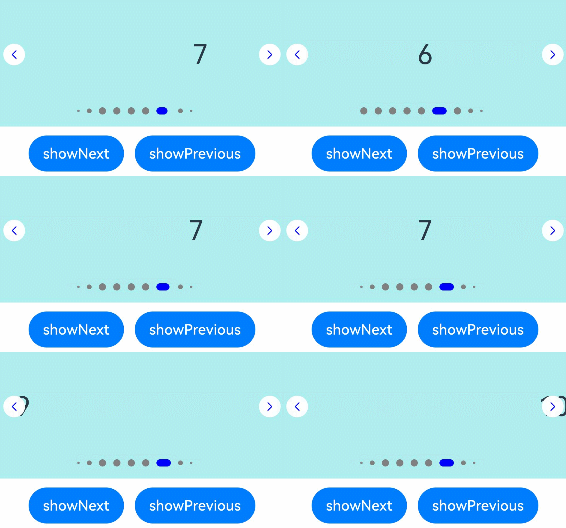
| maxDisplayCount12+ | number | Yes | Maximum number of navigation dots in the navigation point indicator of the dot style. When the actual number of navigation dots exceeds the maximum, the overflow effect will be activated, as shown in Example 5.
Default value: This attribute has no default value; if an invalid value is set, it is equivalent to having no overflow effect.
Value range: 6–9
**NOTE**
1. In the overflow display scenario, interactive features are currently not supported, including gestures and mouse operations.
2. In the overflow display scenario, the position of the selected navigation dot corresponding to the middle page is not completely fixed; it depends on the sequence of previous page-turning operations.
**Atomic service API**: This API can be used in atomic services since API version 12.|
### constructor
constructor()
A constructor used to create a **DotIndicator** object.
**Widget capability**: This API can be used in ArkTS widgets since API version 10.
**Atomic service API**: This API can be used in atomic services since API version 11.
**System capability**: SystemCapability.ArkUI.ArkUI.Full
>**NOTE**
>
>When pressed, the navigation point indicator is zoomed in to 1.33 times. To account for this, there is a certain distance between the navigation point indicator's visible boundary and its actual boundary in the non-pressed state. The distance increases with the value of **itemWidth**, **itemHeight**, **selectedItemWidth**, and **selectedItemHeight**.
## DigitIndicator10+
Defines the navigation point indicator of the digit style. It inherits from [Indicator](#indicator10).
**Widget capability**: This API can be used in ArkTS widgets since API version 10.
**Atomic service API**: This API can be used in atomic services since API version 11.
**System capability**: SystemCapability.ArkUI.ArkUI.Full
| Name | Type | Mandatory | Description |
| ----------------- | ---------------------------------------- | ---- | ---------------------------------------- |
| fontColor | [ResourceColor](ts-types.md#resourcecolor) | Yes | Font color of the navigation point indicator of the digit style.
Default value: **'\#ff182431'**|
| selectedFontColor | [ResourceColor](ts-types.md#resourcecolor) | Yes | Font color of the selected navigation point indicator of the digit style.
Default value: **'\#ff182431'**|
| digitFont | {
size?:[Length](ts-types.md#length)
weight?:number \| [FontWeight](ts-appendix-enums.md#fontweight) \| string
} | Yes | Font style of the navigation point indicator of the digit style.
\- **size**:font size. It cannot be set in percentage.
Default value: **14vp**
\- **weight**: font weight.
Default value: **FontWeight.Normal**|
| selectedDigitFont | {
size?:[Length](ts-types.md#length)
weight?:number \| [FontWeight](ts-appendix-enums.md#fontweight) \| string
} | Yes | Font style of the selected navigation point indicator of the digit style.
\- **size**:font size. It cannot be set in percentage.
Default value: **14vp**
\- **weight**: font weight.
Default value: **FontWeight.Normal**|
### constructor
constructor()
A constructor used to create a **DigitIndicator** object.
**Widget capability**: This API can be used in ArkTS widgets since API version 10.
**Atomic service API**: This API can be used in atomic services since API version 11.
**System capability**: SystemCapability.ArkUI.ArkUI.Full
## ArrowStyle10+
Describes the left and right arrow attributes.
**Atomic service API**: This API can be used in atomic services since API version 11.
**System capability**: SystemCapability.ArkUI.ArkUI.Full
| Name | Type | Mandatory. | Description |
| ---------------- | ---------------------------------------- | ---- | ---------------------------------------- |
| showBackground | boolean | No | Whether to show the background for the arrow.
Default value: **false** |
| isSidebarMiddle | boolean | No | Whether the arrow is shown on either side of the navigation point indicator.
Default value: **false**
(the arrow is shown on either side of the navigation point indicator)|
| backgroundSize | [Length](ts-types.md#length) | No | Size of the background.
On both sides of the navigation point indicator:
Default value: **24vp**
On both sides of the component:
Default value: **32vp**
This parameter cannot be set in percentage.|
| backgroundColor | [ResourceColor](ts-types.md#resourcecolor) | No | Color of the background.
On both sides of the navigation point indicator:
Default value: **'\#00000000'**
On both sides of the component:
Default value: **'\#19182431'**|
| arrowSize | [Length](ts-types.md#length) | No | Size of the arrow.
On both sides of the navigation point indicator:
Default value: **18vp**
On both sides of the component:
Default value: **24vp**
**NOTE**
If **showBackground** is set to **true**, the value of **arrowSize** is 3/4 of the value of **backgroundSize**.
This parameter cannot be set in percentage.|
| arrowColor | [ResourceColor](ts-types.md#resourcecolor) | No | Color of the arrow.
Default value: **'\#182431'** |
## SwiperAutoFill10+
Describes the auto-fill attribute.
**Widget capability**: This API can be used in ArkTS widgets since API version 10.
**Atomic service API**: This API can be used in atomic services since API version 11.
**System capability**: SystemCapability.ArkUI.ArkUI.Full
| Name | Type | Mandatory| Description |
| ------- | -------------------- | ------ | ------------------------------------ |
| minSize | [VP](ts-types.md#vp10) | Yes | Minimum width of the element.
Default value: **0**|
## Events
In addition to the [universal events](ts-universal-events-click.md), the following events are supported.
### onChange
onChange(event: (index: number) => void)
Triggered when the index of the currently displayed child component changes. The return value is the index of the currently displayed child component.
When the **Swiper** component is used together with **LazyForEach**, the subpage UI update cannot be triggered in the **onChange** event.
**Widget capability**: This API can be used in ArkTS widgets since API version 10.
**Atomic service API**: This API can be used in atomic services since API version 11.
**System capability**: SystemCapability.ArkUI.ArkUI.Full
**Parameters**
| Name| Type | Mandatory| Description |
| ------ | ------ | ---- | -------------------- |
| index | number | Yes | Index of the currently displayed element.|
### onAnimationStart9+
onAnimationStart(event: (index: number, targetIndex: number, extraInfo: SwiperAnimationEvent) => void)
Triggered when the switching animation starts. The **index** parameter indicates the index before the animation starts (not the one after). When the **Swiper** component contains multiple columns, the index is of the leftmost element.
**Widget capability**: This API can be used in ArkTS widgets since API version 10.
**Atomic service API**: This API can be used in atomic services since API version 11.
**System capability**: SystemCapability.ArkUI.ArkUI.Full
**Parameters**
| Name | Type | Mandatory| Description |
| ------------------------- | ---------------------------------------------------------- | ---- | ------------------------------------------------------------ |
| index | number | Yes | Index of the currently displayed element. |
| targetIndex10+ | number | Yes | Index of the target element to switch to. |
| extraInfo10+ | [SwiperAnimationEvent](#swiperanimationevent10) | Yes | Extra information of the animation, including the offset of the currently displayed element and target element relative to the start position of the **Swiper** along the main axis, and the hands-off velocity.|
### onAnimationEnd9+
onAnimationEnd(event: (index: number, extraInfo: SwiperAnimationEvent) => void)
Triggered when the switching animation ends.
This event is triggered when the switching animation of the **Swiper** component ends, whether it is caused by gesture interruption or by calling **finishAnimation** through SwiperController. The **index** parameter indicates the index after the animation ends. When the **Swiper** component contains multiple columns, the index is of the leftmost element.
**Widget capability**: This API can be used in ArkTS widgets since API version 10.
**Atomic service API**: This API can be used in atomic services since API version 11.
**System capability**: SystemCapability.ArkUI.ArkUI.Full
**Parameters**
| Name | Type | Mandatory| Description |
| ----------------------- | ---------------------------------------------------------- | ---- | ------------------------------------------------------------ |
| index | number | Yes | Index of the currently displayed element. |
| extraInfo10+ | [SwiperAnimationEvent](#swiperanimationevent10) | Yes | Extra information of the animation, which is the offset of the currently displayed element relative to the start position of the **Swiper** along the main axis.|
### onGestureSwipe10+
onGestureSwipe(event: (index: number, extraInfo: SwiperAnimationEvent) => void)
Triggered on a frame-by-frame basis when the page is turned by a swipe. If there are multiple columns, **index** indicates the index of the leftmost component.
**Atomic service API**: This API can be used in atomic services since API version 11.
**System capability**: SystemCapability.ArkUI.ArkUI.Full
**Parameters**
| Name | Type | Mandatory| Description |
| --------- | ---------------------------------------------------------- | ---- | ------------------------------------------------------------ |
| index | number | Yes | Index of the currently displayed element. |
| extraInfo | [SwiperAnimationEvent](#swiperanimationevent10) | Yes | Extra information of the animation, which is the offset of the currently displayed element relative to the start position of the **Swiper** along the main axis.|
### customContentTransition12+
customContentTransition(transition: SwiperContentAnimatedTransition)
Defines a custom switching animation. You can define custom animation attributes, such as **opacity**, **scale**, and **translate**, in the callback invoked on a frame-by-frame basis during the swiping-initiated page switching animation.
Instructions:
1. This API does not work when **prevMargin** and **nextMargin** are set in such a way that the **Swiper** frontend and backend display the same page during loop playback.
2. During the swiping-initiated page switching animation, the [SwiperContentTransitionProxy](#swipercontenttransitionproxy12) callback is invoked for all pages in the viewport on a frame-by-frame basis. For example, when there are two pages whose subscripts are 0 and 1 in the viewport, two callbacks whose indexes are 0 and 1 are invoked in each frame.
3. When the **swipeByGroup** parameter of the **displayCount** attribute is set to **true**, the callback is invoked for all pages in a group if any page in the group is within the viewport; and all pages in a group are removed from the render tree if none of them are within the viewport.
4. During the swiping-initiated page switching animation, the default animation (page scrolling) is still effective. If you do not want the page to scroll, you can set the **translate** attribute on the main axis to offset the page scrolling. For example, if the value of **displayCount** is **2** and there are two pages whose subscripts are 0 and 1 within the viewport, you can set the **translate** attribute on the main axis to the following on a frame-by-frame basis: **translate** for page 0 = **-position** x **mainAxisLength**; **translate** for page 1 = **-(position - 1)** x **mainAxisLength**
**Atomic service API**: This API can be used in atomic services since API version 12.
**System capability**: SystemCapability.ArkUI.ArkUI.Full
**Parameters**
| Name| Type| Mandatory| Description|
| ------ | ---- | ---- | ---- |
| transition | [SwiperContentAnimatedTransition](#swipercontentanimatedtransition12) | Yes| Information about the custom switching animation.|
### onContentDidScroll12+
onContentDidScroll(handler: ContentDidScrollCallback)
Triggered when content in the **Swiper** component scrolls.
Instructions:
1. This API does not work when **prevMargin** and **nextMargin** are set in such a way that the **Swiper** frontend and backend display the same page during loop playback.
2. During page scrolling, the [ContentDidScrollCallback](#contentdidscrollcallback12) callback is invoked for all pages in the viewport on a frame-by-frame basis. For example, when there are two pages whose subscripts are 0 and 1 in the viewport, two callbacks whose indexes are 0 and 1 are invoked in each frame.
3. When the **swipeByGroup** parameter of the **displayCount** attribute is set to **true**, the callback is invoked for all pages in a group if any page in the group is within the viewport.
**Atomic service API**: This API can be used in atomic services since API version 12.
**System capability**: SystemCapability.ArkUI.ArkUI.Full
**Parameters**
| Name| Type| Mandatory| Description|
| ------ | ---- | ---- | ---- |
| handler | [ContentDidScrollCallback](#contentdidscrollcallback12) | Yes| Callback triggered when content in the **Swiper** component scrolls.|
## SwiperAnimationEvent10+
Describes the animation information of the **Swiper** component.
**Atomic service API**: This API can be used in atomic services since API version 11.
**System capability**: SystemCapability.ArkUI.ArkUI.Full
| Name | Type | Read Only| Optional| Description |
| ------------- | ----------- | ---- | ---- |------------------------------- |
| currentOffset | number | No| No| Offset of the currently displayed element relative to the start position of the **Swiper** along the main axis. Unit: vp
Default value: **0**|
| targetOffset | number | No| No| Offset of the target element relative to the start position of the **Swiper** along the main axis. Unit: vp
Default value: **0**|
| velocity | number | No| No| Hands-off velocity at the beginning of the animation. Unit: VP/S
Default value: **0**|
## SwiperContentAnimatedTransition12+
Information about the custom page switching animation.
**Atomic service API**: This API can be used in atomic services since API version 12.
**System capability**: SystemCapability.ArkUI.ArkUI.Full
| Name| Type| Mandatory| Description|
| ------ | ---- | ---- | ---- |
| timeout | number | No| Timeout for the switching animation. The timeout timer starts when the default animation (page scrolling) reaches the point where the first frame is moved out of the viewport. If you do not call the **finishTransition** API of [SwiperContentTransitionProxy](#swipercontenttransitionproxy12) before the timer expires, the component considers that the custom animation of the page ends and immediately removes the page node from the render tree. The unit is ms. The default value is **0**.|
| transition | Callback<[SwiperContentTransitionProxy](#swipercontenttransitionproxy12)> | Yes| Content of the custom switching animation.|
## SwiperContentTransitionProxy12+
Implements the proxy object returned during the execution of the custom switching animation of the **Swiper** component. You can use this object to obtain the page information in the custom animation viewport. You can also call the **finishTransition** API of this object to notify the **Swiper** component that the custom animation has finished playing.
**Atomic service API**: This API can be used in atomic services since API version 12.
**System capability**: SystemCapability.ArkUI.ArkUI.Full
### Attributes
| Name| Type| Read Only| Optional| Description|
| ---- | ---- | --- | ---- | --- |
| selectedIndex | number | No| No| Index of the currently selected page.|
| index | number | No| No| Index of a page in the viewport.|
| position | number | No| No| Position of the page specified by **index** relative to the start position of the **Swiper** main axis (start position of the page corresponding to **selectedIndex**).|
| mainAxisLength | number | No| No| Length of the page specified by **index** along the main axis.|
>**NOTE**
>
>- For example, when the index of the currently selected child component is 0, during a transition animation from page 0 to page 1, the callback is triggered for all pages within the viewport on every frame. When pages 0 and 1 are both in the viewport, the callback is triggered twice per frame. The first callback has **selectedIndex** as **0**, **index** as **0**, **position** as the ratio of how much page 0 has moved relative to its position before the animation started on the current frame, and **mainAxisLength** as the length of page 0 on the main axis. The second callback has **selectedIndex** as **0**, **index** as **1**, **position** as the ratio of how much page 1 has moved relative to page 0 before the animation started on the current frame, and **mainAxisLength** as the length of page 1 on the main axis.
>
>- If the animation curve is a spring interpolation curve, during the transition animation from page 0 to page 1, due to the position and velocity when the user lifts their finger off the screen, animation may overshoot and slide past to page 2, then bounce back to page 1. Throughout this process, a callback is triggered for pages 1 and 2 within the viewport on every frame.
### finishTransition12+
finishTransition(): void
Notifies the **Swiper** component that the custom animation has finished playing.
**Atomic service API**: This API can be used in atomic services since API version 12.
**System capability**: SystemCapability.ArkUI.ArkUI.Full
## ContentDidScrollCallback12+
type ContentDidScrollCallback = (selectedIndex: number, index: number, position: number, mainAxisLength: number) => void
Triggered during the swipe action of the **Swiper** component. For details about the parameters, see [SwiperContentTransitionProxy](#swipercontenttransitionproxy12).
**Atomic service API**: This API can be used in atomic services since API version 12.
**System capability**: SystemCapability.ArkUI.ArkUI.Full
| Name| Type| Mandatory| Description|
| ------ | ---- | ---- | ---- |
| selectedIndex | number | Yes| Index of the currently selected page.|
| index | number | Yes| Index of a page in the viewport.|
| position | number | Yes| Position of the page specified by **index** relative to the start position of the **Swiper** main axis (start position of the page corresponding to **selectedIndex**).|
| mainAxisLength | number | Yes| Length of the page specified by **index** along the main axis.|
## Example
### Example 1
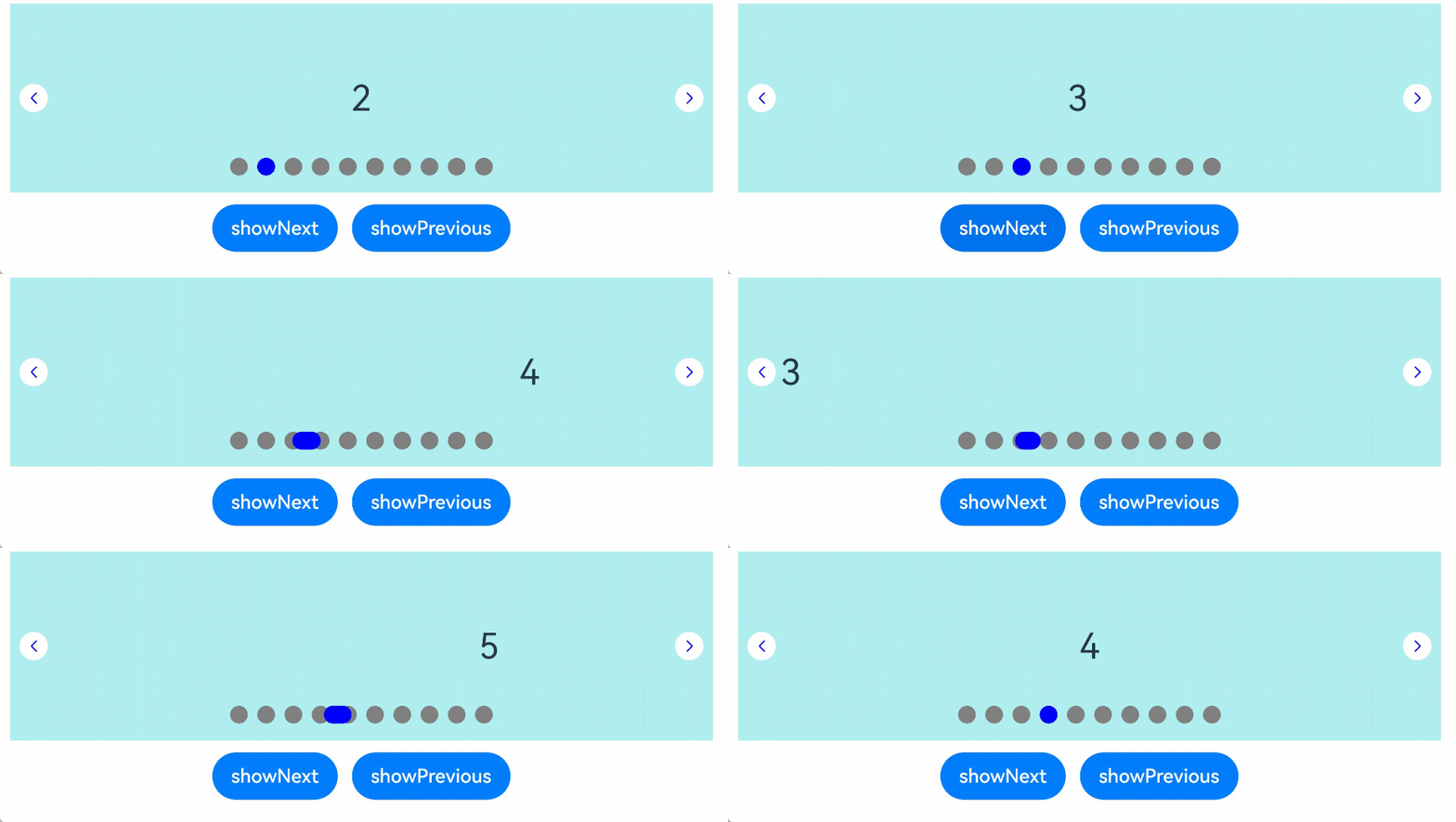
This example shows the usage of **indicatorInteractive**.
```ts
// xxx.ets
class MyDataSource implements IDataSource {
private list: number[] = []
constructor(list: number[]) {
this.list = list
}
totalCount(): number {
return this.list.length
}
getData(index: number): number {
return this.list[index]
}
registerDataChangeListener(listener: DataChangeListener): void {
}
unregisterDataChangeListener() {
}
}
@Entry
@Component
struct SwiperExample {
private swiperController: SwiperController = new SwiperController()
private data: MyDataSource = new MyDataSource([])
aboutToAppear(): void {
let list: number[] = []
for (let i = 1; i <= 10; i++) {
list.push(i);
}
this.data = new MyDataSource(list)
}
build() {
Column({ space: 5 }) {
Swiper(this.swiperController) {
LazyForEach(this.data, (item: string) => {
Text(item.toString())
.width('90%')
.height(160)
.backgroundColor(0xAFEEEE)
.textAlign(TextAlign.Center)
.fontSize(30)
}, (item: string) => item)
}
.cachedCount(2)
.index(1)
.autoPlay(true)
.interval(4000)
.loop(true)
.indicatorInteractive(true)
.duration(1000)
.itemSpace(0)
.indicator( // Set the style of the navigation point indicator.
new DotIndicator()
.itemWidth(15)
.itemHeight(15)
.selectedItemWidth(15)
.selectedItemHeight(15)
.color(Color.Gray)
.selectedColor(Color.Blue))
.displayArrow({ // Set the arrow style of the navigation point indicator.
showBackground: true,
isSidebarMiddle: true,
backgroundSize: 24,
backgroundColor: Color.White,
arrowSize: 18,
arrowColor: Color.Blue
}, false)
.curve(Curve.Linear)
.onChange((index: number) => {
console.info(index.toString())
})
.onGestureSwipe((index: number, extraInfo: SwiperAnimationEvent) => {
console.info("index: " + index)
console.info("current offset: " + extraInfo.currentOffset)
})
.onAnimationStart((index: number, targetIndex: number, extraInfo: SwiperAnimationEvent) => {
console.info("index: " + index)
console.info("targetIndex: " + targetIndex)
console.info("current offset: " + extraInfo.currentOffset)
console.info("target offset: " + extraInfo.targetOffset)
console.info("velocity: " + extraInfo.velocity)
})
.onAnimationEnd((index: number, extraInfo: SwiperAnimationEvent) => {
console.info("index: " + index)
console.info("current offset: " + extraInfo.currentOffset)
})
Row({ space: 12 }) {
Button('showNext')
.onClick(() => {
this.swiperController.showNext()
})
Button('showPrevious')
.onClick(() => {
this.swiperController.showPrevious()
})
}.margin(5)
}.width('100%')
.margin({ top: 5 })
}
}
```
### Example 2
```ts
// xxx.ets
class MyDataSource implements IDataSource {
private list: number[] = []
constructor(list: number[]) {
this.list = list
}
totalCount(): number {
return this.list.length
}
getData(index: number): number {
return this.list[index]
}
registerDataChangeListener(listener: DataChangeListener): void {
}
unregisterDataChangeListener() {
}
}
@Entry
@Component
struct SwiperExample {
private swiperController: SwiperController = new SwiperController()
private data: MyDataSource = new MyDataSource([])
aboutToAppear(): void {
let list: number[] = []
for (let i = 1; i <= 10; i++) {
list.push(i);
}
this.data = new MyDataSource(list)
}
build() {
Column({ space: 5 }) {
Swiper(this.swiperController) {
LazyForEach(this.data, (item: string) => {
Text(item.toString())
.width('90%')
.height(160)
.backgroundColor(0xAFEEEE)
.textAlign(TextAlign.Center)
.fontSize(30)
}, (item: string) => item)
}
.cachedCount(2)
.index(1)
.autoPlay(true)
.interval(4000)
.indicator(Indicator.digit() // Set the navigation point indicator of the digit style.
.right("43%")
.top(200)
.fontColor(Color.Gray)
.selectedFontColor(Color.Gray)
.digitFont({ size: 20, weight: FontWeight.Bold })
.selectedDigitFont({ size: 20, weight: FontWeight.Normal }))
.loop(true)
.duration(1000)
.itemSpace(0)
.displayArrow(true, false)
Row({ space: 12 }) {
Button('showNext')
.onClick(() => {
this.swiperController.showNext()
})
Button('showPrevious')
.onClick(() => {
this.swiperController.showPrevious()
})
}.margin(5)
}.width('100%')
.margin({ top: 5 })
}
}
```

### Example 3
```ts
// xxx.ets
class MyDataSource implements IDataSource {
private list: number[] = []
constructor(list: number[]) {
this.list = list
}
totalCount(): number {
return this.list.length
}
getData(index: number): number {
return this.list[index]
}
registerDataChangeListener(listener: DataChangeListener): void {
}
unregisterDataChangeListener() {
}
}
@Entry
@Component
struct SwiperExample {
private swiperController: SwiperController = new SwiperController()
private data: MyDataSource = new MyDataSource([])
aboutToAppear(): void {
let list: number[] = []
for (let i = 1; i <= 10; i++) {
list.push(i);
}
this.data = new MyDataSource(list)
}
build() {
Column({ space: 5 }) {
Swiper(this.swiperController) {
LazyForEach(this.data, (item: string) => {
Text(item.toString())
.width('90%')
.height(160)
.backgroundColor(0xAFEEEE)
.textAlign(TextAlign.Center)
.fontSize(30)
}, (item: string) => item)
}
.displayCount(3, true)
.autoPlay(true)
.interval(4000)
.loop(true)
.duration(1000)
.itemSpace(10)
.indicator( // Set the style of the navigation point indicator.
new DotIndicator()
.itemWidth(15)
.itemHeight(15)
.selectedItemWidth(15)
.selectedItemHeight(15)
.color(Color.Gray)
.selectedColor(Color.Blue))
Row({ space: 12 }) {
Button('showNext')
.onClick(() => {
this.swiperController.showNext()
})
Button('showPrevious')
.onClick(() => {
this.swiperController.showPrevious()
})
}.margin(5)
}.width('100%')
.margin({ top: 5 })
}
}
```

### Example 4
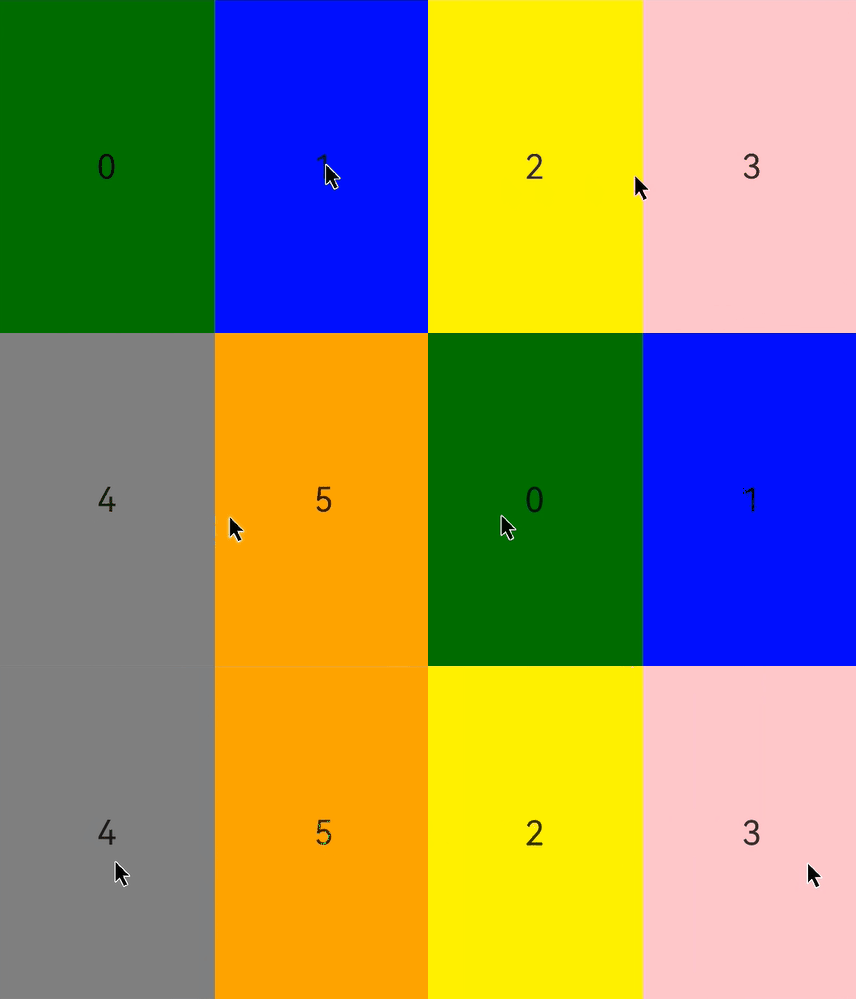
In this example, the **customContentTransition** API is used to define a custom switching animation for the **Swiper** component.
```ts
// xxx.ets
@Entry
@Component
struct SwiperCustomAnimationExample {
private DISPLAY_COUNT: number = 2
private MIN_SCALE: number = 0.75
@State backgroundColors: Color[] = [Color.Green, Color.Blue, Color.Yellow, Color.Pink, Color.Gray, Color.Orange]
@State opacityList: number[] = []
@State scaleList: number[] = []
@State translateList: number[] = []
@State zIndexList: number[] = []
aboutToAppear(): void {
for (let i = 0; i < this.backgroundColors.length; i++) {
this.opacityList.push(1.0)
this.scaleList.push(1.0)
this.translateList.push(0.0)
this.zIndexList.push(0)
}
}
build() {
Column() {
Swiper() {
ForEach(this.backgroundColors, (backgroundColor: Color, index: number) => {
Text(index.toString()).width('100%').height('100%').fontSize(50).textAlign(TextAlign.Center)
.backgroundColor(backgroundColor)
// Customize how the opacity, scale, translate, and other attributes change during the custom switching animation.
.opacity(this.opacityList[index])
.scale({ x: this.scaleList[index], y: this.scaleList[index] })
.translate({ x: this.translateList[index] })
.zIndex(this.zIndexList[index])
})
}
.height(300)
.indicator(false)
.displayCount(this.DISPLAY_COUNT, true)
.customContentTransition({
// The page is removed from the render tree when 1000 ms (timeout time) has elapsed.
timeout: 1000,
// Called on a frame-by-frame basis for all pages in the viewport. You can change the values of attributes such as opacity, scale, translate, and zIndex in the callback to implement a custom animation.
transition: (proxy: SwiperContentTransitionProxy) => {
if (proxy.position <= proxy.index % this.DISPLAY_COUNT || proxy.position >= this.DISPLAY_COUNT + proxy.index % this.DISPLAY_COUNT) {
// Reset the attribute values when a page in the same group is swiped left or is swiped right to be completely out of the viewport.
this.opacityList[proxy.index] = 1.0
this.scaleList[proxy.index] = 1.0
this.translateList[proxy.index] = 0.0
this.zIndexList[proxy.index] = 0
} else {
// When a page in the same group is swiped right but is still within the viewport, the attribute values of the left and right pages in the same group are changed frame by frame based on the position. The changes implement the custom switching animation in which the two pages move close to the middle of the and are transparently scaled in or out.
if (proxy.index % this.DISPLAY_COUNT === 0) {
this.opacityList[proxy.index] = 1 - proxy.position / this.DISPLAY_COUNT
this.scaleList[proxy.index] = this.MIN_SCALE + (1 - this.MIN_SCALE) * (1 - proxy.position / this.DISPLAY_COUNT)
this.translateList[proxy.index] = - proxy.position * proxy.mainAxisLength + (1 - this.scaleList[proxy.index]) * proxy.mainAxisLength / 2.0
} else {
this.opacityList[proxy.index] = 1 - (proxy.position - 1) / this.DISPLAY_COUNT
this.scaleList[proxy.index] = this.MIN_SCALE + (1 - this.MIN_SCALE) * (1 - (proxy.position - 1) / this.DISPLAY_COUNT)
this.translateList[proxy.index] = - (proxy.position - 1) * proxy.mainAxisLength - (1 - this.scaleList[proxy.index]) * proxy.mainAxisLength / 2.0
}
this.zIndexList[proxy.index] = -1
}
}
})
.onContentDidScroll((selectedIndex: number, index: number, position: number, mainAxisLength: number) => {
// Called when content in the component scrolls. In this callback, you can customize the navigation point indicator switching animation.
console.info("onContentDidScroll selectedIndex: " + selectedIndex + ", index: " + index + ", position: " + position + ", mainAxisLength: " + mainAxisLength)
})
}.width('100%')
}
}
```
### Example 5
This example implements an animation for the display of navigation dots that exceed the maximum display count through the **maxDisplayCount** attribute of the **DotIndicator** API.
```ts
class MyDataSource implements IDataSource {
private list: number[] = []
constructor(list: number[]) {
this.list = list
}
totalCount(): number {
return this.list.length
}
getData(index: number): number {
return this.list[index]
}
registerDataChangeListener(listener: DataChangeListener): void {
}
unregisterDataChangeListener() {
}
}
@Entry
@Component
struct Index {
private swiperController: SwiperController = new SwiperController()
private data: MyDataSource = new MyDataSource([])
aboutToAppear(): void {
let list: number[] = []
for (let i = 1; i <= 15; i++) {
list.push(i);
}
this.data = new MyDataSource(list)
}
build() {
Column({ space: 5 }) {
Swiper(this.swiperController) {
LazyForEach(this.data, (item: string) => {
Text(item.toString())
.width('90%')
.height(160)
.backgroundColor(0xAFEEEE)
.textAlign(TextAlign.Center)
.fontSize(30)
}, (item: string) => item)
}
.cachedCount(2)
.index(5)
.autoPlay(true)
.interval(4000)
.loop(true)
.duration(1000)
.itemSpace(0)
.indicator( // Set the style of the navigation point indicator.
new DotIndicator()
.itemWidth(8)
.itemHeight(8)
.selectedItemWidth(16)
.selectedItemHeight(8)
.color(Color.Gray)
.selectedColor(Color.Blue)
.maxDisplayCount(9))
.displayArrow({ // Set the arrow style of the navigation point indicator.
showBackground: true,
isSidebarMiddle: true,
backgroundSize: 24,
backgroundColor: Color.White,
arrowSize: 18,
arrowColor: Color.Blue
}, false)
.curve(Curve.Linear)
Row({ space: 12 }) {
Button('showNext')
.onClick(() => {
this.swiperController.showNext()
})
Button('showPrevious')
.onClick(() => {
this.swiperController.showPrevious()
})
}.margin(5)
}.width('100%')
.margin({ top: 5 })
}
}
```