# Key Event
A key event is triggered when a focusable component, such as **Button**, interacts with a keyboard, remote control, or any other input device with keys. To use a key event for components that are not focusable by default, such as **Text** and **Image**, first set their **focusable** attribute to **true**.
For details about the process and specific timing of the key event triggering, see [Key Event Data Flow](../../../ui/arkts-common-events-device-input-event.md#key-event-data-flow).
> **NOTE**
>
> The APIs of this module are supported since API version 7. Updates will be marked with a superscript to indicate their earliest API version.
## onKeyEvent
onKeyEvent(event: (event: KeyEvent) => void): T
Triggered when a key event occurs.
**Atomic service API**: This API can be used in atomic services since API version 11.
**System capability**: SystemCapability.ArkUI.ArkUI.Full
**Parameters**
| Name | Type | Mandatory | Description |
| ------ | ----------------------------- | ---- | ------------------ |
| event | [KeyEvent](#keyevent) | Yes | **KeyEvent** object. |
**Return value**
| Type | Description |
| -------- | -------- |
| T | Current component. |
## onKeyPreIme12+
onKeyPreIme(event: Callback): T
Triggered before other callbacks when a key event occurs.
If the return value of this callback is **true**, it is considered that the key event has been consumed, and subsequent event callbacks (**keyboardShortcut**, input method events, **onKeyEvent**) will be intercepted and no longer triggered.
**Atomic service API**: This API can be used in atomic services since API version 12.
**System capability**: SystemCapability.ArkUI.ArkUI.Full
**Parameters**
| Name | Type | Mandatory | Description |
| ------ | ----------------------------- | ---- | ------------------ |
| event | [Callback](./ts-types.md#callback12)<[KeyEvent](#keyevent), boolean> | Yes | Callback for processing the key event. |
**Return value**
| Type | Description |
| -------- | -------- |
| T | Current component. |
## KeyEvent
**Atomic service API**: This API can be used in atomic services since API version 11.
**System capability**: SystemCapability.ArkUI.ArkUI.Full
| Name | Type | Description |
| ------------------------------------- | ---------------------------------------- | -------------------------- |
| type | [KeyType](ts-appendix-enums.md#keytype) | Key type. |
| [keyCode](../../apis-input-kit/js-apis-keycode.md#keycode) | number | Key code. |
| keyText | string | Key value. |
| keySource | [KeySource](ts-appendix-enums.md#keysource) | Type of the input device that triggers the key event. |
| deviceId | number | ID of the input device that triggers the key event. |
| metaKey | number | State of the metakey (that is, the **WIN** key on the Windows keyboard or the **Command** key on the Mac keyboard) when the key is pressed. The value **1** indicates the pressed state, and **0** indicates the unpressed state. |
| timestamp | number | Timestamp of the event. It is the interval between the time when the event is triggered and the time when the system starts, in nanoseconds. |
| stopPropagation | () => void | Stops the event from bubbling upwards or downwards. |
| intentionCode10+ | [IntentionCode](../../apis-input-kit/js-apis-intentioncode.md) | Intention corresponding to the key. |
| getModifierKeyState12+ | (Array<string>) => bool | Obtains the pressed status of modifier keys. For details about the error message, see the following error codes. The following modifier keys are supported: 'Ctrl'\|'Alt'\|'Shift'\|'Fn'. This API does not work for the Fn key on an externally connected keyboard.
**Atomic service API**: This API can be used in atomic services since API version 12.|
**Error codes**
For details about the error codes, see [Universal Error Codes](../../errorcode-universal.md).
| ID | Error Message |
| ------- | -------- |
| 401 | Parameter error. Possible causes: 1. Incorrect parameter types. 2. Parameter verification failed. |
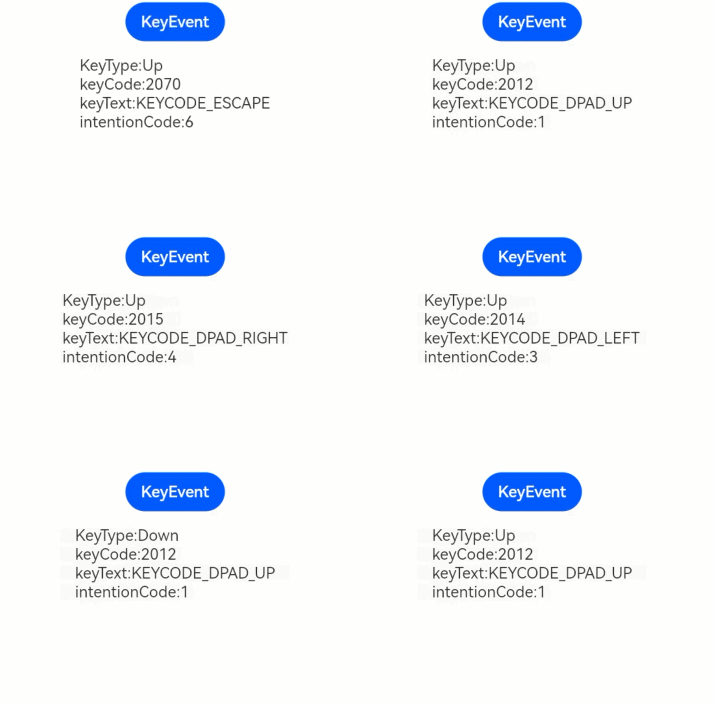
## Example
```ts
// xxx.ets
@Entry
@Component
struct KeyEventExample {
@State text: string = ''
@State eventType: string = ''
build() {
Column() {
Button('KeyEvent')
.onKeyEvent((event?: KeyEvent) => {
if(event){
if (event.type === KeyType.Down) {
this.eventType = 'Down'
}
if (event.type === KeyType.Up) {
this.eventType = 'Up'
}
this.text = 'KeyType:' + this.eventType + '\nkeyCode:' + event.keyCode + '\nkeyText:' + event.keyText + '\nintentionCode:' + event.intentionCode
}
})
Text(this.text).padding(15)
}.height(300).width('100%').padding(35)
}
}
```