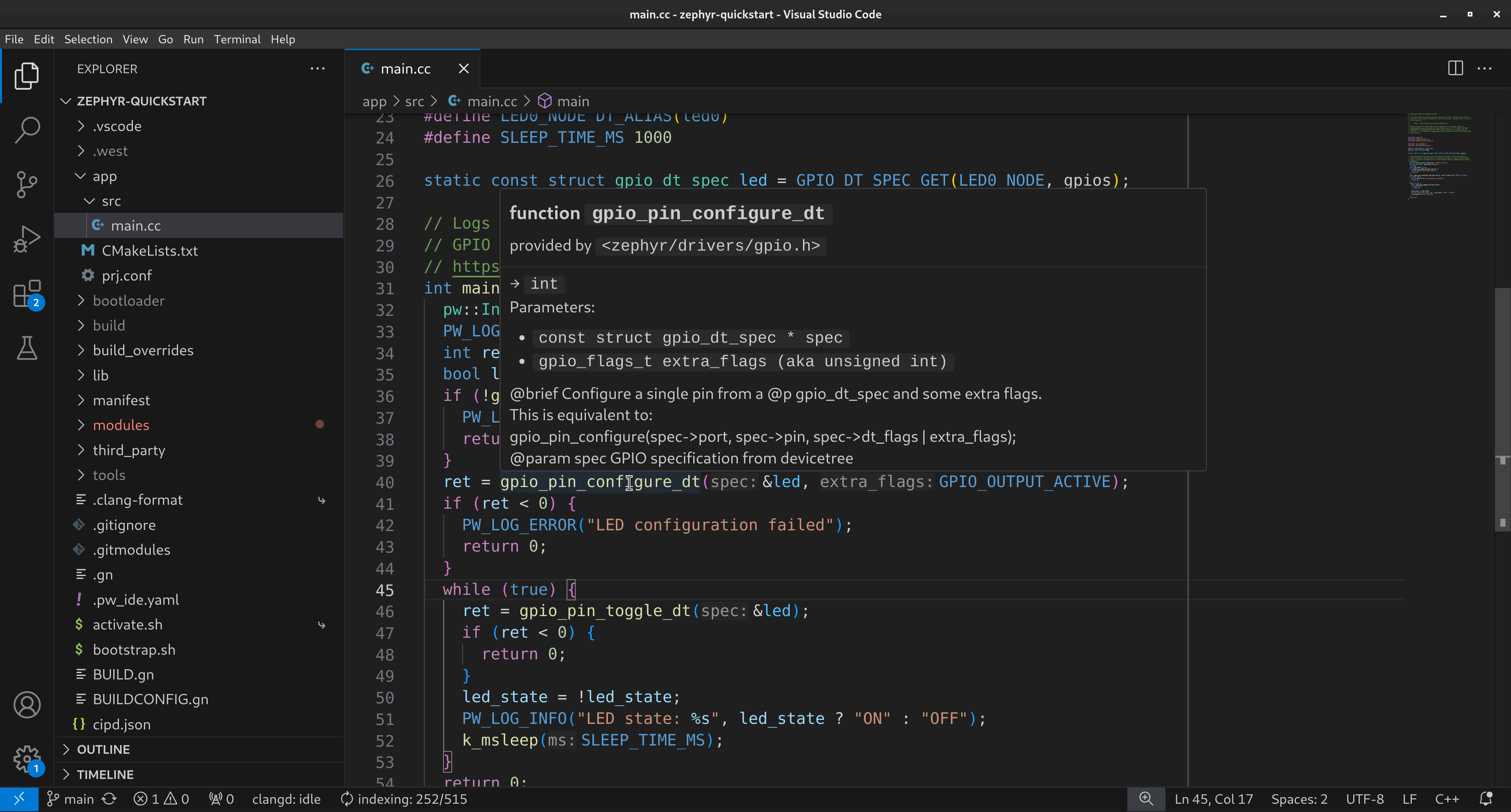
1.. _docs-quickstart-zephyr: 2 3================= 4Zephyr quickstart 5================= 6.. _Zephyr: https://zephyrproject.org/ 7.. _native_sim: https://docs.zephyrproject.org/latest/boards/native/native_sim/doc/index.html 8.. _GPIO Driver API: https://docs.zephyrproject.org/latest/doxygen/html/group__devicetree-gpio.html 9 10This tutorial shows you how to set up a new C++-based `Zephyr`_ project that's 11ready to use Pigweed. You'll learn how to build and run the project's app on 12`native_sim`_ as well as a physical Raspberry Pi Pico. The app uses 13:ref:`module-pw_log` and :ref:`module-pw_string` to log messages and 14Zephyr's `GPIO Driver API`_ to blink an LED. 15 16.. figure:: https://storage.googleapis.com/pigweed-media/zephyr-quickstart-pw_ide.png 17 :alt: Editing the Zephyr quickstart project in VS Code 18 19 The project's :ref:`module-pw_ide` integration provides code intelligence 20 and easy target swapping in VS Code 21 22.. _docs-quickstart-zephyr-prereqs: 23 24------------- 25Prerequisites 26------------- 27* **Disk space**: After setting everything up, the project takes ~19GB of space. 28 The project clones the Zephyr and Pigweed repos as well as their dependencies. 29 It also downloads toolchains and sets up a hermetic development environment. 30* **Operating systems**: This tutorial has only been validated on Debian-based 31 Linux and macOS. Windows support is a work in progress. 32 33.. _docs-quickstart-zephyr-setup: 34 35----- 36Setup 37----- 38#. Complete Pigweed's :ref:`First-time setup <docs-first-time-setup-guide>` 39 process. 40 41#. Clone the starter repo. 42 43 .. tab-set:: 44 45 .. tab-item:: Linux 46 :sync: lin 47 48 .. code-block:: console 49 50 git clone --recursive \ 51 https://pigweed.googlesource.com/pigweed/quickstart/zephyr \ 52 zephyr-quickstart 53 54 .. tab-item:: macOS 55 :sync: mac 56 57 .. code-block:: console 58 59 git clone --recursive \ 60 https://pigweed.googlesource.com/pigweed/quickstart/zephyr \ 61 zephyr-quickstart 62 63 .. _main Pigweed: https://pigweed.googlesource.com/pigweed/pigweed/ 64 .. _main Zephyr: https://github.com/zephyrproject-rtos/zephyr 65 66 This command downloads the `main Pigweed`_ and `main Zephyr`_ repos 67 as Git submodules. 68 69#. Change your working directory to the quickstart repo. 70 71 .. tab-set:: 72 73 .. tab-item:: Linux 74 :sync: lin 75 76 .. code-block:: console 77 78 cd zephyr-quickstart 79 80 .. tab-item:: macOS 81 :sync: mac 82 83 .. code-block:: console 84 85 cd zephyr-quickstart 86 87#. Bootstrap the repo. 88 89 .. tab-set:: 90 91 .. tab-item:: Linux 92 :sync: lin 93 94 .. code-block:: console 95 96 source bootstrap.sh 97 98 .. tab-item:: macOS 99 :sync: mac 100 101 .. code-block:: console 102 103 source bootstrap.sh 104 105 Pigweed's bootstrap workflow creates a hermetic development environment 106 for you, including toolchain setup! 107 108 .. tip:: 109 110 For subsequent development sessions, activate your development environment 111 with the following command: 112 113 .. tab-set:: 114 115 .. tab-item:: Linux 116 :sync: lin 117 118 .. code-block:: console 119 120 source activate.sh 121 122 .. tab-item:: macOS 123 :sync: mac 124 125 .. code-block:: console 126 127 source activate.sh 128 129 The activate script is faster than the bootstrap script. You only need to 130 run the bootstrap script after updating your Zephyr or Pigweed submodules. 131 132 .. _West: https://docs.zephyrproject.org/latest/develop/west/index.html 133 134#. Initialize your `West`_ workspace using the manifest that came with the 135 starter repo. 136 137 .. code-block:: console 138 139 west init -l manifest 140 141#. Update your West workspace. 142 143 .. code-block:: console 144 145 west update 146 147#. (Optional) Initialize :ref:`module-pw_ide` if you plan on working in 148 VS Code. ``pw_ide`` provides code intelligence features and makes it 149 easy to swap targets. 150 151 .. code-block:: console 152 153 pw ide sync 154 155.. _docs-quickstart-zephyr-build: 156 157--------------------- 158Build and run the app 159--------------------- 160 161.. _docs-quickstart-zephyr-build-native_sim: 162 163Native simulator 164================ 165#. Build the quickstart app for `native_sim`_ and run it: 166 167 .. code-block:: console 168 169 export ZEPHYR_TOOLCHAIN_VARIANT=llvm && 170 west build -p -b native_sim app -t run 171 172 You should see the app successfully build and then log messages to 173 ``stdout``: 174 175 .. code-block:: none 176 177 [00:00:00.000,000] <inf> pigweed: Hello, world! 178 [00:00:00.000,000] <inf> pigweed: LED state: OFF 179 [00:00:01.010,000] <inf> pigweed: LED state: ON 180 [00:00:02.020,000] <inf> pigweed: LED state: OFF 181 [00:00:03.030,000] <inf> pigweed: LED state: ON 182 [00:00:04.040,000] <inf> pigweed: LED state: OFF 183 184 .. important:: 185 186 When building for ``native_sim`` make sure that 187 ``ZEPHYR_TOOLCHAIN_VARIANT`` is set to ``llvm``. 188 See :ref:`docs-quickstart-zephyr-troubleshooting-envvar`. 189 190#. (Optional) Build and run an upstream Zephyr sample app: 191 192 .. code-block:: console 193 194 west build -p -b native_sim third_party/zephyr/samples/basic/blinky -t run 195 196.. _docs-quickstart-zephyr-build-pico: 197 198Raspberry Pi Pico 199================= 200.. _Raspberry Pi Pico: https://docs.zephyrproject.org/latest/boards/raspberrypi/rpi_pico/doc/index.html 201.. _Pico SDK: https://github.com/raspberrypi/pico-sdk 202.. _picotool: https://github.com/raspberrypi/picotool 203 204#. Build the quickstart app for `Raspberry Pi Pico`_: 205 206 .. code-block:: console 207 208 export ZEPHYR_TOOLCHAIN_VARIANT=zephyr && 209 west build -p -b rpi_pico app 210 211 .. important:: 212 213 When building for physical boards make sure that 214 ``ZEPHYR_TOOLCHAIN_VARIANT`` is set to ``zephyr``. 215 See :ref:`docs-quickstart-zephyr-troubleshooting-envvar`. 216 217#. Install the `Pico SDK`_ and `picotool`_ so that you can easily 218 flash the quickstart app onto your Pico over USB without needing to 219 manually put your Pico board into ``BOOTSEL`` mode: 220 221 .. code-block:: console 222 223 pw package install pico_sdk 224 pw package install picotool 225 226#. Put the following rules into ``/usr/lib/udev/rules.d/49-picoprobe.rules``: 227 228 .. code-block:: none 229 230 # Pico app mode 231 SUBSYSTEMS=="usb", ATTRS{idVendor}=="2e8a", ATTRS{idProduct}=="000a", MODE:="0666" 232 KERNEL=="ttyACM*", ATTRS{idVendor}=="2e8a", ATTRS{idProduct}=="000a", MODE:="0666", SYMLINK+="rp2040" 233 # RP2 Boot 234 SUBSYSTEMS=="usb", ATTRS{idVendor}=="2e8a", ATTRS{idProduct}=="0003", MODE:="0666" 235 KERNEL=="ttyACM*", ATTRS{idVendor}=="2e8a", ATTRS{idProduct}=="0003", MODE:="0666", SYMLINK+="rp2040" 236 # Picoprobe 237 SUBSYSTEMS=="usb", ATTRS{idVendor}=="2e8a", ATTRS{idProduct}=="0004", MODE:="0666" 238 KERNEL=="ttyACM*", ATTRS{idVendor}=="2e8a", ATTRS{idProduct}=="0004", MODE:="0666", SYMLINK+="picoprobe" 239 240#. Apply the rules: 241 242 .. code-block:: console 243 244 sudo udevadm control --reload-rules 245 sudo udevadm trigger 246 247#. Flash the app onto your board: 248 249 .. code-block:: console 250 251 picotool reboot -f -u && 252 sleep 3 && 253 picotool load -x ./build/zephyr/zephyr.elf 254 255.. _docs-quickstart-zephyr-troubleshooting: 256 257--------------- 258Troubleshooting 259--------------- 260 261.. _docs-quickstart-zephyr-troubleshooting-envvar: 262 263``fatal error: bits/c++config.h: No such file or directory`` 264============================================================ 265If you see a compilation error about not being able to find 266``<bits/c++config.h>``, make sure that your ``ZEPHYR_TOOLCHAIN_VARIANT`` 267environment variable is correctly set: 268 269* Set it to ``llvm`` when building for ``native_sim``. 270* Set it to ``zephyr`` when building for physical boards. 271 272Here's an example of the error: 273 274.. code-block:: console 275 276 ... 277 [2/109] Generating include/generated/version.h 278 -- Zephyr version: 3.6.99 (~/zephyr-quickstart/third_party/zephyr), build: v3.6.0-1976-g8a88cd4805b0 279 [10/109] Building CXX object modules/pigweed/pw_string/CMakeFiles/pw_string.to_string.dir/type_to_string.cc.obj 280 FAILED: modules/pigweed/pw_string/CMakeFiles/pw_string.to_string.dir/type_to_string.cc.obj 281 ccache /usr/bin/g++ 282 ... 283 -c ~/zephyr-quickstart/third_party/pigweed/pw_string/type_to_string.cc 284 In file included from ~/zephyr-quickstart/third_party/pigweed/pw_string/public/pw_string/type_to_string.h:20, 285 from ~/zephyr-quickstart/third_party/pigweed/pw_string/type_to_string.cc:15: 286 /usr/include/c++/13/cstdint:38:10: fatal error: bits/c++config.h: No such file or directory 287 38 | #include <bits/c++config.h> 288 | ^~~~~~~~~~~~~~~~~~ 289 compilation terminated. 290 ... 291 [12/109] Building CXX object modules/pigweed/pw_string/CMakeFiles/pw_string.builder.dir/string_builder.cc.obj 292 FAILED: modules/pigweed/pw_string/CMakeFiles/pw_string.builder.dir/string_builder.cc.obj 293 ccache /usr/bin/g++ 294 ... 295 -c ~/zephyr-quickstart/third_party/pigweed/pw_string/string_builder.cc 296 In file included from /usr/include/c++/13/algorithm:60, 297 from ~/zephyr-quickstart/third_party/pigweed/pw_string/public/pw_string/string_builder.h:21, 298 from ~/zephyr-quickstart/third_party/pigweed/pw_string/string_builder.cc:15: 299 /usr/include/c++/13/bits/stl_algobase.h:59:10: fatal error: bits/c++config.h: No such file or directory 300 59 | #include <bits/c++config.h> 301 | ^~~~~~~~~~~~~~~~~~ 302 compilation terminated. 303 [15/109] Building C object zephyr/CMakeFiles/offsets.dir/arch/posix/core/offsets/offsets.c.obj 304 ninja: build stopped: subcommand failed. 305 FATAL ERROR: command exited with status 1: ~/zephyr-quickstart/environment/cipd/packages/cmake/bin/cmake 306 --build ~/zephyr-quickstart/build --target run 307